
ZenABM
ZenABM is an account-based marketing platform built around LinkedIn ads. It creates and launches campaigns with AI, tracks which companies engage, turns first-party engagement into intent signals and account scores, then reports pipeline and revenue attribution. Sync to HubSpot, Salesforce, or Attio, ask the Zena agent in natural language, or run the same actions from Claude and ChatGPT through its MCP server.
What is ZenABM?
ZenABM is an account-based marketing platform built specifically for LinkedIn ads rather than display networks. It covers the full ABM loop in one place: building and launching campaigns, capturing which companies engage with them, scoring those accounts, reporting on pipeline and revenue, and turning engagement into intent signals a sales team can act on.
Campaign creation happens in natural language. You describe the audience, offer, and budget, and ZenABM builds the campaign structure, then launches it without you opening LinkedIn Campaign Manager. Once live, the platform reads LinkedIn's own API to attribute ad engagement to companies rather than to anonymous impressions. That produces a list of named accounts that viewed or clicked, with job title detail, and lets you build retargeting audiences from ad engagement or CRM events. Bids and budgets can be adjusted and underperforming ads paused as you go, either manually or through the AI agent.
Signals are first-party. ZenABM does not rely on reverse-IP lookups to guess which company visited your site; intent comes from the engagement of target account employees with your LinkedIn ads, delivered through LinkedIn's API. Those signals feed account scoring, which is default on Starter and customizable on higher tiers, and can be sent to HubSpot, Salesforce, or Attio so sales sees activity in the tools they already use. Webhooks and an API are available for teams that want to push data into their own ABM engine.
The AI layer has three entry points. Zena is an in-app agent that answers questions about campaign performance, top engaged companies, and influenced deals, and can take actions with your approval. It draws on skills built from the knowledge of more than 30 LinkedIn ad experts, covering audits, strategy, and budget planning. The same skills are exposed through an MCP server, so Claude, ChatGPT, Perplexity, Gemini, and other AI clients can query ad data and run tasks from a slash command. Automated reporting is the third: weekly, monthly, or quarterly summaries written as insights and action items rather than raw exports, delivered to your inbox.
Pricing starts at $59 per month on Starter and rises through Growth, Pro, and Agency tiers, with no markup on ad spend and pricing that does not scale with your budget. Every plan opens with a 37-day free trial, setup is a few authorization clicks with no revops project, and ABM campaigns are capped by plan: one on Starter, three on Growth, unlimited from Pro upward.
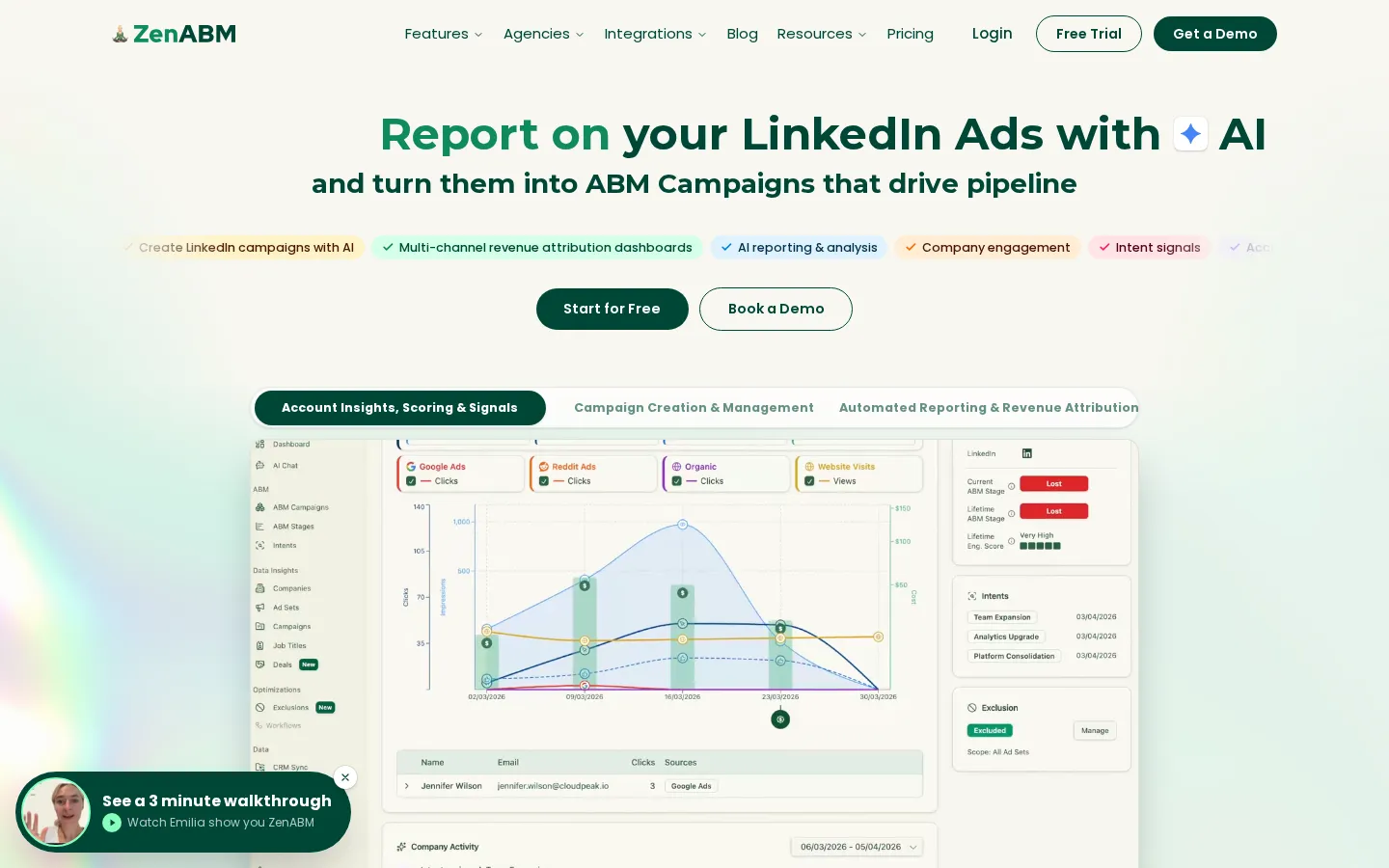
ZenABM Core Features
AI Campaign Creation
Describe audience, offer, and budget in natural language and ZenABM builds and launches the LinkedIn campaign, so you never open Campaign Manager to ship a test.
Company-Level Engagement
Attributes ad views and clicks to named companies through LinkedIn's API, with job title insight into who inside the account is engaging.
First-Party Intent Signals
Intent comes from target account employees engaging with your ads rather than reverse-IP lookups, so signals reflect real interest instead of guessed traffic.
Account Scoring
Ranks accounts by engagement and intent, default on Starter and customizable from Growth upward, so sales works a prioritized list rather than raw activity.
AI Agent Zena
An in-app assistant with skills built from 30+ LinkedIn ad experts that answers performance questions, runs audits and budget reviews, and can take actions with your approval.
MCP Server and Expert Skills
Exposes the same skills and data to Claude, ChatGPT, Perplexity, and Gemini, so a skill can be called as a slash command from the AI client you already use.
Automated AI Reporting
Weekly, monthly, and quarterly reports written as insights and action items and delivered to your inbox, rather than another raw data export.
CRM Sync, Webhooks, and API
Pushes engagement and scores into HubSpot, Salesforce, or Attio, with webhooks and API access for teams piping data into their own ABM engine.
Who is ZenABM for?
ZenABM is aimed at B2B marketing and demand generation teams that already run, or want to run, account-based programs on LinkedIn. The clearest fit is a demand gen manager or paid social specialist who owns LinkedIn budget but cannot answer which companies the ads actually reached, because Campaign Manager reports on impressions and clicks rather than named accounts. ZenABM turns that engagement into a company list, so the weekly question of who engaged becomes a report instead of a manual export. Growth and ABM leads at B2B SaaS companies fit next. They need account scoring that reflects real buying behavior, and they need it visible inside the CRM their sales team lives in. Because HubSpot, Salesforce, and Attio sync are supported, a scored account list can reach a rep without a revops ticket. Sales and SDR teams are the third audience. They use the engagement list to prioritize outreach and to know which accounts have moved into an interested stage, which is the use case existing customers describe most often. Agencies are the fourth, and they get a dedicated tier. The Agency plan adds separate dashboards per client and starts from three client accounts, which suits LinkedIn ads and ABM consultancies running programs on behalf of several brands and needing to report on each separately. Fractional demand gen strategists and independent consultants are a fifth fit: one person running LinkedIn ads for multiple clients, who needs reporting and scoring out of the box rather than a spreadsheet built by hand. Marketing operations people benefit for a different reason. Setup avoids a long integration project, authorization is a few clicks, defaults are sensible, and webhooks plus API access let a team extend the pipeline later if it outgrows the built-in reporting. It is a weaker fit for teams advertising mainly on display networks, since everything here runs on LinkedIn's API and its engagement data, and for very small advertisers who only need one campaign reported on.
ZenABM Use Cases
Create a LinkedIn campaign from a plain-language brief and launch it without opening Campaign Manager.
See which target companies engaged with your ads last week and hand sales a named account list.
Score accounts by engagement and intent so reps know which ones to work first.
Build retargeting audiences from people who engaged with ads or hit a CRM milestone.
Pause underperforming ads and shift budget while a campaign is still running.
Send engagement and account scores into HubSpot, Salesforce, or Attio without a revops project.
Generate weekly or quarterly ABM reports that explain what changed and what to do next.
Run LinkedIn ABM programs for multiple clients with separate dashboards per account.
ZenABM Pros and Cons
Pros
- Covers the whole LinkedIn ABM loop, from campaign creation and engagement capture through scoring, reporting, and CRM sync, instead of one slice of it.
- No markup on ad spend and pricing that does not scale with budget, which is unusual among ABM platforms that resell advertising inventory.
- Signals come from LinkedIn's own API engagement data rather than reverse-IP guessing, so the account list is defensible when sales asks where it came from.
- The MCP server lets Claude, ChatGPT, Perplexity, and Gemini work directly with your ad data, so analysis happens in whichever AI client the team already uses.
- A 37-day free trial with few-click setup means a team can validate the reporting before committing to a subscription.
Cons
- There is no ongoing free plan; after the 37-day trial the cheapest option is the $59 per month Starter tier, which caps you at one ABM campaign and 10 Zena chats a day.
- The platform is built around LinkedIn ads, so teams running most of their ABM on display networks or other channels will not get the same coverage.
- Customizable scoring and intent are held for Growth and above, so the entry tier gives you defaults rather than control.
FAQ About ZenABM
ZenABM Pricing
ZenABM is paid-only after a 37-day free trial, starting at $59 per month for Starter and rising through Growth at $159, Pro at $399, and Agency at $479, with annual billing giving two months free and no markup on ad spend.
Check official pricingStarter
One ABM campaign, default account scoring, LinkedIn company insights with intent, and 10 Zena chats per day; annual billing saves $120.
Growth
Up to three ABM campaigns, customizable account scoring and intent, and 50 Zena chats per day; annual billing saves $480.
Pro
Unlimited ABM campaigns, customizable scoring, unlimited Zena chats, and separate dashboards per ABM campaign; annual billing saves $1,200.
Agency
Unlimited campaigns and chats with dashboards separated per client, starting from three client accounts; annual billing saves $1,440.
ZenABM Alternatives

ColdIQ
ColdIQ is an agent and API layer over 40+ B2B data providers. Ask in plain English for companies, contacts, verified emails or mobiles, and it scores each provider on fit, cost and accuracy, routes the call to the winner, then falls back through a waterfall. The same credits work in browser chat, Slack, a REST API and an MCP server for Claude Code and Cursor.
TapVid
TapVid is an AI explainer video engine built for product teams. Paste a prompt or upload a PDF, doc, URL or PPT, review the generated outline and script, then edit individual scenes by typing. Assets and copy stay exactly as supplied, a Brand Kit applies your fonts and colours. Paid plans export watermark-free 1080p, and a REST API plus MCP server handle batch work.

Thumbs.ai
Thumbs.ai is an AI thumbnail studio for YouTube creators. Describe a video and it renders a finished cover, recreate a competitor's thumbnail as a fresh variation, swap in your face with a chosen expression, or clone the visual DNA of any channel. Twenty-plus design effects, a two-million template library and a CTR rater sit alongside it.