
Timelinify
Timelinify is an AI timeline generator that drafts chronological events from a topic or your own text. Paste notes or attach a PDF, Word file, spreadsheet, or image, then edit dates and wording before exporting. Each generation costs two credits, export of one timeline costs $1, and subscriptions add unlimited exports. No install is needed; everything runs in the browser.
What is Timelinify?
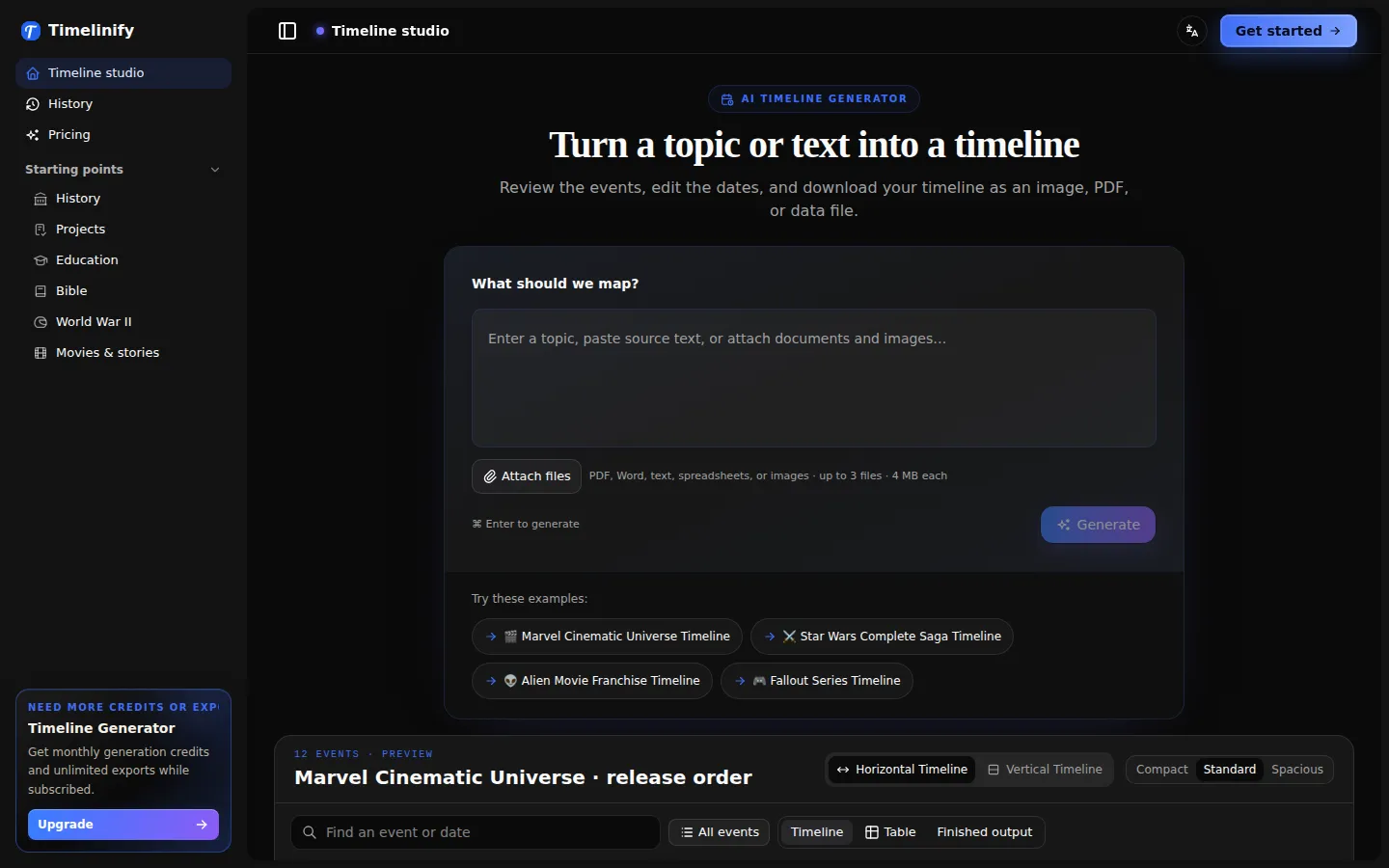
Timelinify is a browser-based AI timeline generator built around one loop: describe what you want mapped, check the events the model drafts, then export a finished file. The homepage calls the workspace Timeline studio and pairs a prompt box with file attachments — PDF, Word, plain text, spreadsheet, or image, up to three files at four megabytes each — so you can hand it a chapter, a project brief, or a set of notes instead of retyping a chronology.
Output arrives as a draft timeline of discrete events. Each event carries a date, a title, and a description, and the sample Marvel Cinematic Universe timeline on the homepage shows the shape: twelve events from Iron Man in 2008 to Guardians of the Galaxy Vol. 3 in 2023, grouped into phases, each row naming a date, an entry, and a sentence of context. Events open in a reading pane, so you can click a card, search, or pick a point on the overview strip to read the full text before deciding whether it is right.
Editing is the point of the product rather than an afterthought. Dates and descriptions can be corrected, missing events added, and the view switched between horizontal and vertical. Density toggles between compact, standard, and spacious, which matters when a long chronology has to fit one slide, and a table view exposes the same data as rows. The homepage frames the whole flow as three steps: start with a topic or text, check the details, download your timeline.
Export is where the money sits. PNG, PDF, wide PDF, JSON, and CSV are available with paid export access; a single $1 purchase unlocks every format for one timeline, and an active subscription removes the per-timeline charge. JSON and CSV are the practical route when a chronology has to feed a spreadsheet, a slide deck, or another tool rather than stand alone as a picture.
Generation runs on credits at two per timeline. New accounts receive ten gift credits after email verification, which works out to five drafts before any payment, and subscribers get 400 credits a month on Starter at $8 or 4,500 credits on Pro at $59. Six starting points — history lessons, project roadmaps, classroom assignments, company milestones, case chronologies, and stories and franchises — prefill the prompt so you can see the output shape without composing an instruction first. The site positions the result as an editable first draft, not an authority on dates.
Timelinify Core Features
Topic-to-timeline generation
Type a subject or paste notes with dated events and Timelinify returns a chronological draft of dated events, each with a title and a short description.
File attachments
Up to three files per request — PDF, Word, plain text, spreadsheet, or image, capped at four megabytes each — so an existing chapter, brief, or dataset can seed the timeline.
Event editing and reading pane
Open any event to read the full text, correct dates and descriptions, add missing events, or search and jump through the overview strip.
Layout and density controls
Switch between horizontal and vertical timelines and set density to compact, standard, or spacious, with a table view that exposes every event as a row.
Multi-format export
Paid export access unlocks PNG, PDF, wide PDF, JSON, and CSV for a timeline, covering both presentation images and data handoff.
Six starting points
History lessons, project roadmaps, classroom assignments, company milestones, case chronologies, and stories or franchises each prefill the prompt with a usable instruction.
Credit-based generation
Generation costs two credits per timeline, with ten gift credits after email verification and monthly allowances of 400 or 4,500 credits on the two subscriptions.
Who is Timelinify for?
Timelinify suits people who already have a chronology in their head or in a document and need it turned into something presentable. Teachers and students are the clearest fit: the classroom starting point covers lesson visuals, student timelines, study guides, and presentation-ready sequences, and a pasted chapter or PDF can be drafted into dated events that a class then corrects together. Project and product managers are the second group. The project roadmap starting point covers launches, milestone plans, marketing campaigns, and implementation work, and the wide PDF export is the kind of artifact that goes into a planning review or a kickoff deck. The same applies to company milestones: founding stories, product releases, funding rounds, and brand moments laid out in order. Researchers, paralegals, and analysts working through case chronologies get a narrower but real benefit. Incidents, evidence dates, document events, and research notes can be arranged into a clean chronological view, then exported as CSV or JSON to join a spreadsheet or case file. Writers and fans mapping fictional universes — release orders, character arcs, franchise watch orders — are served by the movie and story examples the site leads with. It is a weaker fit for anyone needing a certified historical record, since output is a draft to verify, or for teams wanting an API, live collaboration, or a native app. The $1 per-timeline export charge also penalises one-off users who need a single image, and anyone after a quick graphic for one meeting may find a general design tool cheaper than a per-export purchase.
Timelinify Use Cases
Turn a chapter of notes into a dated history timeline, then correct the events before a lesson.
Draft a product launch roadmap from a brief and export it as a wide PDF for a planning review.
Build a case chronology from incident dates and document notes, then export CSV for a spreadsheet.
Map a film franchise in release order for a watch party or a fan explainer, complete with phases.
Create a company milestone timeline from founding dates, funding rounds, and product releases.
Produce a presentation-ready classroom timeline from a topic, styled vertically for a slide.
Rebuild a project history from an uploaded spreadsheet of milestones instead of retyping every row.
Timelinify Pros and Cons
Pros
- Editing is first-class: dates, descriptions, and missing events are all correctable, and the horizontal/vertical plus density controls mean one draft can serve a slide, a page, or a table.
- Export range is unusually broad for the price: PNG, PDF, wide PDF, JSON, and CSV all unlock for a single $1 payment on one timeline, with no subscription required.
- Starting with your own material works well: three attachments of up to 4MB each accept PDF, Word, text, spreadsheet, or image, so existing notes and documents can seed the draft.
- Free trial is genuinely usable: ten gift credits after email verification cover five full generations before any payment is needed.
Cons
- Every export is paywalled at $1 per timeline, so anyone who only needs a single image still pays beyond the free drafts.
- Dates and events come from an AI draft with no citation trail, and the site publishes no accuracy claim, so historical or legal use needs independent verification.
- No API, no collaboration, and no native app: it is a single-user browser workspace, and JSON or CSV export is the only route into another system.
FAQ About Timelinify
Timelinify Pricing
Freemium with credit-based generation and paid exports. New accounts get ten gift credits after email verification; each generation costs two credits, so five timelines are free. Exporting one timeline costs $1 and unlocks PNG, PDF, wide PDF, JSON, and CSV for it. Starter is $8 per month for 400 credits (about 200 timelines) with unlimited exports and a private timeline library; Pro is $59 per month for 4,500 credits (about 2,250 timelines) with the same export and library benefits. Both are cancellable anytime, and yearly billing is advertised with two months free.
Check official pricingTimelinify Alternatives

iMobie
iMobie is a consumer software suite for iPhone, iPad and Android owners, covering data recovery, phone-to-phone transfer, passcode and Apple ID unlocking, system repair and storage cleaning. Its multimedia line adds AI-assisted screen recording in FocuSee, real-time voice changing in Vozard and AI video upscaling in AnyEnhancer, sold through monthly, yearly and perpetual licences on its own store.

Velozity
Velozity is a multiplayer AI office for remote teams that puts people and AI agents in the same shared workspace. Persistent presence, video and audio calls, transcripts, tasks, notes, calendars and guest passes live in a single window, while built-in and bring-your-own agents take on real work across more than 100 integrations and a cloud computer.

HiNoter
HiNoter converts audio, video, PDFs, and meeting recordings into transcripts, structured summaries, and action items. It records Zoom, Google Meet, and Microsoft Teams calls, accepts uploaded files or YouTube links, and transcribes over 100 languages. A one-time free credit covers a single note, Personal Pro costs $6.99 a week or $69.99 a year, and Team Pro starts at $119.98 a year for two seats.