
SnapDub
Turns long recordings into ready-to-post shorts Paste a long video, get vertical clips that keep the speaker in frame
What is SnapDub?
• Smart Clipping: Uses AI to scan your video and automatically pull out the best highlights. • Vertical Framing: Turns horizontal videos into vertical clips and follows the speaker's face. • Auto Layout: Stacks your facecam on top and gameplay on the bottom for stream clips. • Full Packaging: Adds catchy captions, titles, descriptions, and hashtags for you. • Consistent Branding: Uses templates to make sure every clip matches your unique style. • Direct Posting: Syncs with your accounts to publish your content straight to social media. • Generous Free Plan: Gives you 500 credits to start editing for free without needing a credit card.
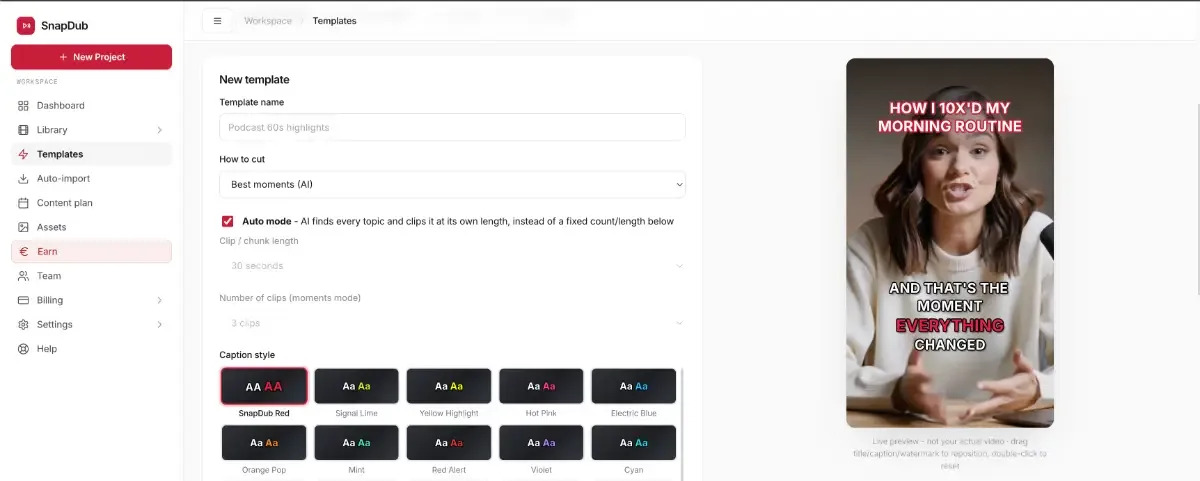
SnapDub Core Features
• Smart Clipping
• Vertical Framing
• Auto Layout
Who is SnapDub for?
Content Creators, Podcasters, Streamers, Brands, Marketing Teams, Agencies, Social Media Managers, Coaches, Media, and Production Teams
SnapDub Use Cases
AI Social Media Tools
Content Creation
AI Video Editing
SnapDub Pros and Cons
Pros
- n/a
- n/a
- n/a
Cons
- n/a
FAQ About SnapDub
SnapDub Alternatives

Velozity
Velozity is a multiplayer AI office for remote teams that puts people and AI agents in the same shared workspace. Persistent presence, video and audio calls, transcripts, tasks, notes, calendars and guest passes live in a single window, while built-in and bring-your-own agents take on real work across more than 100 integrations and a cloud computer.

Cindy
Cindy is an open-source desktop AI agent from XD Inc. that unifies Claude Code, Codex and Pi harnesses with 20+ tools, persistent memory and reusable skills. Use it free with your own API key or existing Coding Plan, or pay for the optional managed model service that works the moment you sign in. No setup project required.

Migoo
Migoo turns a single chat window into a small AI department: a general assistant plus named specialists for video ads, design, slides, brochures, research, data analysis, photo editing, writing, websites and job applications. It reads the Google Workspace context you connect, then drafts reports, files expenses, builds decks and produces publishable assets, charging through a monthly points allowance rather than per-seat licences.