
Mycel
Mycel is a web platform that works like an AI teammate for accounting, bookkeeping, agency and advisory firms. It drafts recurring client deliverables from the client's own files and an accepted past example, applies your corrections as rules, chases missing documents by email, invoices accepted work with pay links, runs outbound and content, and waits for your approval.
What is Mycel?
Mycel is an AI team for service firms: a web product that takes on the recurring client work a small accounting, bookkeeping, agency or advisory firm already owes its clients, and does it the way that firm does it. The site frames it as doing the work you do for clients, the way you do it, and finding you new clients, with the owner deciding what waits for a yes. It is built by one founder, Islam Hachimi, and sold to owner-led firms rather than as a general chatbot.
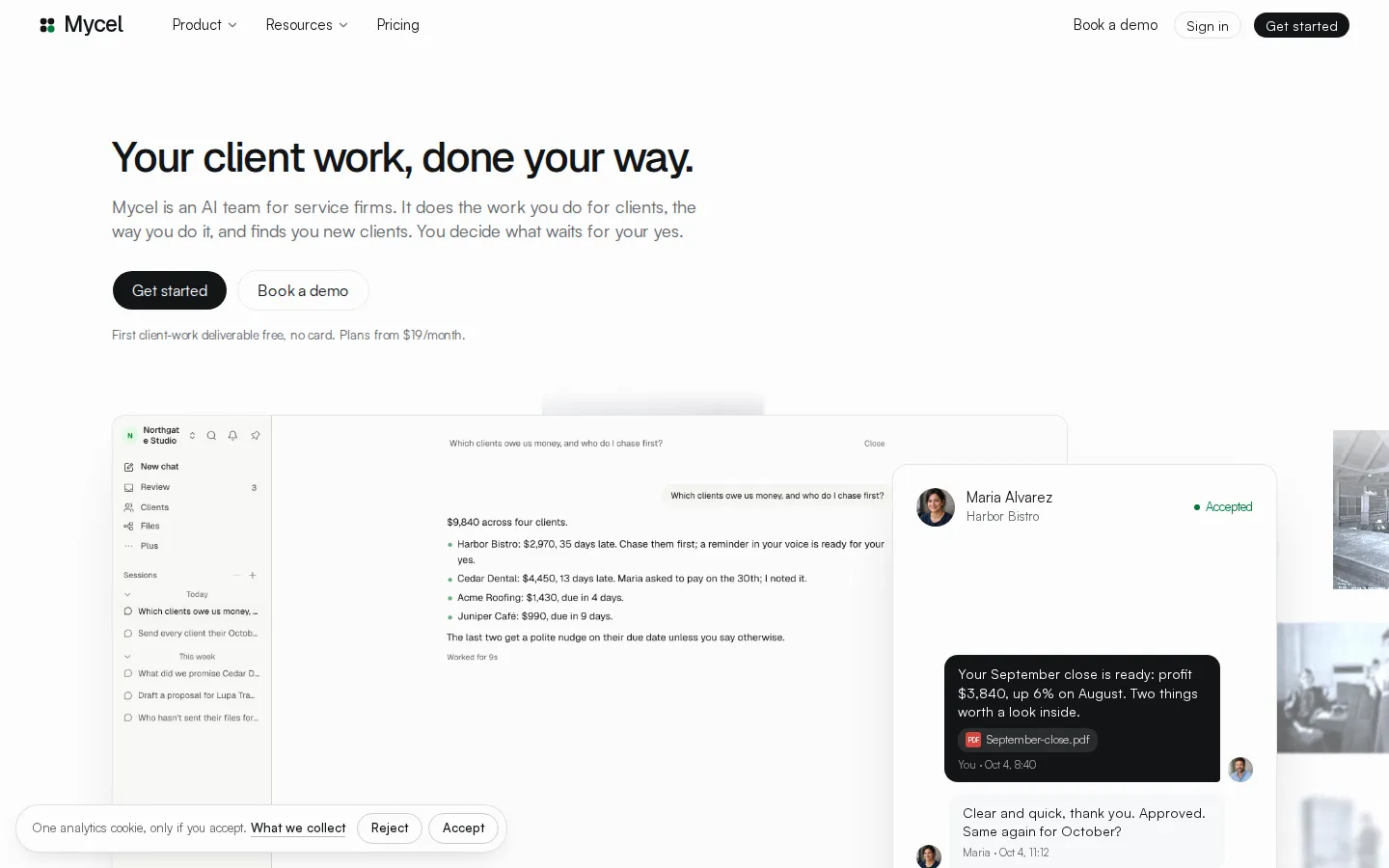
The product organises work around a client rather than a prompt. A job is one piece of work done, and each job is tied to that client's files, its due date, the firm's template and the methods the firm has approved. The site shows six families of work: finding clients with outbound notes to businesses showing a buying moment, writing content such as one LinkedIn post a day from real work, producing the client deliverable, chasing documents the client has not sent, invoicing accepted work and chasing late payment, and building the firm's own website. In the demo a firm closes September for a restaurant client, issues invoice INV-0042 for $1,450 with a pay link, and is paid three hours later.
Learning is by correction rather than configuration. Edit a draft once and the correction can become a rule for that client or that kind of client; a saved example keeps food cost reported as a share of sales on page one for every restaurant client. Jobs check themselves against source figures before release, and gaps surface as requests for missing information rather than guesses. Automatic delivery is on by default for eligible work that passes its checks, and can be switched off or set to require review for an engagement.
Delivered work lands in a client portal under the firm's own name, showing the summary, the numbers and an accept button, and accepted work can invoice itself with a payment link. Firms connect tools they already use: QuickBooks, Xero, Gusto, Clio, Jobber, HubSpot, Salesforce, Stripe, Square, Gmail, Google Drive and Sheets, Slack, Calendly, Zoom, Shopify and Mailchimp. Mycel says it reads only what a job needs, encrypts credentials at rest and never passes them to a model, and keeps each client's work apart under a data processing agreement.
Plans are sold by capacity: five monthly tiers from $19 to $699, metered by clients included, seats, jobs a month and AI capacity, plus a per-client charge beyond the included number. The first client-work deliverable is free without a card; plans start with a seven-day trial that needs a card and is charged from day eight. Work pauses at a plan's limit, with no AI overage charges.
Mycel Core Features
Client work in your format
Each job runs on your template, the client's own files and an accepted past example, then checks its figures against the source before you release it.
Client portal under your name
Approved deliverables appear in a branded portal where the client reads the summary, sees the numbers and clicks accept or asks a question.
Methods that stick
Correct a draft once and the fix can be saved as a rule for that client or that service, with a change history you can review later.
Document chasing
Mycel emails the client once with a date, then nudges until the missing file arrives, and reports how many requests are still open.
Invoicing with pay links
With Stripe connected, accepted work invoices itself and late invoices get chase notes written in your voice for your approval.
Ask anything, in chat or on a schedule
@mention Mycel for questions like who owes money or what you promised a client, and set repeating jobs such as Monday client updates.
Outbound and content
Drafts first notes to businesses showing a buying moment and writes daily posts from delivered work, sending only after you approve the campaign.
Existing tool connections
QuickBooks, Xero, Gusto, Clio, Jobber, HubSpot, Salesforce, Stripe, Square, Gmail, Google Drive, Sheets, Slack, Calendly, Zoom, Shopify and Mailchimp.
Who is Mycel for?
Mycel is aimed at owner-led service firms that bill for recurring, document-heavy work and still review every deliverable themselves. The clearest fit is a small bookkeeping or accounting firm: monthly closes, management reports and chasing client receipts are the same job every period, and an accepted past close is exactly the example Mycel asks for when learning a firm's format. Fractional CFOs and advisory partners are the second audience, because they sell interpretation on top of numbers and often carry too many clients for the hours available. Marketing agencies and consultancies fit the content and reporting side: monthly client reports built from a CRM, a post a day drawn from delivered work, and outbound notes to prospects showing a buying signal. Design and creative studios, law practices and IT service providers use the same shape of work, with proposals, portals, review calls and weekly client updates, and the site's own examples are drawn from those trades. Firms with roughly twenty to sixty clients are the natural home for the higher tiers, since pricing is metered by client count and the value compounds when the same report shape repeats every month. Inside any of these firms the daily users are usually the owner, an operations lead, an office manager or a senior bookkeeper rather than a developer. It is a weaker fit for firms whose work is genuinely one-off and judgement-heavy, for teams that want a chatbot they prompt directly, and for anyone who needs a public API or deep custom integrations. The product is web-only, does no code hosting, and expects the firm to keep owning client relationships and final sign-off.
Mycel Use Cases
Close a restaurant client's month from their POS export and bank files, and deliver the report in your own template.
Chase the receipts and statements a client still owes, with one polite email and a follow-up until the file arrives.
Invoice accepted work automatically with a pay link and write the reminder for invoices that run past due.
Draft a monthly client report from HubSpot figures, with every number traced back to the CRM record.
Draft first outreach notes to local businesses that show a buying signal, and send only after you approve the campaign.
Answer operational questions such as which clients owe money, what is late and who should be chased first.
Onboard a new client end to end: proposal, portal, first scheduled report and an introduction email in your voice.
Publish one daily social post built from work the firm actually delivered, scheduled for your buyers' morning.
Mycel Pros and Cons
Pros
- The unit of work is a client deliverable rather than a chat, so files, due dates, templates and approved methods stay attached to the job across periods.
- Corrections become reusable rules, which is the part most AI tools miss: the second month should need less editing than the first, not the same amount.
- Accepted work can bill itself through Stripe with a pay link, and the client portal carries the firm's own name rather than Mycel's branding.
- Pricing scales by clients, seats and jobs rather than by tokens, and the site states plainly that AI usage is included with no overage charges.
Cons
- Every job still needs a human check, and the site admits its checks can miss mistakes, so the promised time saving depends on how much of your review you can actually drop.
- It is a young, founder-led product with no public API and a web-only interface, and a search for independent reviews or customer case studies turned up almost nothing beyond the vendor's own pages.
- Automatic delivery is on by default for eligible work, so a firm must configure approval rules deliberately before letting it near real client relationships.
FAQ About Mycel
Mycel Pricing
Five monthly subscription tiers metered by clients, seats, jobs and AI capacity: Solo $19, Practice $69, Studio $129, Firm $219 and Agency $699, with extra clients at $15, $12 or $9 a month. Yearly billing is offered. The first client-work deliverable is free with no card; plans then include a seven-day trial that requires a card and charges from day eight. A one-time $2,500 Done with you engagement includes setup and the first month of Firm. AI usage is included and work pauses at the plan limit instead of billing overages.
Check official pricingSolo
Two clients, one business, one seat, 90 jobs a month and 1x AI capacity, with a client portal, isolated client logins and email support; seven days free, then $19 a month.
Practice
Five clients included then $15 a month each, one business, two seats, 300 jobs a month and 3x AI capacity, with the client portal and email support.
Studio
Ten clients included then $15 a month each, two businesses, three seats, 600 jobs a month and 6x AI capacity, with the client portal and email support.
Firm
Recommended tier: 20 clients included then $12 a month each, three businesses, five seats, 1,200 jobs a month, 10x AI capacity and priority support.
Agency
Sixty clients included then $9 a month each, ten businesses, 15 seats, 5,000 jobs a month, 33x AI capacity and a named support contact.
Done with you
Setup service that configures your services in your format, imports your clients and files, and runs the first month with you until work goes out unaided; includes the first month of Firm.
Mycel Alternatives

Motion
Motion is a video agent from Mosaic that turns a written brief, raw footage or a reference clip into an edited video. It plans the story, generates or cuts shots, adds music and sound, then lets you refine the result in chat, on the preview or in a timeline before exporting to Premiere Pro, After Effects or DaVinci Resolve.

Cotlet
Cotlet is a hosted MCP server and REST API for apps with no API. Cotlet builds and maintains each integration and fixes it when the app changes. Cotlet is operated by Take Group sp. z o.o., Katowice, Poland.

Buddy
Buddy is a DevOps and platform-engineering automation suite for building, testing and shipping software. It pairs visual and YAML CI/CD pipelines with deployments to thousands of targets, ephemeral cloud sandboxes, tunnels, domains and visual regression tests. Its AI angle is agentic: a hosted MCP server, the bdy CLI and agent skills let Claude Code, Codex and Cursor run pipelines and deploy.