
MoodBoard AI
MoodBoard AI creates professional mood boards from a style selection in seconds. Interior designers, decorators, and fashion creatives use its AI to generate boards with matching color palettes, furniture and product ideas, and automated shopping lists. Over 120,000 boards have been generated, with a free plan for trying the workflow.
What is MoodBoard AI?
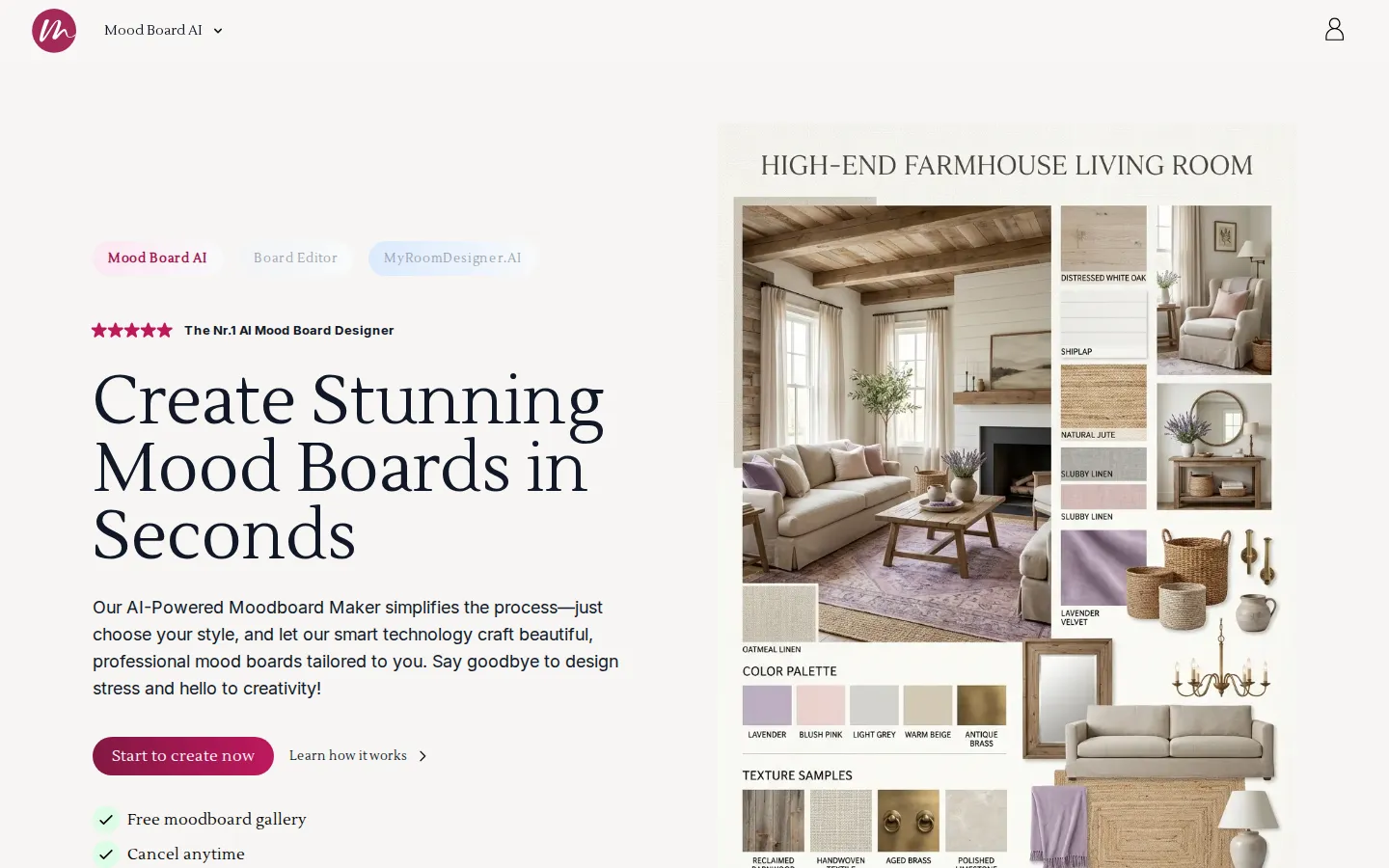
MoodBoard AI is an AI-powered mood board maker that creates beautiful, professional mood boards from a simple style choice in seconds. Instead of dragging images around a canvas, users pick a style and the AI assembles a curated board complete with color palettes, textures, and matching product ideas, which is why more than 120,000 boards have been generated so far. The tool is used for interior design, fashion, and related creative work, and its editor lets users refine boards by removing or swapping items, importing their own products with one click, and adding custom products manually through a URL, name, price, and image. AI features include background removal, photo description generation that improves prompts for more accurate generations, chat conversations about a generated design where users request modifications and get suggestions, and upscaling, clean-up, and find-similar-product tools. The automated shopping list creator collects every added item with its price and produces a summarized total cost for tracking. A color palette generator rounds out the workflow. Plans are tiered by monthly AI generations, board counts, and import volumes, from a free plan with one board per month to premium plans with hundreds of generations. The editor is where the practical work happens: boards can be rearranged, items removed or replaced, and real products pulled in from online stores so a concept board doubles as a shopping plan. MoodBoard AI reports strong user reception, with more than 120,000 boards generated and a 4.9 out of 5 rating from creators, and the service has appeared on Product Hunt, Reddit, Medium, and YouTube coverage. For designers presenting to clients, the board output is formatted so it reads as a professional deliverable rather than a rough collage, with consistent item tiles, price information, and palette swatches. The AI generation pipeline accepts a style description and returns boards tailored to that direction, and the chat interface lets users refine a generated design conversationally, asking for warmer tones, different furniture styles, or alternative layouts. Plan limits scale predictably from one board per month on the free tier to 200 boards and 400 AI generations monthly on the premium plan, which accommodates individual decorators as well as busy studios.
MoodBoard AI Core Features
AI mood board generation
Choose a style and receive a complete board with palette, textures, and curated items in seconds.
Chat with AI about your design
Ask questions, request modifications, and get design suggestions conversationally.
Color palette generator
Extract and generate matching color palettes for each board.
AI background removal
Remove backgrounds from product photos without external editors.
One-click product import
Add real products to boards from stores with a single click, with monthly quotas per plan.
Automated shopping list
Every added item is listed with price, and a summarized total tracks the board's cost.
Upscale, clean-up, and find similar
Refine generated images or locate comparable products for alternatives.
Custom board editor
Swap items, remove clutter, and manage boards across projects with per-plan board limits.
Who is MoodBoard AI for?
MoodBoard AI is built for interior designers and decorators who present concept boards to clients and need polished visuals quickly. Homeowners and DIY renovators use it to explore style directions for living rooms, bedrooms, and kitchens before committing to purchases. Furniture and home decor businesses create product-focused boards to showcase collections and inspire customers. Fashion and retail stylists adapt the mood board workflow to outfit and collection concepts, while event planners and creators use boards to communicate themes and palettes to collaborators. Real estate stagers and architects preparing client presentations also benefit from fast concept visuals. Anyone who wants to move from a loose idea to a board with curated products, textures, and a shopping list in minutes fits the tool, and the free plan lets casual users test one board per month before subscribing. Real estate agents and home stagers prepare concept boards for listings to help buyers visualize furnished spaces, and architecture students and educators use the tool to build presentation boards for studio reviews. Renovation contractors also share boards with clients to align on finishes and budgets before work begins. Interior design students and recent graduates build professional portfolios with consistent board presentation, and online sellers of furniture and decor use boards to style product bundles for seasonal campaigns.
MoodBoard AI Use Cases
Present a living room concept to a client with a polished AI-generated board and matching palette.
Explore five style directions for a renovation in minutes instead of assembling reference collages by hand.
Build product-focused boards for a furniture store to inspire customers and link to shoppable items.
Create outfit and collection mood boards for a fashion concept meeting with fabric tones and palettes.
Produce event theme boards with a palette, textures, and decor item suggestions for vendors.
Turn a homeowner's vague inspiration into a board with a concrete shopping list and total cost.
Rapidly iterate on kitchen or bedroom designs by chatting with the AI for modification suggestions.
Compile client-ready design presentations with consistent board styling across multiple rooms.
MoodBoard AI Pros and Cons
Pros
- Near-instant board creation from a style choice with genuinely useful palettes and item curation.
- Practical e-commerce touches such as one-click product import and automated shopping list totals.
- Free plan lets casual users generate a board per month before committing to a subscription.
Cons
- Board counts and AI generation quotas are capped per month on every paid tier.
- Output quality depends on how clearly the style direction can be expressed to the AI.
- Fashion and non-interior use cases are supported but the product skews toward home decor.
FAQ About MoodBoard AI
MoodBoard AI Pricing
Freemium. Free plan includes 1 board/month. Personal $29/mo ($24/mo billed annually, $288/yr); Business $99/mo ($79/mo annually, $948/yr); Premium $199/mo ($149/mo annually, $1,788/yr). Limits scale in AI generations, boards, and product imports.
Check official pricingFree
1 board, 3 one-click imports, 1 AI background removal, AI generations and palette generator.
Personal
50 AI generations, 10 boards, 200 imports, chat with AI, upscale and clean-up tools.
Business
200 AI generations, 100 boards, 400 imports per month for professional designers.
Premium
400 AI generations, 200 boards, 800 imports for studios and high-volume creators.
MoodBoard AI Alternatives

AI Room Design
AI Room Design is a photo-led interior design generator. You upload a photo of a real room, pick one of ten styles or write a custom brief, and it returns redesign previews that keep your actual layout, windows, doors, and perspective intact. Compare each idea against the original before you shop, hire a contractor, or start renovating.

PicHome
PicHome is a web tool that converts an uploaded 2D floor plan, whether a hand sketch, a CAD drawing, or a designer layout, into a walkable 360 degree virtual tour. It detects rooms, doors, and furniture, renders photoreal panoramas, links rooms through door hotspots, and exports a soundtracked MP4 in 16:9, 9:16, or square formats.

Redocor
AI home design from one room photo: visualize furniture, colors, materials, lighting, and styles while keeping the room layout.