
Greysound
Greysound is a browser DAW that pairs a full multi-track studio with an AI co-producer named CoProducer. Record, arrange, mix and master using built-in synths, samplers and effects, generate samples and MIDI parts, split stems, and keep sessions in the cloud. Core editing is free; you pay only for AI credits.
What is Greysound?
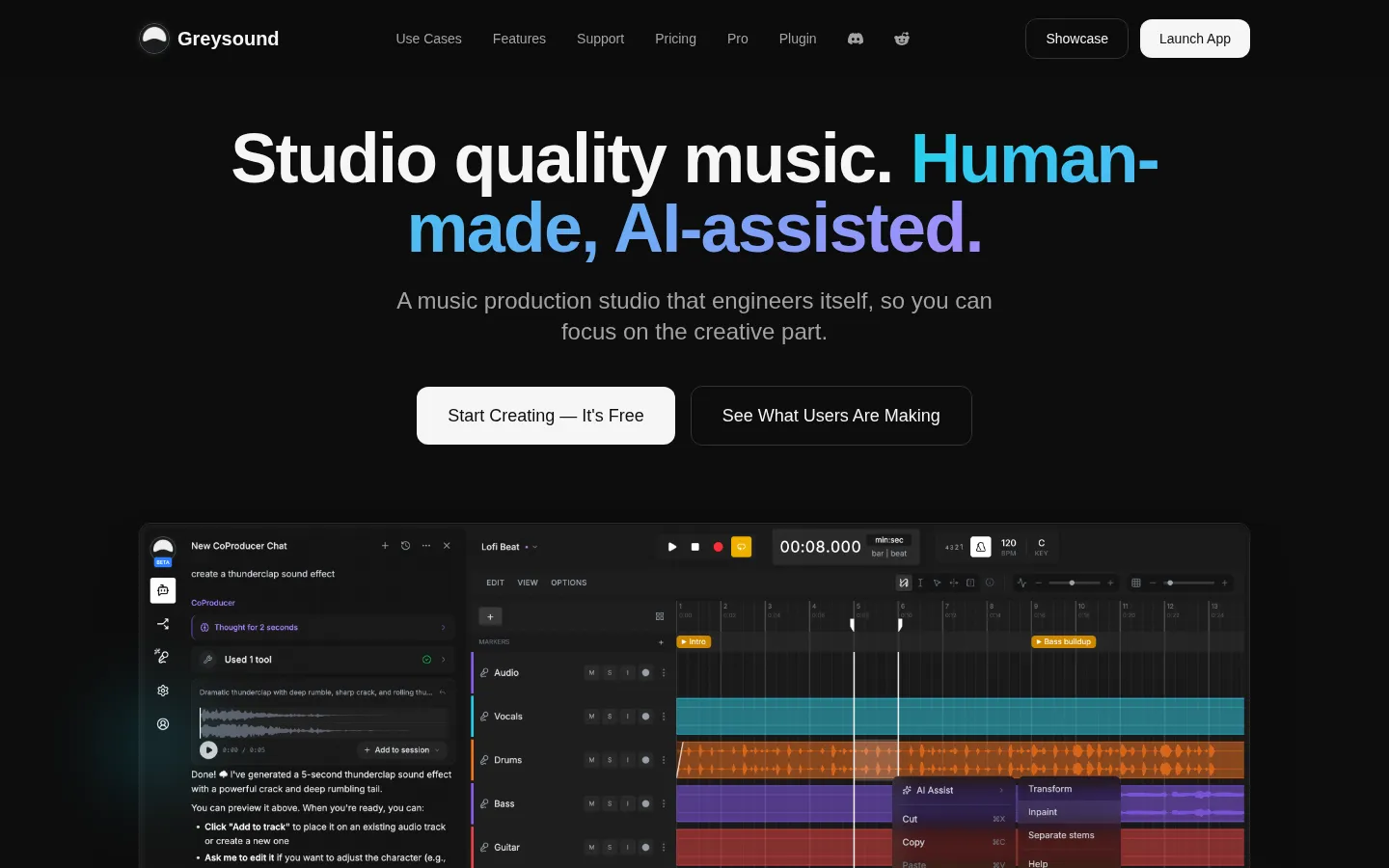
Greysound is a complete music production studio that runs in a web browser, built by Moonrise Technologies in San Francisco. It combines a conventional multi-track DAW — audio recording, MIDI editing, arrangement, a full mixing console with EQ, compression and reverb, plus built-in synthesizers, samplers and drum machines — with an AI assistant the team calls CoProducer. Instead of bolting a chatbot onto a legacy desktop app, Greysound treats the AI as an assistant engineer: it can generate melodies, drum patterns and full arrangements from a natural-language request, create samples and loops, split a mixed track into stems, and handle tedious editing chores such as automatic phase detection across tracks, noise removal and deleting silence from long regions with fades added.
The pitch is deliberately narrow in scope: automate the tedious, keep the craft human. You describe what you want, Greysound drafts it as editable material, and every note, parameter and effect module remains yours to change. Nothing is locked into a black box, which is why the tagline reads human-made, AI-assisted.
Because it is browser-native, there is nothing to install, sessions sync to the cloud and open on any machine, and collaborators can share a link. Core recording, editing, arranging, mixing and saving are free forever; AI actions consume credits from a weekly allowance, with extra credits sold one-time and never expiring. For people who need low-latency tracking with their own audio interface, Greysound Pro is a native macOS, Windows and Linux app built on Tracktion Engine that runs VST3 and Audio Unit plugins and stores sessions on local disk. A separate VST3 plugin brings the same idea to other DAWs: describe a sound and get an editable native effect chain.
That distinction matters when you compare Greysound with text-to-song generators. Those tools output a finished stereo file you can only accept or regenerate. Greysound outputs session material: MIDI clips you can transpose, audio regions you can cut, instruments you can re-voice, effect chains you can inspect module by module. The AI is the assistant engineer in the room, not the artist. It also means the studio is usable with no AI at all — a songwriter can record a vocal and guitar, arrange, mix and export while spending zero credits, then decide later whether the assistant is worth subscribing for.
Greysound Core Features
AI CoProducer
Chat with an assistant that reads your session and generates melodies, drum patterns, MIDI parts and full arrangements through natural conversation, with every result left fully editable.
AI Stem Splitting
Import a reference track and isolate vocals, drums, bass, guitar, piano and other parts so you can study the arrangement or reuse individual stems.
AI Sample Synthesis
Generate samples, loops and one-shot effects from a text prompt instead of digging through sample libraries for hours.
Virtual Instruments
Synthesizers, a sampler and drum machines ship in the browser with no plugin installation, configuration or license keys.
Mixing and Effects
A full mixing console with EQ, compression, reverb and more, plus over twenty built-in effects for mastering inside the browser.
Workflow Automation
Automatic phase detection and correction across tracks, AI noise removal, batch stem processing with intelligent gain staging and silence trimming with fades.
Cloud Sessions
Projects save to the cloud and reopen on any machine, so sessions are shareable and never tied to one computer's hard drive.
Greysound Pro and Plugin
A native macOS, Windows and Linux app with low-latency audio, VST3 and AU support, plus a VST3 plugin that builds editable effect chains inside other DAWs.
Who is Greysound for?
Greysound is aimed at anyone who makes music on a computer and wants the studio to handle the boring parts. The site groups its audience into four self-selected roles — pro engineer, amateur engineer, pro musician and vibe musician — and the product genuinely covers that spread. Professional mixing and recording engineers use it for phase alignment, silence cleanup and batch stem processing, saving hours on repetitive prep before the creative pass. Amateur and home-studio producers get a full mixing console, EQ, compression and reverb without buying plugins or learning a desktop DAW from scratch. Singer-songwriters and topline writers use CoProducer to turn a hummed idea into chords, basslines and drum patterns, then edit every note by hand. Beatmakers and electronic artists generate samples, loops and effects on demand instead of digging through sample packs, and split reference tracks to study arrangement and sound design. Composers working on film, games and short-form video need fast turnaround, so they sketch cues in the browser and regenerate single bars rather than re-recording whole regions. Music students and educators benefit from AI stem splitting as a teaching tool — isolating parts of a reference mix to hear how it was built. Content creators and podcasters who are not trained engineers can clean up audio, add music beds and export a finished track without leaving the tab. Desktop-first users who already own VST3 or Audio Unit plugins can move to Greysound Pro, and anyone married to another DAW can use the VST3 plugin to design effect chains in place.
Greysound Use Cases
Sketch a full song arrangement from a hummed melody using CoProducer's generated chords, bass and drums.
Clean up a messy multitrack session by phase-aligning tracks and trimming silence with automatic fades.
Split a reference track into stems to study how a favourite producer built the arrangement and mix.
Generate custom drum loops and one-shot samples for a beat without buying another sample pack.
Mix and master a finished track in the browser console with EQ, compression and reverb.
Draft cue music for a video, game or podcast episode and export stems quickly.
Teach music production by isolating individual instruments from a commercial mix in class.
Design a vocal effect chain with words in another DAW using the Greysound VST3 plugin.
Greysound Pros and Cons
Pros
- Runs entirely in the browser with no install, so you can start creating in seconds on any machine.
- Non-AI editing, recording, mixing and project saving are free forever, with paid tiers only for AI credits.
- AI output stays editable note by note and parameter by parameter rather than producing locked audio files.
- Founder-led support includes a bookable one-on-one call with the creator for anyone not fully satisfied.
- Native desktop app and VST3 plugin extend the same workflow to low-latency recording and existing DAWs.
Cons
- AI features require an internet connection and consume credits, so heavy generation work needs a paid plan.
- Browser-based production still trails dedicated desktop DAWs for very large sessions and complex plugin chains.
- The separate Pro desktop app and VST3 plugin are billed on their own terms rather than bundled with web plans.
FAQ About Greysound
Greysound Pricing
Greysound is free forever for recording, editing, mixing and saving, with AI credits sold through weekly-refreshed subscriptions from $52/year (Base) up to $416/year (Max), plus one-time credits at $3 per 1,000.
Check official pricingFree
All non-AI features including recording, editing, arranging, mixing and saving, plus 1,000 starter credits and free credits earned through eligible activity.
Base
1,000 AI credits refreshed every week; $6/mo or $1.50/week on monthly billing, a 67% saving on annual. Extra credits at $3 per 1,000, no expiry.
Pro
2,200 AI credits refreshed every week; $10/mo or $2.50/week on monthly billing, a 70% saving on annual. Extra credits at $3 per 1,000, no expiry.
Max
10,000 AI credits refreshed every week; $40/mo or $10/week on monthly billing, a 73% saving on annual. Extra credits at $3 per 1,000, no expiry.
Greysound Plugin
VST3 plugin for macOS and Windows with a 7-day free trial, then $9/mo or $7.50/mo billed annually, for AI-designed editable effect chains inside other DAWs.
Greysound Alternatives

Kits AI
Kits AI is a studio for AI vocals built by Arpeggi Labs. It clones a singing voice from a short recording, converts any take into one of 100+ licensed artist voices, and adds vocal removal, stem splitting, harmonies, AI mastering and instrument models. A free plan includes 15 conversion minutes; paid tiers start at $10 per month.

Sonilo
Sonilo turns video into licensed music and sound effects. Upload a clip and it writes an original soundtrack that follows the cuts, adds Foley and ambience, or generates songs from lyrics and prompts. Free credits refresh every two weeks with no credit card required, Pro adds commercial licensing with a downloadable certificate, and paid plans start at $11.99 per month.
Songscription
Songscription converts recordings into playable notation. Upload an MP3, WAV, or M4A file, paste a YouTube or TikTok link, or photograph printed sheet music, and its AI writes out notes, chords, and guitar tabs. Musicians, teachers, and producers use it to learn songs by ear faster, archive original compositions, and move audio into notation software or a DAW.