
EaseMate AI
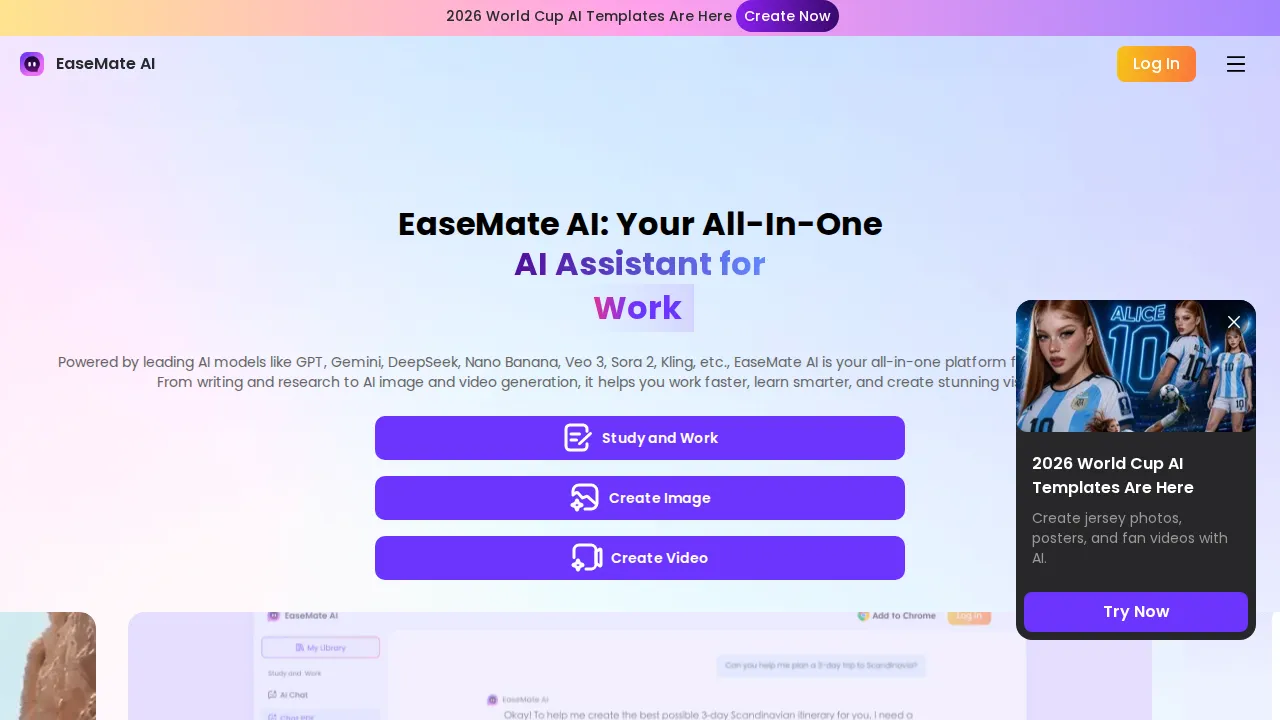
EaseMate AI is an all-in-one AI assistant offering image generation, video creation, AI chat, ChatPDF, writing assistance, AI study tools, and more through a single subscription. Supporting models like Kling, Veo 3, Seedance, Wan 2.5, Flux, GPT-4o, and Midjourney, EaseMate provides a unified workspace for content creation, learning, and productivity.
What is EaseMate AI?
EaseMate AI is an all-in-one AI assistant platform developed by EaseUS that brings together AI image generation, video creation, intelligent chat, PDF analysis, writing assistance, and study tools under a single subscription. Instead of juggling multiple separate AI services, users get access to a unified workspace supporting leading models like Kling, Veo 3, Seedance, Wan 2.5, Flux, GPT-4o, and Midjourney. EaseMate simplifies content creation workflows by eliminating the need to switch between different tools for different tasks. Whether you need to generate marketing visuals, analyze academic PDFs, get writing suggestions, or chat with an AI assistant, EaseMate provides it all from one dashboard. The platform is available as both a web application and a Chrome extension, making it accessible directly from your browser.
EaseMate AI Core Features
AI Image Generation
Generate high-quality images from text prompts using models like Flux, Midjourney, and Seedance, with style controls and resolution options.
AI Video Creation
Create videos from text descriptions using Kling, Veo 3, and Wan 2.5, supporting various aspect ratios and motion styles.
AI Chat Assistant
Chat with an intelligent AI powered by GPT-4o for general questions, brainstorming, and problem-solving across any topic.
ChatPDF Analysis
Upload and analyze PDF documents with AI, extracting key information, summarizing content, and answering questions about your documents.
Writing Assistance
Get AI-powered help with writing tasks including email composition, article drafting, proofreading, and content rewriting.
AI Study Tools
Access specialized tools for homework help, research assistance, problem-solving, and learning support across multiple subjects.
Chrome Extension
Use EaseMate directly from your browser without switching between tabs, with quick access to all AI features from the extension popup.
Multi-Model Support
Choose from a wide range of AI models including Kling, Veo 3, Seedance, Wan 2.5, Flux, GPT-4o, and Midjourney for different task types.
Unified Workspace
Access all AI tools from a single dashboard with consistent interface, eliminating the need to manage multiple separate AI subscriptions.
Credit-Based System
Use credits across all tools with flexible plans starting from a free tier, with Lite and Pro plans offering additional monthly credits.
Who is EaseMate AI for?
EaseMate AI is designed for students who need study assistance and PDF analysis tools for academic work. Content creators and social media managers benefit from the integrated image and video generation capabilities. Professionals and office workers use it for writing assistance, document analysis, and daily productivity tasks. Freelancers and small business owners appreciate having multiple AI tools consolidated into one affordable subscription. Educators and researchers rely on ChatPDF and study tools for research and lesson preparation.
EaseMate AI Use Cases
Generate marketing images and social media visuals using Flux or Midjourney models for brand campaigns.
Create short video content with Kling or Veo 3 for product demos, social reels, and promotional materials.
Analyze academic PDFs and research papers to quickly extract key findings and generate summaries.
Get homework help and study assistance across math, science, and humanities subjects with AI tutoring.
Draft professional emails, reports, and articles with AI writing assistance and grammar checking.
Brainstorm creative ideas and concepts with the AI chat assistant for content planning and project development.
Turn blog posts into video scripts and visual content using the integrated image and video generation workflow.
Translate and summarize documents across languages for international communication and research.
Create presentation slides and visual aids from text descriptions for business meetings and classroom teaching.
EaseMate AI Pros and Cons
Pros
- All-in-one platform eliminates the need for multiple separate AI tool subscriptions.
- Supports a wide range of state-of-the-art models including Midjourney, Flux, and GPT-4o.
- Free tier available with no credit card required to start using basic features.
- Chrome extension provides convenient access directly from the browser.
- Backed by EaseUS, a well-established software company with a track record of reliable products.
Cons
- Free plan has limited credits which may not be sufficient for heavy users.
- Some advanced AI models are only available on higher-tier paid plans.
- Web-based platform requires internet connection and may have latency during peak usage.
FAQ About EaseMate AI
EaseMate AI Pricing
Free Basic plan available. Lite $8.9/mo (1,200 credits). Pro $19.9/mo (3,000 credits). Annual plan saves 32%.
Check official pricingBasic
Free plan with limited credits and basic AI models
Lite
1,200 credits/mo. First month $8.9, then $9.9/mo
Pro
3,000 credits/mo. First month $19.9, then $24.9/mo. Supports Kling, Veo 3, Seedance, Flux, GPT-4o, Midjourney
EaseMate AI Alternatives

Cindy
Cindy is an open-source desktop AI agent from XD Inc. that unifies Claude Code, Codex and Pi harnesses with 20+ tools, persistent memory and reusable skills. Use it free with your own API key or existing Coding Plan, or pay for the optional managed model service that works the moment you sign in. No setup project required.
Safeguest
Safeguest is a guest-screening platform for short-term rental hosts. Every booking is verified inside your PMS: government ID and a biometric selfie, a signed guest agreement, and a refundable deposit or the No Deposit Option. An AI-written Arrival Briefing grades the booking Green, Yellow or Red, so you know who is arriving before keys change hands. Prevent is free; Protect is $29 per stay.

Migoo
Migoo turns a single chat window into a small AI department: a general assistant plus named specialists for video ads, design, slides, brochures, research, data analysis, photo editing, writing, websites and job applications. It reads the Google Workspace context you connect, then drafts reports, files expenses, builds decks and produces publishable assets, charging through a monthly points allowance rather than per-seat licences.