Delta
Delta is a multiplayer environment for coding with AI agents, built by the creators of Zed. Conversations, code changes and reasoning stay anchored to the code in one thread, so you can see why a change was made. Teams can join the same thread in real time, review in context, and switch models, harnesses or machines without losing history.
What is Delta?
Delta is a multiplayer environment for coding with AI agents, built by the creators of Zed and currently in beta. It keeps the agent conversation and the code it produced in one place: each thread holds the prompts, tool calls, reasoning, edits, diffs and test runs behind a change, so the reasoning lives on with the results instead of disappearing into terminal scrollback.
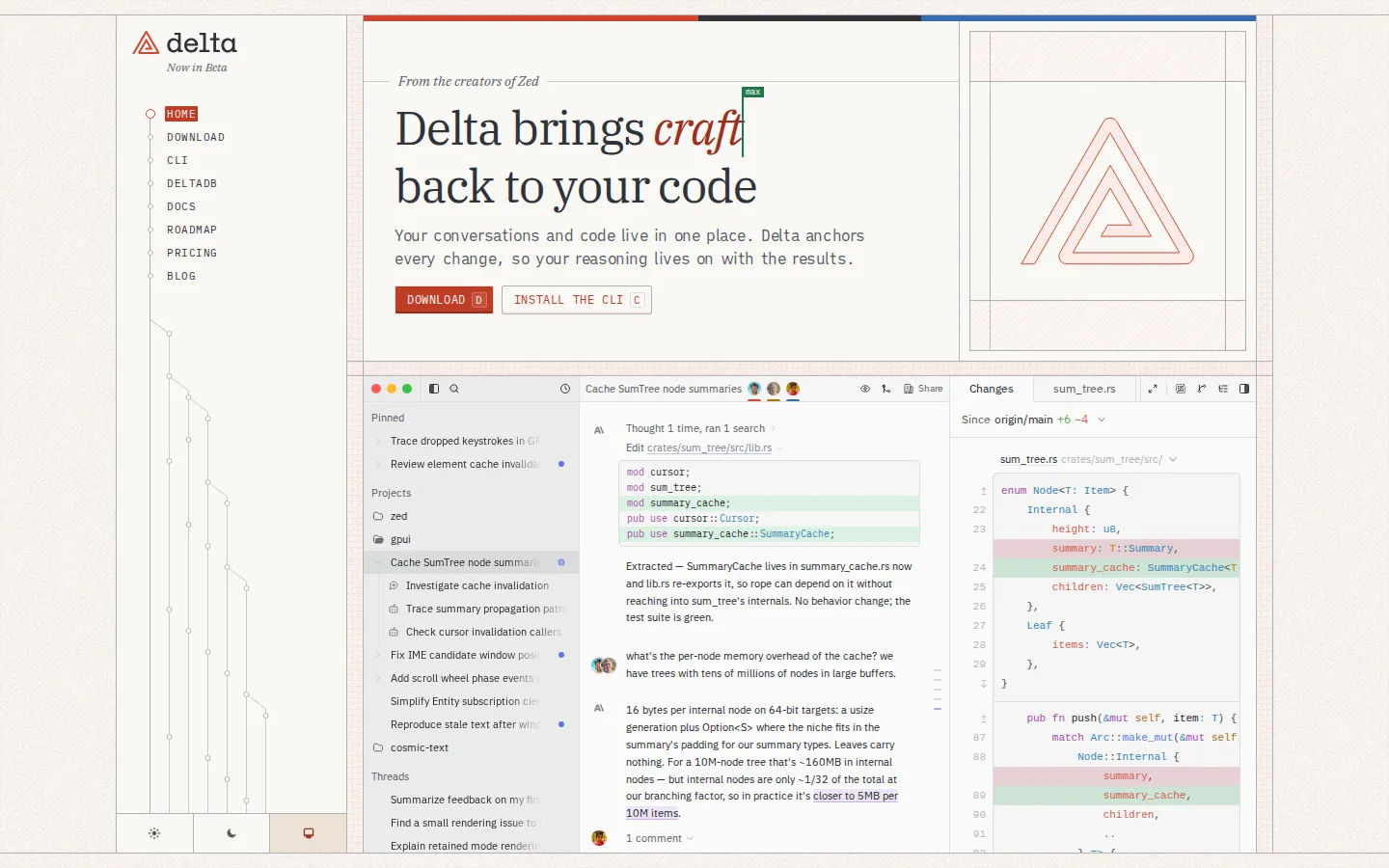
The product has three layers. Delta, the app, is a first-party harness where threads with teammates and agents sit side by side, running on desktop, in the browser and on mobile. The Delta CLI lets you keep the agent you already have, starting with Claude Code, and share a session so a teammate can join from their own machine or from the app. DeltaDB, underneath both, is a version control system that records every edit together with the conversation behind it, so a thread shared from Claude Code can be opened in the Delta app and the other way around.
Because the thread is anchored to the changes, you can revert to any edit in a thread, see how the code came to be, and comment on the conversation or on a line of code while the work is still evolving. Teammates can be invited into the same thread to review, comment and work alongside the agent in real time, with general access options for invited people, everyone at a company, or anyone with the link.
You can also swap the model, harness or runtime, moving between Claude, GPT and Gemini, between Claude Code and the Delta app, or between a laptop and a cloud runner, and the change history plus the conversation behind it stay recorded in DeltaDB. Delta is in beta and billed through the same account as Zed: a free Personal tier for users who bring their own API keys, and a Pro tier at $10 per month that includes hosted models and $5 of tokens each month.
Delta Core Features
Anchored threads
Every conversation stays attached to the code it produced, so opening an old thread shows the exact diff, tool calls and reasoning behind the change.
Real-time multiplayer review
Invite teammates into a live thread to comment on the conversation or on any line of code while the agent keeps working.
Bring your own agent
The Delta CLI shares a Claude Code session so a teammate can join from their own terminal, with the same thread visible in the app.
DeltaDB version control
An edit-level version control system that records each change together with the conversation that caused it, going beyond commit-only history.
Revert to any edit
Restore a thread to any earlier point while keeping the surrounding context, instead of reconstructing work from memory or scrollback.
Swap models, harnesses and machines
Move between Claude, GPT and Gemini, Claude Code and the Delta app, or a laptop and a cloud runner without losing context.
Access controls
Share a thread with specific people by email, with everyone at your company, or with anyone holding the link.
Cross-surface continuity
Open the same thread on desktop, web or mobile and continue the conversation exactly where it stopped.
Who is Delta for?
Delta is aimed at software engineers and product teams who use AI coding agents every day and keep losing the thread between the prompt that produced a change and the change itself. AI-native software engineers: developers who already work mostly through agents such as Claude Code or a first-party harness, and want the conversations, diffs and test runs recorded in one place instead of scattered across terminal scrollback and chat. Engineering teams adopting agents together: teams that need several people to review, comment on and steer one agent session the way they review a pull request, rather than passing screenshots and notes between tools. Tech leads and staff engineers reviewing agent output: reviewers who want to see the reasoning and tool calls behind a diff before merging, and to comment on the conversation or a specific line while the work is still moving. Platform and tooling teams: infrastructure groups running a mix of harnesses and models who want to swap the model, the harness or the machine without losing the context of how the code got there. Early-stage startups and small product teams: lean teams with no dedicated developer-experience staff who want a shared workspace for agent work without building internal tooling first. Open-source maintainers and contributors: maintainers onboarding people into unfamiliar codebases who want the exploration trace, benchmark runs and review notes preserved next to the code.
Delta Use Cases
Review an agent-written diff with your team before merging it into main.
Hand a half-finished Claude Code session to a teammate so they can continue it.
Revert a change to an earlier edit while keeping the reasoning that produced it.
Trace how a bug fix evolved across prompts, tool calls and test runs.
Onboard a contributor into an unfamiliar codebase using a shared exploration thread.
Compare how Claude, GPT and Gemini approach the same refactor in one thread.
Move an in-progress task from a laptop to a cloud runner without losing context.
Comment on specific lines of agent output while the work is still in progress.
Delta Pros and Cons
Pros
- Keeps conversation, diffs and test output in a single thread instead of scattered across tools.
- Real-time multi-user review is a genuine differentiator for agent-written code.
- Works with the agent you already use through the CLI, starting with Claude Code.
- Shares an account and plans with Zed, so existing Zed subscriptions carry over.
- The free Personal tier supports bringing your own API keys or external agents.
Cons
- Delta is in beta, so features, interfaces and the CLI are still changing.
- Hosted models need the $10 per month Pro plan, while Personal depends on your own API keys.
- Edit predictions available in Zed are not available in Delta.
FAQ About Delta
Delta Pricing
Delta is free on the Personal plan when you bring your own API keys or external agents, and Pro costs $10 per month with hosted models and $5 of included tokens, all billed through your existing Zed account.
Check official pricingPersonal
Use your existing API keys or external agents with Delta, including revert to any edit, the conversation behind every change, in-context review, and coding with teammates and agents.
Pro
Zed-hosted models available out of the box, $5 of included tokens each month, usage-based billing beyond included credits, everything in Personal, and a two-week free trial without a credit card.
Delta Alternatives
Multica
Multica is a project management workspace for teams working alongside AI coding agents. Connect the CLIs you already use, assign them issues, and follow progress on a shared board. Workflows, scheduled autopilots, shared skills and chat integrations keep humans and agents on the same task lifecycle.
Cotlet
Cotlet is a hosted MCP server and REST API for apps with no API. Cotlet builds and maintains each integration and fixes it when the app changes. Cotlet is operated by Take Group sp. z o.o., Katowice, Poland.
Pydantic
Pydantic is the company behind Pydantic Validation and a four-part AI engineering stack: Pydantic AI for type-safe Python agents, Logfire for OpenTelemetry traces and evaluations, Pydantic Evals for test datasets, and AI Gateway for one-key model routing with spend caps. Core libraries are open source; the hosted platform is metered with a free tier of 10 million records monthly.