
ChatPDF
ChatPDF is a web-based AI assistant for documents: upload a PDF and chat with it in any language. It answers questions with clickable citations, summarizes long papers, translates documents, and compares several files in one conversation. The free plan covers two documents a day, while ChatPDF Plus raises limits to 2,000-page files and unlimited chats.
What is ChatPDF?
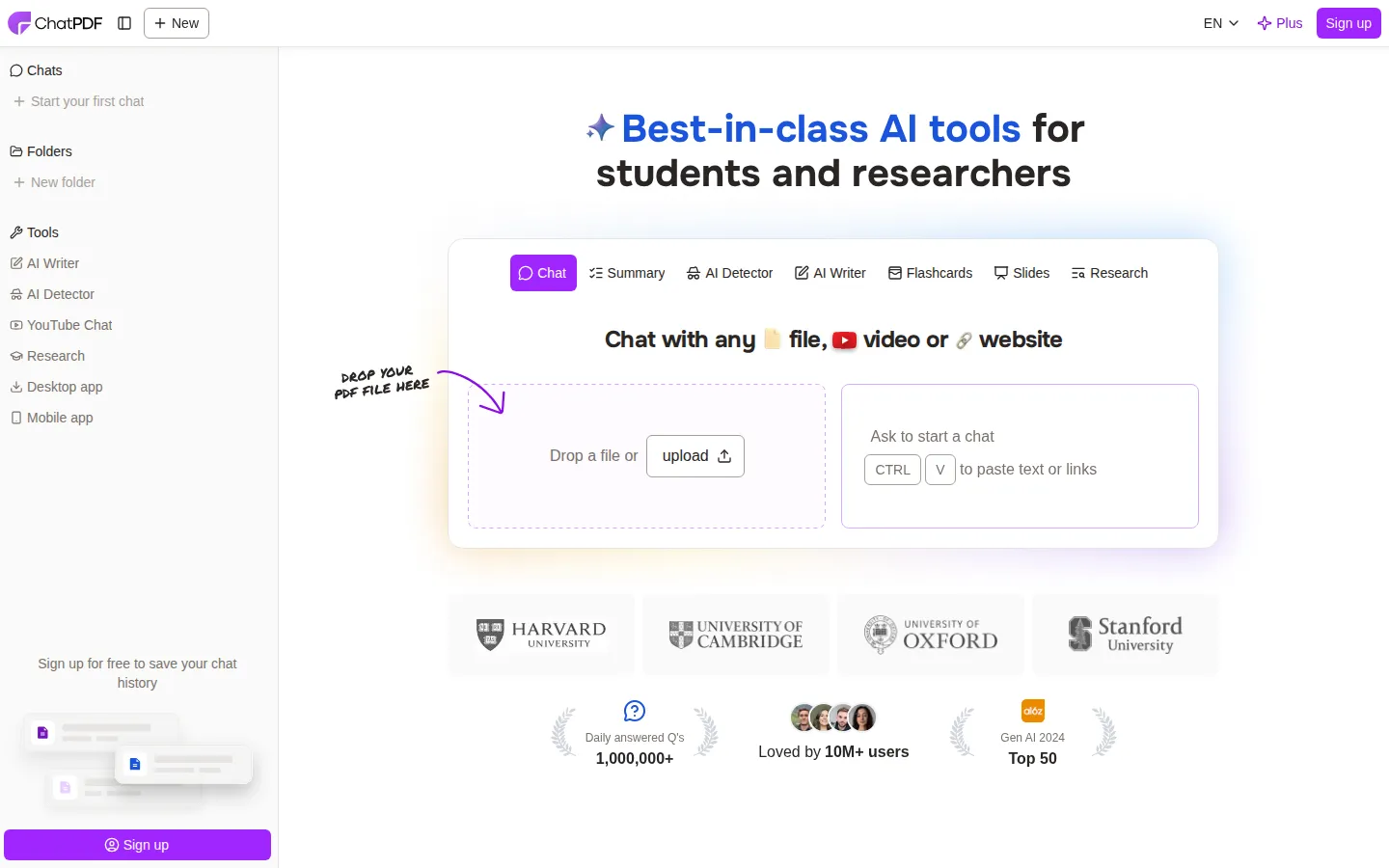
ChatPDF is a browser-based AI document assistant from ChatPDF GmbH that turns any PDF into something you can question. You drop a file into the page, and the AI reads it, builds a map of its content and meaning, then answers your questions with citations that link back to the exact page. The product launched as a simple "chat with your PDF" tool and has since grown into a suite of study and research utilities.
The core workspace is a two-pane view: the document on one side, the chat on the other. Answers arrive with clickable reference markers, so a citation scrolls the PDF straight to the sentence that supports it. Instead of uploading a file you can press Ctrl+V to paste raw text, a website link or a YouTube link.
Supported formats go well beyond PDF. ChatPDF accepts Word (.doc, .docx), PowerPoint (.ppt, .pptx), Markdown (.md) and plain text (.txt) files and converts them internally; non-PDF files are capped at 32 MB. Documents in any language are accepted, and you can upload in one language while asking questions in another, which makes it practical for international research. The AI Detector page lists support for more than 20 languages.
Because one PDF is rarely enough, ChatPDF uses folders. A folder holds several documents and the model reasons across all of them, so you can compare papers, follow a theme through a reading list, or question a contract together with its annexes. Chats are saved in a sidebar, and you can share a link that lets anyone chat with that PDF for free.
Around the chat itself the company has added a wider toolbox aimed at students and researchers: an AI Writer for drafting papers, an AI Detector that scores how likely a text is AI-generated, AI Flashcards for exam revision, AI Slides for presentations, AI Research (Scholar) search that finds papers and answers questions from their text, and YouTube Chat, which answers questions about a video with clickable timestamps.
Under the hood, ChatPDF says it dynamically routes queries between GPT-4o and GPT-4o-mini to balance speed, quality and efficiency, and builds a map of the document's meaning rather than depending on keyword search. Documents are protected with SSL in transit and encrypted at rest, and you can delete your files at any time.
ChatPDF also ships desktop apps for Windows and Mac and mobile apps for iOS and Android, and it exposes a developer API. The backend API accepts a PDF from a public URL or as an upload, asks stateless questions (up to six messages per request), returns inline page references, can stream answers word by word and can delete sources programmatically, which suits custom chatbots over your own documents. API files are limited to 2,000 pages or 32 MB, and free API keys get a limited monthly allowance while paid API plans raise it. On the company's own numbers, ChatPDF reports more than 10 million users, over 1,000,000 questions answered every day and a 4.9 rating.
ChatPDF Core Features
Chat with any document
Ask questions in plain language and get answers drawn from the PDF, with the document open side by side.
Cited answers
Every response links to the pages it used, and one click jumps to the exact source sentence in the file.
Multi-file folders
Group several PDFs, Word files or slides into one folder and ask questions that span all of them.
Summaries and translation
Get an automatic chat summary of any document and translate it into your own language on request.
AI Research (Scholar)
Search top-ranked journals for papers, read cited AI summaries and then chat with the papers themselves.
Study tools
Generate flashcards for revision and turn material into slide decks with AI Slides, plus an AI Writer for longer drafts.
AI Detector
Paste up to 1,000 words to get an AI-likelihood score, with coverage of 20+ languages and humanizer-resistant detection.
Developer API
A documented backend API to add PDFs by URL or upload, ask stateless chat questions, return page references, stream responses and delete sources.
Who is ChatPDF for?
ChatPDF is aimed squarely at people who have to read a lot of dense documents and would rather ask questions than scroll. The site names three audiences - researchers, students and professionals - and the tool maps well onto each of them. University students are the largest group. They use it on lecture slides, textbooks, course readings and past papers: summarize a chapter before a seminar, ask for a plain-language explanation of a difficult passage, generate flashcards for exam revision, or have ChatPDF quiz them with multiple-choice questions. Because a free account saves history, a whole semester of readings can live in folders. Students on a budget can work entirely inside the free tier of two documents a day. Academic researchers and PhD candidates use ChatPDF to triage literature. Upload a paper, ask what dataset it used, how its method differs from a previous study, or what the stated limitations are, and the answer points to the page it came from. Folders let them hold a reading list in one conversation and ask cross-document questions, and AI Research finds and summarizes new papers from top-ranked journals with citations, which speeds up a literature review considerably. Professionals in legal, finance, consulting and operations roles are the third group. Contracts, financial reports, compliance manuals, product documentation and training material are all long, detailed and expensive to read line by line. Asking for a specific clause, a risk factor or a definition turns hours of scanning into minutes, and sharing a link means a colleague can query the same document without a licence. Because ChatPDF accepts and answers in any language, it suits non-native speakers studying or working in a second language: upload a paper in one language and ask questions in your own. The built-in translation feature does the same job on the document itself, and the AI Detector supports 20+ languages. Adjacent roles benefit too. Teachers and lecturers can summarise readings, pull out exam questions and check text for AI writing before grading. Journalists, analysts and market researchers can interrogate long reports and transcripts. Librarians and knowledge managers can point patrons at a tool that turns a static PDF collection into something searchable in plain English. Finally, developers building document chatbots or support assistants are served by the backend API, which handles source upload, stateless chat, references and streaming. Small teams that would otherwise stitch together embeddings, a vector store and an LLM can use ChatPDF as the retrieval layer behind their own interface.
ChatPDF Use Cases
Summarize a long research paper or thesis chapter before writing a literature review.
Revise for exams with AI-generated flashcards and multiple-choice questions from lecture readings.
Compare several papers, contracts or reports inside one folder and ask cross-document questions.
Translate a foreign-language manual or article, then ask follow-up questions in your own language.
Pull clauses, obligations and risk factors out of contracts, financial reports and compliance manuals.
Turn research notes or a report into a shareable presentation outline with AI Slides.
Check whether a text was AI-generated before submitting, grading or publishing it.
Build a custom chatbot over your own document collection using the ChatPDF backend API.
ChatPDF Pros and Cons
Pros
- No registration required to try it; the free plan allows two documents per day, and the paid plan is clearly described as unlimited document analysis.
- Answers are anchored to clickable citations and a side-by-side PDF view, which makes verification fast.
- Accepts PDF, Word, PowerPoint, Markdown and text files in any language, and answers in the language you ask in.
- Bundles study and research extras - flashcards, slides, AI Writer, AI Detector, AI Research and YouTube Chat - under one subscription.
- Documented developer API with a free API plan and paid API plans for larger usage.
Cons
- Free tier limits are tight: 2 chats per day, 120 pages and 10 MB per file, 20 messages per day and 5 files per folder, so anything heavy pushes you to Plus.
- There is no public pricing page - /pricing returns a 404 - so the Plus price only appears inside the in-app paywall, and the offer varies between users (we observed $13.99 to $15.99 per month for US visitors).
- Saving chat history, using folders and generating share links requires an account, and the developer API accepts only PDFs of up to 2,000 pages or 32 MB per file.
FAQ About ChatPDF
ChatPDF Pricing
ChatPDF is freemium: the free plan covers two documents per day with 120-page, 10 MB files and 20 messages, while ChatPDF Plus lifts those limits (2,000 pages, 150 MB, unlimited documents) for roughly $15.99 per month or $76.99 per year in the US, with the exact offer varying slightly by region and test bucket.
Check official pricingFree
2 documents (chats) per day, 120 pages and 10 MB per file, 20 chat messages per day, folders of up to 5 files, 1 AI Detector check and 2 flashcard decks per week. No account required.
ChatPDF Plus (Monthly)
Unlimited document analysis, files up to 2,000 pages and 150 MB, 1,000 chats and 2,000 messages per day, folders of up to 50 files, high-quality model, 500 AI Detector checks per day and the full study toolset.
ChatPDF Plus (Yearly)
The same ChatPDF Plus benefits billed annually, which works out at about $6.42 per month - roughly 60% below the monthly price at this bucket. Subscriptions can be paused for up to three months.
Developer API
A personal API key unlocks the documented backend API with a free API plan allowance of AI messages and PDF pages per month; paid API plans raise the limit. API files are capped at 2,000 pages or 32 MB.
ChatPDF Alternatives
PDF2EPUB
PDF2EPUB uses multimodal AI to convert PDFs into reflowable, navigation-ready EPUB files that keep formulas, code blocks, tables and two-column layouts intact. It rebuilds tables of contents, strips watermarks, translates content into 18 languages and offers three quality models: Lite, Pro and Ultra. Start free with the first 40 pages, then pay per page with credits or a monthly subscription.
AIDocMaker
AIDocMaker is a free AI document generator that turns prompts or uploaded files into professional Word documents, PDFs, PowerPoint slides, spreadsheets and voiceovers. You describe what you need, attach source material, and the agent drafts, formats and refines the file for you. Template-driven generators cover reports, proposals, contracts and letters, while paid tiers unlock flagship models, larger uploads and commercial audio rights.

Doclio
Doclio is an online PDF editor from Doclio Inc. It edits text and images in place, converts between PDF, Word, PowerPoint, Excel and image formats, merges, splits, rotates, compresses, protects and unlocks files, and fills and signs documents. AI tools summarise, translate and answer questions about a PDF. It runs in the browser with no install, needs no account for basic edits, and a free plan covers everyday use.