
Try AI Editor
Try AI Editor is a free web photo editor driven by text prompts: upload an image, describe the change in one sentence, and download a watermark-free PNG. It packs GPT Image, Nano Banana, and Seedream image models plus Kling, Veo, and Seedance video generators behind a single simple composer, with credits instead of subscriptions up front.
What is Try AI Editor?
Try AI Editor is a browser-based AI photo editor built around a single idea: upload an image, describe the change in ordinary English, and download the result. There are no layers, masks, brushes, or adjustment panels to learn. It went live in July 2026 as an independent, self-funded project built with Next.js and deployed on Vercel, and it runs generation through a third-party image service rather than training or hosting models of its own.
The workflow is deliberately narrow. A signed-in user uploads a JPG, PNG, WebP, or HEIC file up to 10MB, optionally attaches a reference image, types a prompt, and picks a model along with aspect ratio and resolution. The result returns as a full-size PNG with no watermark. Generation is asynchronous, so the page polls for the task and streams the finished image back through the site's own server rather than linking out to a provider URL.
Model choice is unusually broad for a free tool. The catalog covers OpenAI's GPT Image 2 and GPT Image 2.5, the Google Nano Banana family from 2 Lite through Pro, and ByteDance's Seedream 5 Lite, 5 Pro, and 4.5, with higher tiers reaching 4K. A separate video shelf adds Kling, MiniMax, Seedance, Veo 3.1, and Gemini Omni for prompt-to-clip and image-to-clip work, all through the same composer. Credit cost per model and resolution sits beside the Generate button before anything is spent.
Privacy is stated plainly rather than implied. Uploads are read into memory, forwarded to the third-party provider with your instruction, and never written to disk; there is no gallery, no archive, and no profile built from what you upload. Finished edits live in your own browser, so clearing browser data removes them and nothing is recoverable server-side. API credentials stay on the server, and the browser only ever talks to tryaieditor.com.
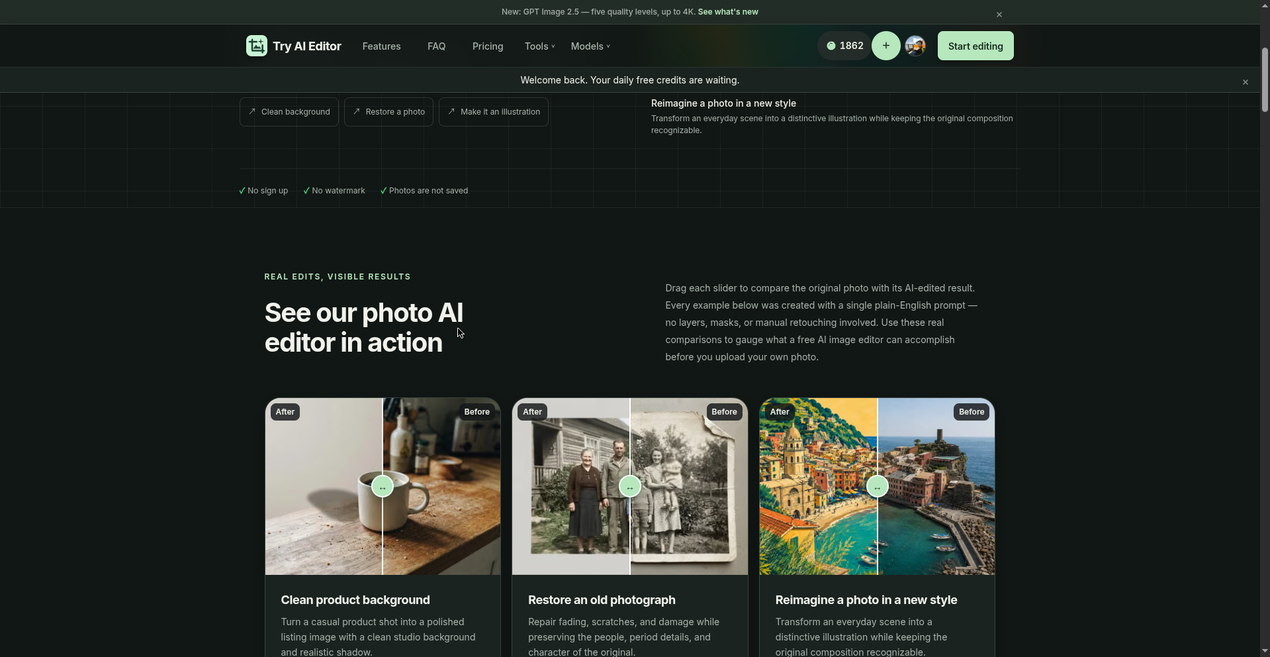
Every tool and model page on the site, from background removal and object erasing to style transfer, old photo restoration, upscaling, and a no-restrictions editor, is the same editor with guidance written for that job, so there is no second interface to relearn. A prompt library supplies ready-made instructions, and a before/after slider helps judge an edit against the original. The site is also offered in Spanish.
Pricing is metered, not unlimited, and the site says so plainly. New accounts receive 20 credits, a daily check-in adds 5 more, and a standard edit runs about 5 credits, so the free allowance covers roughly one ordinary edit a day. Monthly plans from $10, yearly billing at 25% off, and one-time packs from $5 cover heavier use; plan credits reset each month and pack credits expire after six months.
The limits deserve equal billing. An AI editor reconstructs plausible detail rather than recovering information that was never captured, so restoration invents what damage hid and upscaling invents texture. For faces, text, logos, and product details, compare against the original before publishing. There is also no project library and no public API; the entire product is the web editor.
Try AI Editor Core Features
Prompt-only editing
describe the change in plain English and skip layers, masks, and brushes entirely.
Multi-model catalog covering GPT Image 2 and 2.5, Nano Banana 2 Lite through Pro, and Seedream 5 Lite, 5 Pro, and 4.5 at up to 4K.
Video generation from the same composer with Kling, MiniMax, Seedance, Veo 3.1, and Gemini Omni, either prompt-to-clip or image-to-clip.
Watermark-free full-size PNG downloads, cleared for commercial use with no attribution and no licensing fee.
Free allowance of 20 welcome credits plus 5 daily check-in credits, where a standard edit costs about 5 credits.
Credit pricing and remaining balance shown beside Generate before every run, so cost is known up front.
Privacy-first handling
uploads are processed in memory by a third-party service, never written to disk, and edit history stays in your browser.
Runs in any modern browser on phone, tablet, or desktop with nothing to install, plus a Spanish-language interface.
Who is Try AI Editor for?
Try AI Editor suits people who need one photo fixed or restyled and have no interest in learning Photoshop. The common thread is a specific, describable outcome plus a deadline: a seller who needs a clean product shot before a listing goes live, a marketer who wants a campaign visual in a particular look, or someone with a scanned family photograph that has cracked and faded. E-commerce and marketplace sellers are the clearest fit. Replacing a cluttered background with a studio wall, removing a distracting object from a phone snapshot, or adding a soft shadow takes one sentence here instead of a retouching job. Because output is watermark-free and cleared for commercial use, listing images can go straight to a storefront without a second pass. Social media and content creators use it for restyling: turning a flat photo into an illustrated poster, shifting the mood, or iterating on a concept across several models to see which renders the idea best. The multi-model catalog matters here, since comparing GPT Image 2.5 against Nano Banana Pro on the same prompt is a few clicks and every credit price is visible before a run. Families and archivists reach for old photo restoration, where the tool repairs scratches, evens exposure, and can add period-appropriate color from a plain description. Hobbyists and beginners get a low-stakes way to experiment, because the free allowance costs nothing and asks for no card. Small agencies and solo freelancers use it as a fast first pass: block out a concept, show a client two or three prompt variations, then take the winner into a proper editor if it needs precision. Real estate agents, restaurant owners, and Etsy sellers get the same benefit at a smaller scale, swapping a messy interior or a plate shot for something cleaner in a minute rather than booking a shoot. It is a weaker fit for professional retouchers who need precise local control, layer-based compositing, or color-managed output; for teams needing shared asset libraries, brand kits, or approval workflows; and for anyone who needs an API, batch processing, or reproducible pipelines. There is no project storage, so anything that must persist belongs in a download folder. Anyone editing faces, documents, or product labels at high stakes should also expect to check the result against the original, because generative editing reconstructs detail rather than recovering it.
Try AI Editor Use Cases
Replace a cluttered product-shot background with a clean studio wall and a realistic soft shadow
Remove a photobomber, sign, cable, or stray object and rebuild the space behind it
Restore a scratched, creased, faded family photograph and add period-accurate color
Restyle an ordinary photo as a watercolor, sketch, or illustrated travel poster
Generate an ad or poster concept from text with readable in-image lettering
Upscale a soft or small image for a cleaner marketplace listing or print
Turn a still product photo into a short social video clip with sound
Try AI Editor Pros and Cons
Pros
- Genuinely free to start: Google sign-in yields 20 credits and a 5-credit daily top-up with no card required.
- No watermark on downloads, and commercial use is explicitly permitted without attribution.
- Broad model access in one place, including GPT Image 2.5, Nano Banana Pro, and Seedream 5, plus five video families.
- Credit costs are displayed before each run, and uploads are never stored on the site's servers.
Cons
- Requires a Google account to generate, and the old no-account visitor allowance stopped refilling in September 2026.
- No project library, batch mode, or API, so files and workflows have to be managed outside the tool.
- Plan credits do not roll over and pack credits expire after six months, which punishes occasional users.
FAQ About Try AI Editor
Try AI Editor Pricing
Freemium credit model. A free Google sign-in grants 20 welcome credits plus 5 daily check-in credits, and a standard edit costs about 5 credits. Paid capacity comes as monthly plans of 1,000 credits for $10, 2,500 for $20, and 5,000 for $40, the same tiers billed yearly at 25% off ($7.50 to $30 per month), or one-time packs from $5 for 200 credits to $40 for 3,000. Plan credits reset monthly without rollover; pack credits expire after six months.
Check official pricingFree
Google sign-in only: 20 welcome credits plus 5 daily check-in credits, no card required, no watermark.
Starter credit pack
200 credits at $0.025 per credit, valid six months, spent after daily check-in credits.
1,000 credits monthly
1,000 credits refilled each billing month at $0.01 per credit; unused plan credits do not roll over.
2,500 credits monthly
The most popular tier: 2,500 credits monthly at $0.008 per credit.
5,000 credits monthly
5,000 credits monthly at $0.008 per credit for high-volume editing.
5,000 credits yearly
Billed annually at $30 per month for 5,000 credits, 25% below monthly billing.
Try AI Editor Alternatives

DeepSwap
DeepSwap is an online AI face swap studio for video, GIF and photo. Upload a clip, pick a source face, and its private model renders a realistic swap in seconds, handling up to six faces, tricky angles and 1080p output, plus enhancement, background removal, cartoon filters and text-to-video generation, with a credit-based API for bulk work.

Bananai
Bananai is a free-to-start AI image editor and video generator that puts the Nano Banana model family at the centre of one browser workspace. Type a prompt or upload a photo to remove backgrounds, restyle, upscale and generate 4K images, then animate stills or create clips with Seedance, Wan, Veo and other models. Paid credits start at $5.39 a month billed yearly.

CarePhoto
CarePhoto is a browser-based AI photo studio built around a chat window instead of editing panels. You upload reference photos, describe the change, and it runs on third-party models including Seedance 2.5, Seedream 5.0 Pro, FLUX 3, Nano Banana Pro and GPT Image. Plans start at $7.99 per month, with 20 free credits on signup.