
PhotoTextEdit
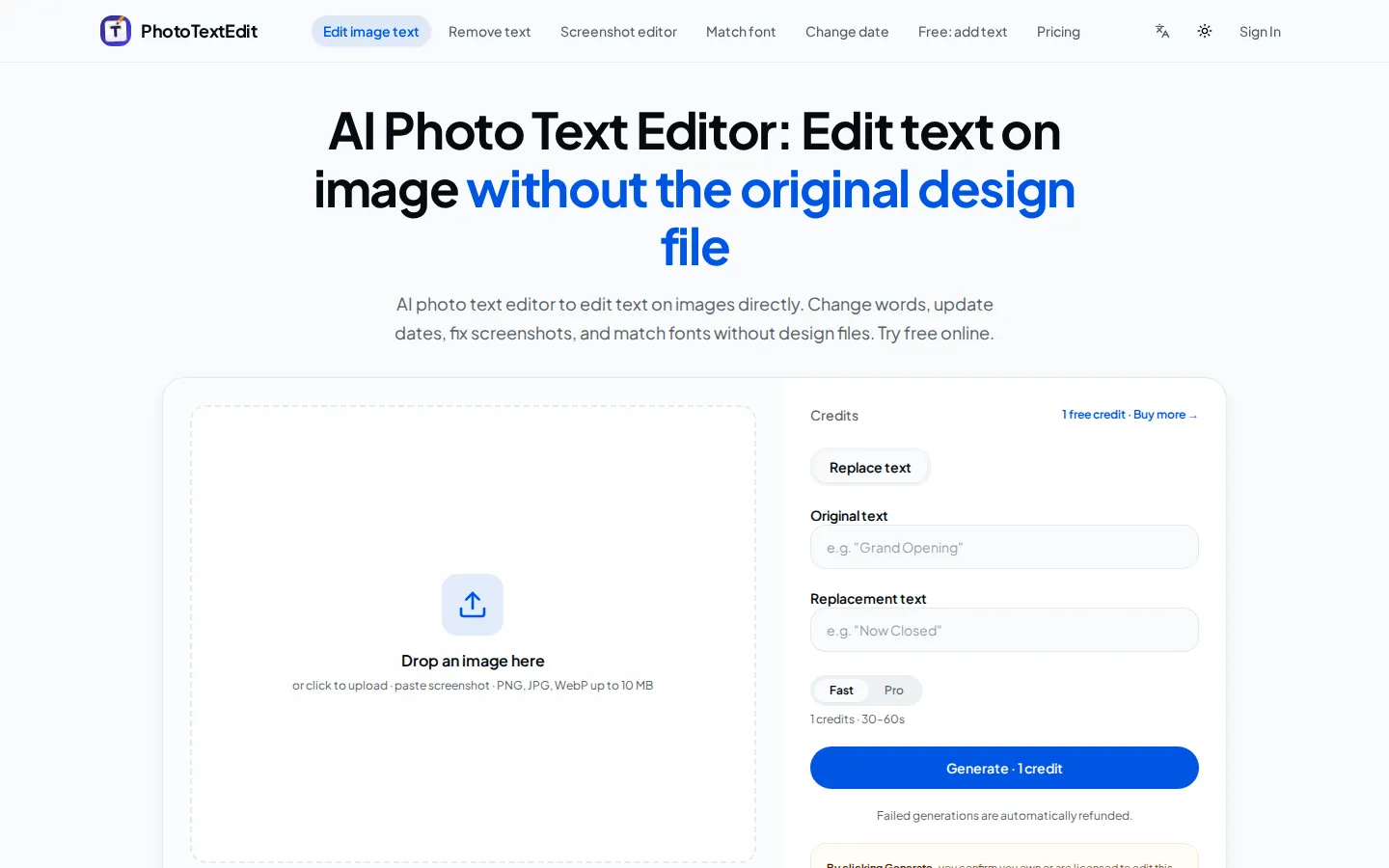
PhotoTextEdit edits text inside existing photos, posters, screenshots and product shots without the original design file. Upload a PNG, JPG or WebP up to 10 MB, enter the original and replacement wording, and the AI regenerates the lettering with matched font, lighting and perspective in 30 to 60 seconds. A free Add Text tool is included.
What is PhotoTextEdit?
PhotoTextEdit is a browser-based AI photo text editor built for one narrow job: changing words that are already printed on an image. Instead of opening a layered design file, you upload the flattened picture, type the text you want replaced and enter the new wording. The service regenerates that lettering in place and tries to leave everything around it untouched, so the curve of a ceramic mug, the grain of kraft paper, the gloss on a wine label or the angle of 3D shop signage stays as it was.
The homepage calls this a pixel-perfect typography engine with adaptive lighting and grain matching, and quotes 99.4% font and perspective accuracy across 250,000 processed images. It also claims 100,000 creators and businesses in more than 180 countries. Output reaches 2K resolution for commercial work when paid credits are used, while trial credits granted at signup render at 1K.
Editing runs in two modes. Fast mode costs one credit, accepts any aspect ratio including panoramas and long banners, and suits everyday edits and multi-word replacements. Pro mode costs three credits and targets 2K textures with realistic lighting for commercial graphics inside 1:3 to 3:1 aspect ratios. A generation usually takes 30 to 60 seconds, and failed jobs are refunded automatically.
A published gallery of thirteen before-and-after cases covers coffee mugs, birthday cakes, leather debossing, storefront signage, real estate listings, cosmetics packaging, showroom cars, wine labels, apparel tags, conference badges, printed menus, sale banners and App Store screenshots.
Around the editor sit single-purpose pages for removing text, editing screenshots, matching a font, changing a date, repairing garbled text in AI images and adding plain text for free. The Add Text overlay needs no account; the AI editing workflow does, and it starts with one free credit. Results download without a watermark and without a second charge.
The tool is deliberately narrow. It cannot design from a blank canvas, it struggles with lettering under about 15 pixels tall, and it accepts only single PNG, JPEG or WebP files up to 10 MB, so a PDF page has to be exported first. Edits to passports, government IDs, official seals, bank statements and receipts made to look genuine are refused, and violations terminate the account without refund.
PhotoTextEdit Core Features
Text replacement on flattened images
Enter the original wording and its replacement, and the AI regenerates the lettering in place without a PSD, AI or Figma source file.
Font and perspective matching
New text is blended into curved packaging, 3D signage and angled surfaces with adaptive lighting and grain matching so the surrounding pixels stay intact.
Fast and Pro modes
Fast costs one credit and accepts any aspect ratio including panoramas; Pro costs three credits and renders 2K textures with realistic lighting for commercial graphics.
Dedicated single-purpose tools
Separate pages handle text removal, screenshot editing, font matching, date changes, garbled AI text repair and free text overlays, each opening straight into the relevant workflow.
Free Add Text overlay
A no-signup tool for placing plain text on an image, kept separate from the credit-based AI editing engine.
Non-expiring credit packs
One-time purchases from $9.99 for 30 credits, downloads at no extra charge, and automatic refunds when a generation fails.
Commercial 2K output
Paid credits render at 2K resolution for print and digital campaigns, and the licence includes commercial use of the edited image.
Acceptable-use guardrails
Passports, government IDs, official seals, bank statements and deceptive receipt or chat edits are refused, with request logs retained and accounts terminated for violations.
Who is PhotoTextEdit for?
PhotoTextEdit suits people who have a finished image and no way to reopen it. E-commerce sellers are the clearest fit: a brand that already shot its packaging can swap a product name, ingredient line or net weight for a day-to-night SKU variant without booking another studio session. App marketers and localisation teams use the screenshot editor to rewrite headlines and button labels on App Store captures in a dozen languages rather than rebuilding and re-exporting Figma files. Agencies and freelance designers reach for it when a client's source file is lost, or when the designer who built a banner is offline and the discount percentage has to change today. Small businesses with physical signage, printed menus, event badges and price tags get a practical alternative to a reshoot, provided the lettering is large and sharp enough to read. Real estate agents, car dealers, wineries, cosmetics brands and conference organisers are the examples the site itself shows. It is a poor fit for anyone who wants to design from a blank canvas, repair text only a few pixels tall, work across multi-page PDFs, or alter identity documents and receipts. Teams that need layers, vector tools and brand templates will still want Photoshop, Photopea or Canva alongside it. Occasional users get the better deal: a single pack can cover a season of campaign tweaks, whereas a studio producing dozens of variants every week may spend more over a year than a layered editor licence would cost. Reviewers of marketing assets also use it to test headline variants before a designer is briefed.
PhotoTextEdit Use Cases
Swap a product name, ingredient list or net weight on packaging photography instead of booking a second studio shoot.
Localise App Store screenshots into multiple languages by replacing headlines and button labels directly on the capture.
Update listing status and asking price on real estate photos, from FOR SALE to SOLD, without reopening RAW files.
Change vintage years, appellations or batch numbers on wine and spirits bottle labels while keeping the paper grain.
Rewrite discount percentages and calls to action on finished sale banners for a new seasonal promotion.
Repair garbled or misspelled text in an AI-generated image so the render becomes usable instead of being discarded.
Refresh attendee names, talk titles or stage dates on conference badges and event passes.
Remove unwanted text from a photo, or add a plain caption with the free overlay tool before posting.
PhotoTextEdit Pros and Cons
Pros
- Keeps fonts, lighting and surface texture convincing on curved, reflective and printed surfaces, which is the hard part of editing text on a photograph.
- Pay-as-you-go credits from $9.99 with no subscription, no expiry, free downloads and automatic refunds for failed jobs.
- Free trial credits at signup plus a genuinely free Add Text overlay let you judge output quality before spending anything.
- Focused tools for removal, screenshots, dates, font matching and AI text repair cover the common jobs without opening a full editor.
Cons
- Text below roughly 15 pixels, curved surfaces and busy backgrounds still need manual checking, and the site states plainly that matches are not guaranteed.
- No blank-canvas design, layers or vector editing, and uploads are limited to one PNG, JPEG or WebP file of 10 MB, so PDFs must be exported first.
- Acceptable-use rules block IDs, passports, bank statements and receipt edits, and a violation terminates the account without refund.
FAQ About PhotoTextEdit
PhotoTextEdit Pricing
Freemium. Signing up grants trial credits that render at 1K, and a separate Add Text overlay is free without an account. AI editing runs on one-time credit packs: Starter $9.99 for 30 credits, Pro $19.99 for 75 and Studio $39.99 for 180, or $0.333, $0.267 and $0.222 per edit. No subscription, credits never expire, failed generations are refunded and commercial use is included.
Check official pricingPhotoTextEdit Alternatives

Lummi
Lummi is a stock library where AI-generated photos, illustrations, and 3D models sit next to editing tools that work on the asset you just picked. Search by category, color, or mood, then reframe, restyle, or remove the background before downloading. The free tier covers standard-resolution personal and commercial use; Pro adds watermark-free files, ultra resolution, and generation credits.
SparkPix
SparkPix is a free AI photo editor that runs in the browser and edits photos from plain text instructions. Upload a JPG, PNG or WebP up to 20 MB, describe the change, and it removes backgrounds, erases objects, restores old prints, upscales resolution, restyles images or generates new ones using models such as GPT Image and NanoBanana.
MindPic AI
MindPic AI is a browser-based creative platform that turns text prompts or uploaded photos into images, edits, short videos, and background music. It bundles background removal, object erasing, photo enhancement, restoration, retouching, style filters, virtual try-on, and watermark removal in one workspace. You can start generating without an account, then sign in for a larger daily free allowance or upgrade to a credit plan.