
Narrative
Narrative is an AI video editor from Narrative AI Inc. that converts long recordings into finished cuts. Bring footage from your camera roll or desktop, describe the edit you want in plain words, and the agent transcribes, finds the best moments, trims dead air, adds captions and titles, then delivers an editable multitrack timeline you can keep refining by chat or by hand.
What is Narrative?
Narrative is an AI-first video editor built by Narrative AI Inc. Its premise is simple: instead of clicking through a timeline, you describe the edit you want in plain language and an agent does the cutting for you. You bring footage from a camera roll, a shoot, a podcast or an interview, and Narrative reads the media, transcribes the speech, then proposes a finished cut.
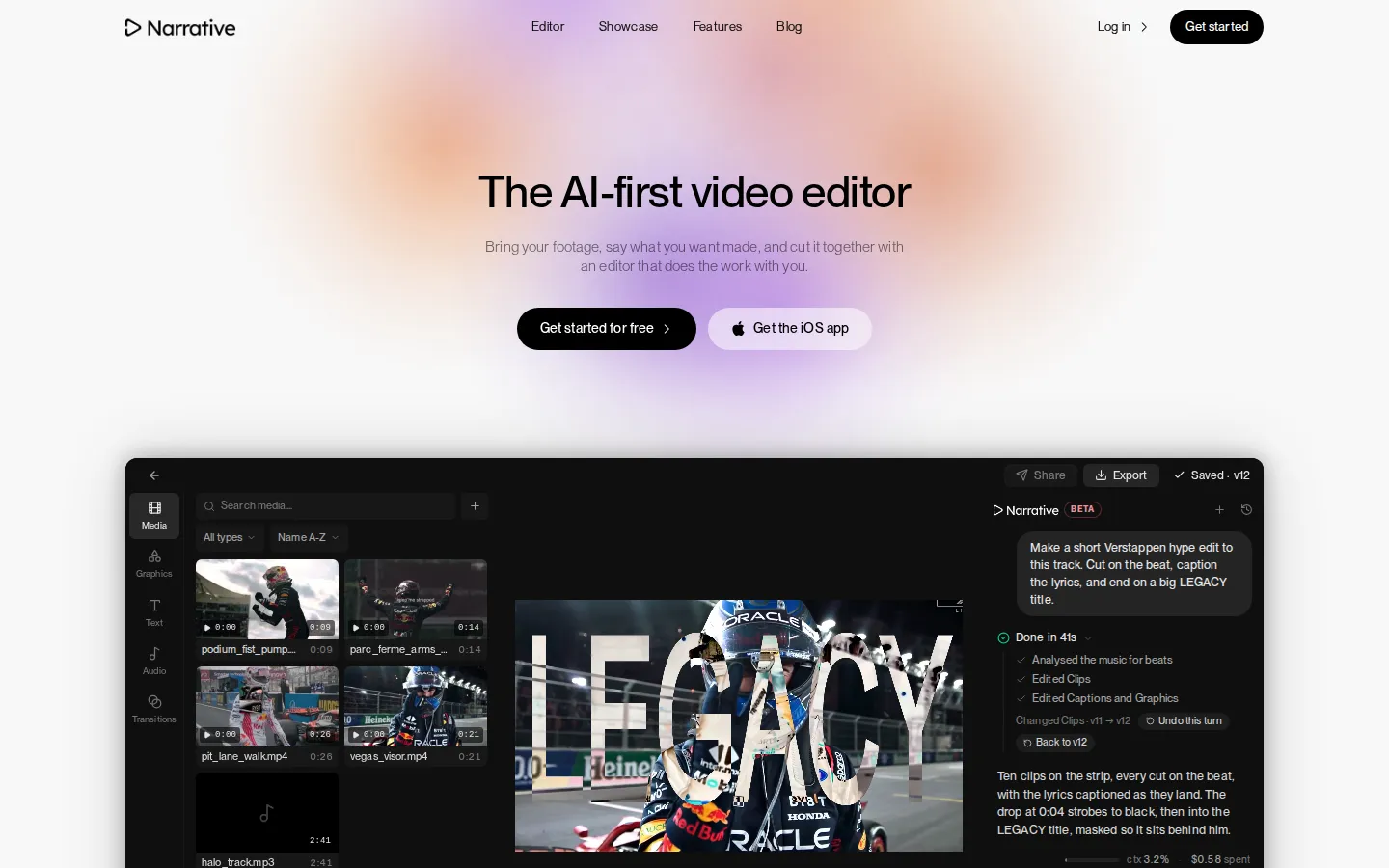
The workflow is conversational. You can type phrases such as make a 30 second highlight reel, cut this to the beat, remove the ums, start on the best line, or vertical with captions, and the assistant performs the edit and reports what it changed. Every instruction becomes a version, so the project keeps a full history and you can restore any earlier state with one click. Because the result still lands on a normal multitrack timeline, you stay in control: you can trim a clip, move a title, swap a transition or adjust audio by hand whenever you prefer.
Narrative handles both short-form and long-form work. It can pull the strongest moments out of a two hour recording, assemble a supercut, build a vertical reel with captions, or produce a longer highlight film with music underneath. Automatic transcription powers much of this, letting the editor work from words rather than waveforms, so you can search for a topic, find a soundbite or trim filler such as silence and um from the edit. Captions and lyric text can be generated and animated, and titles or graphics can be masked and layered over the footage.
The editor exposes creative controls too. You choose a reasoning level, with Fast for quick cuts and small changes, Balanced for most edits, and Max for long footage and difficult briefs. You also set the frame for each platform, switching between 16:9, 9:16 with both speakers stacked in shot, 1:1 feed and 4:5 portrait. Media, graphics, text, audio and transitions live in the same workspace as the conversation, and edits render with beat detection so cuts can land on the music.
Narrative runs on the web and as an iPhone app, with projects shared across both, and it exports finished video for publishing. The core editing capabilities require a Narrative subscription, offered in Plus and Pro tiers billed monthly or annually. Brand presets keep titles, captions and styling consistent across a series, which matters for creators and teams posting often. In short, Narrative positions itself as an editor that does the work with you rather than a template generator: you remain the director, but you delegate the tedious assembly.
Narrative Core Features
Conversational editing
Describe the edit in plain words, such as make a 30 second reel, cut to the beat or remove the ums, and the agent performs it and reports what changed.
Automatic transcription
Narrative transcribes your recordings so you can edit from the words, search a topic, find soundbites and start on the best line in long footage.
Beat-matched cuts
The editor analyses your music and aligns cuts and transitions to the beat, so montages and hype edits land on the track.
Captions and lyric text
Generate captions automatically, including animated lyric captions that appear as the words land, and style them for each platform.
Titles and masked graphics
Build chrome, glitch and animated titles, masks, collages and picture-in-picture graphics that layer over your footage.
Multitrack timeline
Everything lands on a real timeline with video, text, graphics, transitions and audio, so you can adjust any element by hand after the AI pass.
Version history
Every instruction becomes a version, so you can step back through a dozen or more revisions and restore the project to any earlier state.
Frame presets
Switch between 16:9, 9:16 with stacked speakers, 1:1 feed and 4:5 portrait, reframing a project for each platform from one edit.
Who is Narrative for?
Narrative is aimed at people who edit video regularly and want to spend far less time doing it. Its strongest fit is short-form creators, including TikTok, Instagram Reels and YouTube Shorts producers who post often, work from long takes, and need captions, punchy pacing and vertical framing without building every cut manually. Podcasters and interviewers are a natural audience. Narrative transcribes the conversation, so you can pull clips by searching the words, cut filler and silence automatically, and turn an hour-long episode into a set of captioned social clips or a tighter edit built around the strongest answers. Sports and event creators also fit, since highlight reels, match footage, montages and hype edits are exactly the kind of work where the tool finds high-action moments and locks cuts to a music track. Wedding and documentary filmmakers use it to produce a first assembly from hours of footage, then refine the story by hand. Solo creators and small teams benefit because the assistant absorbs some of the labour of an extra editor; reviewers featured on the site describe increased creative output without hiring more people. Agencies and in-house marketing teams can use brand presets to keep titles, captions and styling consistent across a series and across clients. Beginners can start from a finished draft and adjust it, but Narrative is not only for novices: the export and timeline controls suit experienced editors chasing speed. It is less suited to highly bespoke motion design or complex visual effects, where dedicated compositing tools remain necessary, and heavy long-form colour or audio post is better handled elsewhere. If you mostly post from your phone and want a real timeline rather than a rigid template, Narrative targets you directly, and the iPhone app exists for exactly that workflow.
Narrative Use Cases
Turn a two hour podcast or interview into captioned vertical clips
Cut a sports or event highlight reel to the beat of a music track
Assemble a 30 second highlight reel from hours of raw footage
Remove silence, ums and dead air from talking-head videos automatically
Reframe a widescreen edit into a 9:16 vertical version with stacked speakers
Generate animated captions and lyric text for short-form videos
Produce a long-form highlight film with music placed underneath
Create consistently branded edits with shared titles and styling presets
Narrative Pros and Cons
Pros
- Chat-driven editing is fast and learnable: you describe the change instead of hunting through menus.
- Output stays on a real multitrack timeline, so AI edits are a starting point you can still change by hand.
- Automatic transcription, filler removal, beat-matched cuts and captions cover most day-to-day short-form work.
- Every instruction is versioned, so edits are non-destructive and you can restore an earlier state instantly.
- Runs on the web and as an iPhone app, with a public showcase of real sports, wedding and creator projects.
Cons
- Timeline editing, AI editing and exports require a paid subscription, so the free tier is limited.
- Full pricing is only published through the App Store in-app purchase list, since the website pricing page returns a 404.
- There is no public API documented, and it is not aimed at complex motion design or visual effects work.
FAQ About Narrative
Narrative Pricing
Narrative is free to start and paid through in-app subscriptions, with Plus at $9.99 per month or $49.99 per year and Pro at $19.99 per month or $99.99 per year, and editing plus exports require an active subscription.
Check official pricingFree
Download the app and get started for free; the App Store lists it as free with in-app purchases, though timeline editing, AI editing and exports require a subscription.
Narrative Plus Monthly
Entry paid tier listed in the Apple App Store in-app purchase list for the Narrative: AI Video Editor app.
Narrative Plus Annual
Annual version of the Plus tier, billed once a year through the Apple App Store.
Narrative Pro Monthly
Higher paid tier listed in the Apple App Store in-app purchase list for creators with heavier workloads.
Narrative Pro Annual
Annual version of the Pro tier, billed once a year through the Apple App Store.
Narrative Alternatives

VideoBGRemover
Remove backgrounds from recorded videos online. Keep motion and audio, export transparent WebM or MP4. Free trial and paid plans.

BGChanger AI
Remove video backgrounds with AI, export transparent WebM or solid-color clips, keep original audio, and choose MP4, WebM, MOV, MKV, or GIF.

Kaleidly
Kaleidly is an AI repurposing studio for long videos. Paste a YouTube, TikTok, Instagram, X or Facebook link and it transcribes the episode, learns your writing voice from your own posts, then returns scored vertical clips with synced captions plus five text formats. One credit covers one minute of video. It understands 35 languages and writes posts in the language you write in.