MyToolster
MyToolster packs 41 free utilities into one browser-based site, sorted into Audio & Video, Text, Data, Web, Color, QR Code and Image. Beyond the usual encoders, formatters and generators it runs OpenAI Whisper transcription, AI text and image detection, background removal and subtitle export locally, with no uploads, account or installation, and every tool page does its work client-side.
What is MyToolster?
MyToolster is a free collection of browser-based utilities for developers, designers and everyday tasks, organised into seven categories: Audio & Video, Text, Data, Web, Color, QR Code and Image. It currently lists 41 tools, ranging from a Unicode encoder and a JSON/JSON5 formatter to QR code readers and in-browser Whisper transcription. Nothing requires installation, an account or a credit card, and every tool opens as its own page with an input, an output and a short explanation.
The unusual part for a utilities site is how much of the heavier work runs on the visitor's own machine. Audio to Text, Video to Text and Video to SRT use OpenAI's Whisper models through WebGPU, with automatic fallback to WASM, and transcribe MP3, M4A, WAV, AAC, OGG, WebM, MP4 and MOV files without uploading them; results export as TXT, SRT, VTT, Word or Markdown, and the Whisper tier is selectable between Tiny, Base and Small. The AI Background Remover segments a foreground in the browser using model sizes of roughly 44 MB, 88 MB or 176 MB and returns a transparent PNG. The AI Text Detector downloads a language-specific ONNX classifier on demand, splits long text into windows and combines the scores with a median, capped at 10,000 characters. The AI Image Detector reports visual signals and available metadata separately, and the Claude Watermark Remover strips invisible Unicode and zero-width markers while stating plainly that it cannot remove undisclosed statistical watermarks.
The rest of the catalogue is conventional developer plumbing done well. Text tools cover Unicode, UTF-8, Base64, URL encoding, MD5, a Vigenere cipher and an encoding converter for Shift_JIS, GBK, Big5, EUC-KR and UTF-8, plus a line-by-line text difference checker. Data tools include a JSON/JSON5/JSONC formatter, a JSON to TOON converter aimed at cutting LLM token usage, an XML viewer and validator, a BBCode viewer, a hex-to-binary converter and a URL parameter parser. Web tools add password and token generators, a UUID validator, Unix timestamp conversion, a cryptographically secure random number generator, percentage-change and arcsin calculators, and two stock limit-up and limit-down calculators that the site labels educational rather than investment advice. Color, QR and image utilities round it out with a colour picker, Pantone to RGB/HEX/HSL/CMYK conversion and a searchable reference chart, QR reading and generation, printable WiFi QR cards, a low quality image maker, photo-to-line-drawing and coloring-page converters, and a matcha filter remover.
The interface is available in English, Japanese, Traditional Chinese and Simplified Chinese, and the detection and transcription pages are translated across all four. The AI and media tool pages state plainly what stays on the device; model files are the only thing downloaded.
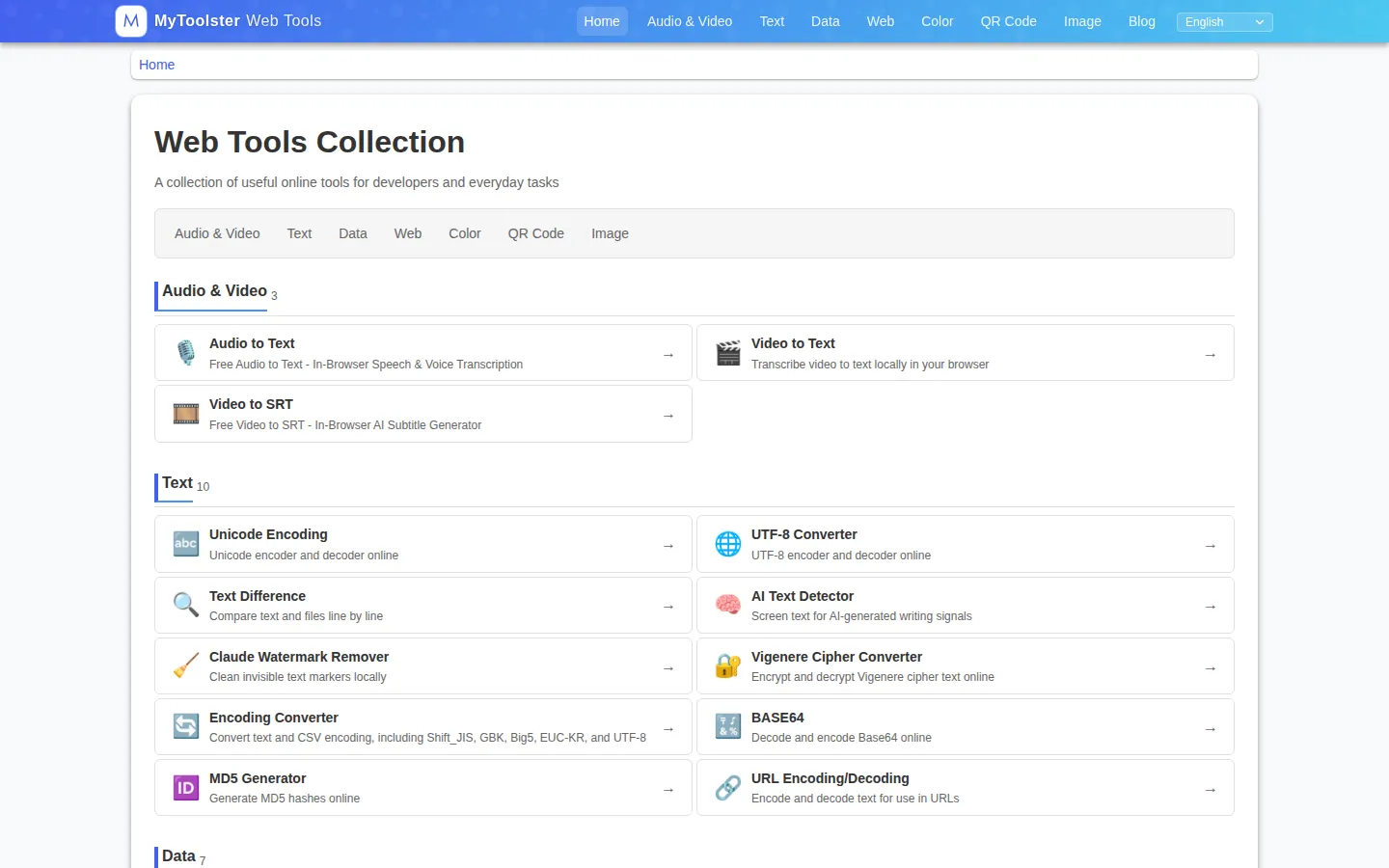
MyToolster Core Features
Local Whisper transcription
Audio to Text, Video to Text and Video to SRT run OpenAI Whisper through WebGPU with a WASM fallback, accept MP3, M4A, WAV, AAC, OGG, WebM, MP4 and MOV, and export TXT, SRT, VTT, Word or Markdown.
AI Text Detector
a language-specific ONNX classifier runs on demand in the browser, handles up to 10,000 characters, windows long text and reports a median score, with English validated, Simplified Chinese on a prototype path and Traditional Chinese/Japanese marked experimental.
AI Image Detector and Background Remover
both process images on the device; the detector separates visual signals from metadata, and the remover offers roughly 44 MB, 88 MB and 176 MB segmentation models and returns a transparent PNG.
Text and encoding toolkit
Unicode lookup, UTF-8, Base64, URL encoding, MD5, Vigenere cipher, a text difference checker, and an encoding converter covering Shift_JIS, GBK, Big5, EUC-KR and UTF-8.
Data and markup tools
a JSON/JSON5/JSONC formatter with comments, a JSON to TOON converter for lower LLM token counts, an XML viewer and validator, a BBCode to safe HTML previewer, hex to binary conversion and a URL parameter parser.
Web and security utilities
password generator, token generator with Random, Hex and Base64URL formats plus entropy estimates, UUID validator, Unix timestamp converter, cryptographically secure random numbers, percentage change and arcsin calculators.
Color, QR and image extras
screen and image colour picker, Pantone to RGB/HEX/HSL/CMYK conversion, a searchable Pantone reference chart with coated and uncoated filters, QR reader, QR generator, printable WiFi QR cards, line drawing, coloring page and matcha filter tools.
Privacy-first delivery
no signup, no uploads for text, images or media, no installation, and a four-language interface covering English, Japanese, Traditional and Simplified Chinese.
Who is MyToolster for?
MyToolster suits developers and technical writers who need a quick utility without opening a terminal or installing a package: formatting a JSON payload, decoding a Base64 string, checking a UUID, comparing two text files or reading a Shift_JIS CSV. Front-end and full-stack engineers will find the encoding, hashing and timestamp tools cover most of the small daily lookups that otherwise turn into a search. It also fits people with a privacy constraint. Journalists, researchers, lawyers and support teams who handle recorded interviews, internal meetings or customer calls can run Whisper transcription and subtitle generation locally, so the audio never reaches a server. Designers and small ecommerce sellers get a usable background remover and QR code generator without a subscription, and colour work is covered by Pantone conversion with a searchable reference chart. Educators and editors who want a first-pass opinion on whether a passage reads as machine-written can use the AI Text Detector, provided they treat the score as a screening signal rather than proof. Video creators cutting in Premiere Pro, CapCut or DaVinci Resolve get the most from Video to SRT, which produces downloadable subtitle files without a paid transcription service. The site is a weaker fit for teams that need an API, batch processing, stored history or a support contract. There are no accounts, so nothing syncs between devices, and each job runs in a single browser tab on the machine in front of you. Anyone transcribing hours of footage at scale, or needing audit trails and vendor support, should look at a hosted transcription or developer-utility platform instead.
MyToolster Use Cases
Transcribe an interview recording into text without uploading the audio anywhere.
Generate SRT or VTT subtitles for a video before editing it in Premiere Pro, CapCut or DaVinci Resolve.
Screen a draft article for AI-like writing signals before publishing it.
Format and validate a JSON or JSON5 payload that keeps failing a linter.
Convert a JSON dataset to TOON to shrink the token cost of an LLM prompt.
Decode a CSV that was exported in Shift_JIS, GBK or Big5 and comes out garbled.
Read a QR code from a screenshot or photo, or print a WiFi QR card for guests.
Remove the background from a product photo and download a transparent PNG.
MyToolster Pros and Cons
Pros
- Almost everything runs client-side, so text, images and media never leave the device; only AI model files are downloaded.
- Genuinely free with no account, seat limit, credit system or paywalled export.
- Broad coverage in one place: 41 tools across text, data, web, colour, QR, image and audio/video, each on a focused page.
- The heavy AI tools are the real differentiator: Whisper transcription, subtitle export and background removal normally require an upload or a subscription.
- Four-language interface and honest labelling of detector limits, experimental languages and educational calculators.
Cons
- There is no API, CLI or batch mode, so repetitive or scripted work still has to be done one file at a time in a tab.
- The AI tools depend on the local machine: Whisper and segmentation models mean 44-176 MB downloads on first use, and transcription is slow without WebGPU.
- The AI text and image detectors are screening signals only, with Traditional Chinese and Japanese classifier paths still experimental, so results cannot be treated as proof.
FAQ About MyToolster
MyToolster Pricing
All tools are free. MyToolster publishes no pricing page (/pricing returns a 404), no paid tier, subscription, credit pack or account, and no signup is required to use any utility. Costs fall on the operator, so the practical limits are device resources rather than money: the Whisper and segmentation models download once at roughly 44-176 MB depending on the tier, and longer transcription jobs run on the local CPU or GPU. Feedback goes through the site's X account rather than a paid support plan.
Check official pricingFree (all tools)
All 41 tools with no account and no quota; AI models download once to the browser and run locally.
MyToolster Alternatives

Google AI Studio
Google AI Studio is a free browser workspace for building with Gemini models. It pairs a prompt playground for text, image, audio and video with structured output, function calling, Google Search grounding, API key management and one-click code export, and deploys finished projects straight to the Gemini API, which bills per token beyond its free tier.

FastRouter
FastRouter is a unified LLM gateway that gives developers one OpenAI-compatible API for 200+ models from providers such as OpenAI, Anthropic, Google, and xAI. It adds automatic model routing, fallbacks, caching, spend caps, role-based access, guardrails, and per-request observability, while passing provider token prices through with no markup on any plan, including the free tier.

Cindy
Cindy is an open-source desktop AI agent from XD Inc. that unifies Claude Code, Codex and Pi harnesses with 20+ tools, persistent memory and reusable skills. Use it free with your own API key or existing Coding Plan, or pay for the optional managed model service that works the moment you sign in. No setup project required.