
Kira
Kira is a browser-based creative studio for AI image and video generation and editing. Upload a photo or start from a prompt, then apply featured effects like You as Spiderman, Muscle Maxing or Fix Messy Backgrounds, edit with inpainting and background tools, or generate short videos. Kira Creator is its co-creation community, sharing challenges and templates, and every account begins with free credits.
What is Kira?
Kira is a browser-based AI creative studio for making and editing images and videos, built around one-tap effects rather than complex prompt engineering. You sign in, open the editor, and move between Featured, Image and Video tabs, then generate from text, drop in your own photo, or pick a trending template such as You as Spiderman, Muscle Maxing, Fix Messy Backgrounds, Sunset Beach Pic, Y2K Beach Pic, Dreamy Boat Portrait, French Riviera, Tropical Beach Club or Digi Cam Night Selfie. Some entries carry a Pro or a Max badge, marking the tiers where heavier models unlock.
The product blends generation and editing in one canvas. Beyond text-to-image creation, Kira offers style transfer, image upscale and expand, inpainting and partial edits, replace or remove background, inpaint and erase, Redux, plus adjust, filter and crop tools. Release 5.8 brought a brand new web interface, replaced Inpaint with Sketch, and added comments on posts and the ability to follow other users, which turned the editor into something closer to a social app.
Video is a first-class part of the product, not an afterthought. You can generate short clips, edit or extend existing video, drive Motion Control effects such as a viral TikTok dance, and generate music or add vocals to a result. Video generation and video editing run at 15 credits per second, rising to 25 credits per second on Kira Ultra, while Motion Control costs 15 credits per second and music generation or adding vocals costs 25 credits per song.
Credits are the currency of everything. Each successful image generation or edit costs 5 credits, as do style transfer, image upscaling and inpainting, and image-related actions in Kira Ultra can consume three to four times more. Crucially, credits are only deducted when a result is successfully returned, so failed, cancelled or errored generations cost nothing.
Free access is generous enough to test the product properly. Free users receive 15 credits every day that refresh automatically, plus a one-time allowance of 30 credits on signup, and those free credits cover all standard image features; unused daily credits do not carry over. The Share Kira promotion advertises 50 credits per user with no limit for inviting others.
Kira Creator is the site's co-creation community, an explore feed of challenges and hashtags such as #workout, #odyssey, #pet, #spidey, #summer, #fall, #nightout and #kirau, where members post finished images, climb reward ladders and earn free credits for taking part.
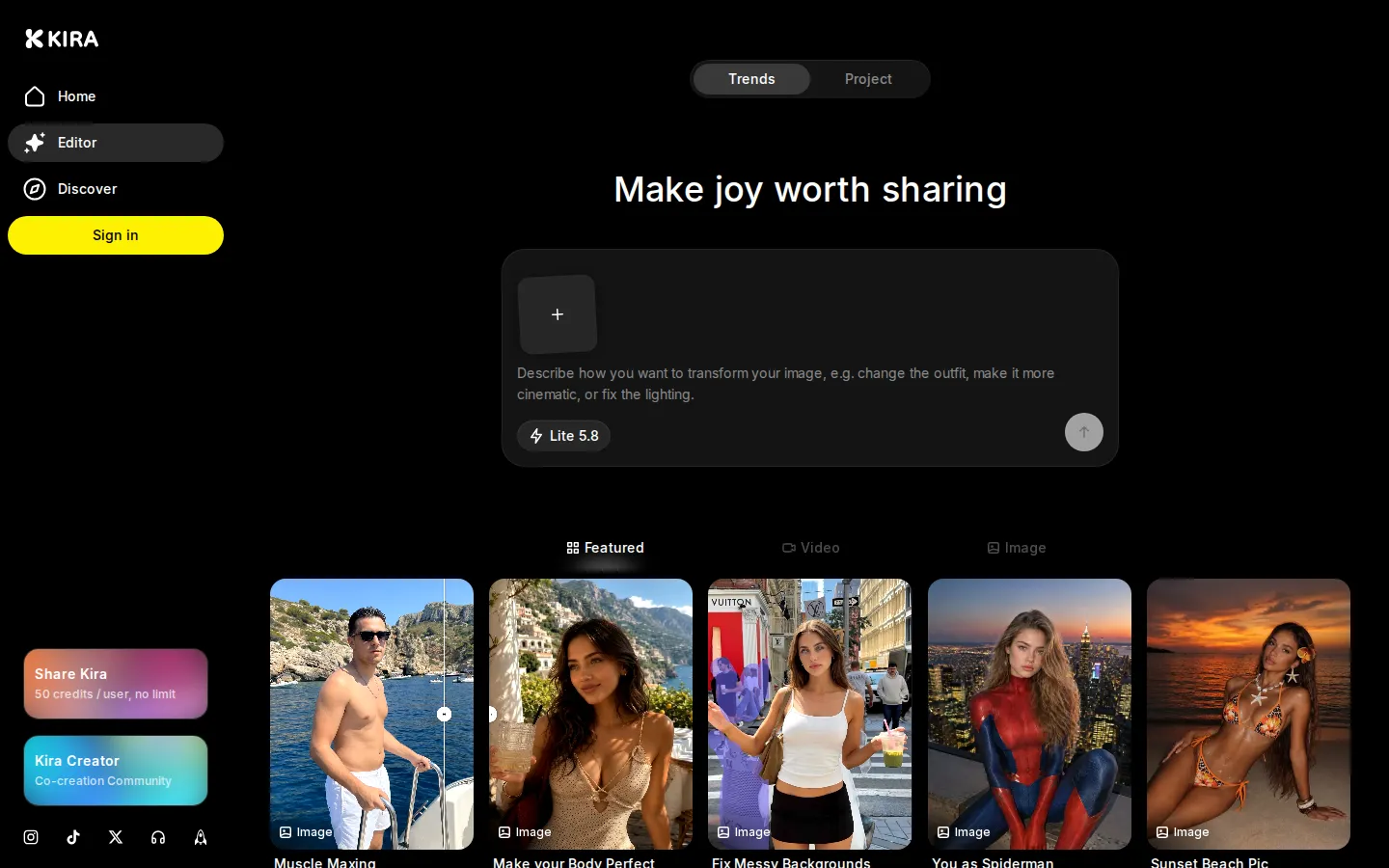
Kira Core Features
One-Tap Effects
Trending templates such as You as Spiderman, Muscle Maxing, Fix Messy Backgrounds and Y2K Beach Pic that turn a selfie into a scene.
AI Image Generation and Editing
Text-to-image creation plus style transfer, upscale and expand, inpainting, Sketch, Redux, and adjust, filter and crop tools in one canvas.
Background Tools
Replace or remove background, inpaint and erase tools for cleaning up messy or unwanted areas of a photo.
AI Video Generation
Generate short clips, edit or extend existing video, and produce Motion Control effects such as a viral TikTok dance.
Music and Vocals
Generate music or add vocals to a result, billed at 25 credits per song.
Kira Modes
Kira Lite on every tier, plus Nova and Ultra models on higher plans, with advanced modes such as Thinking Mode and Crazy Mode for subscribers.
Credits System
Transparent per-action costs, with charges only applied when a result is successfully returned and no charge for failed generations.
Kira Creator Community
A co-creation gallery with hashtag challenges, follow and comment features, and free credits as rewards for posting.
Who is Kira for?
Kira is built for people who want striking AI images and short videos without learning a professional editing suite. Casual users get the most obvious value: pick a trending effect such as You as Spiderman, Muscle Maxing, Sunset Beach Pic, Y2K Beach Pic or Digi Cam Night Selfie, drop in a selfie, and share the result. The whole flow is one-tap, so no prompt engineering is required and the free tier is enough to try every standard image feature. Social-first creators are the second audience. Kira leans hard into shareable, platform-native aesthetics, with video options such as Motion Control: Viral TikTok Dance, clips driven by motion references, music generation and vocal add-ons. Anyone making short-form content for TikTok, Instagram or X can produce a hook image or a few seconds of movement without a camera, a model or a studio. The third group is the editor who wants real tools rather than a novelty filter. Kira bundles style transfer, image upscale and expand, inpainting and partial edits, replace or remove background, inpaint and erase, Redux, and adjust, filter and crop controls in the same canvas as generation, with a Sketch tool replacing the older Inpaint flow in version 5.8. The fourth is the heavy user and power seller. Pro adds limit-free model access and video generation, while Max raises the credit allowance to 6,000 credits a month and unlocks Kira Ultra, where image actions can consume three to four times more credits. Photographers, small studios and marketers producing images at volume are the natural Max audience. Finally there is the community-minded creator. Kira Creator is a co-creation space where members follow each other, comment on posts, join themed challenges such as #workout, #odyssey, #pet, #spidey and #summer, and earn free credits for posting. Kira suits someone who wants both a tool and a feed to publish into, rather than a private generator.
Kira Use Cases
Turn a selfie into a themed image such as You as Spiderman, Muscle Maxing or a Y2K beach photo
Clean up a messy background or remove unwanted objects from an existing photo
Generate original images from a text prompt without any image editing experience
Upscale, expand or restyle an existing picture for print or social sharing
Create a few seconds of AI video movement, such as a viral TikTok dance effect
Add music or vocals to a generated image or clip for a finished post
Join a Kira Creator hashtag challenge and earn free credits for posting work
Produce high-volume marketing images and edits on the Max plan with Ultra models
Kira Pros and Cons
Pros
- Free tier is genuinely usable: 15 credits refresh daily plus a one-time 30-credit signup grant, and free credits cover every standard image feature.
- Credits are only charged for successful results, so failed, cancelled or errored generations cost nothing.
- Generation and editing live in the same browser canvas, with style transfer, inpainting, upscaling, background tools and video in one place.
- Kira Creator adds a real community layer, with hashtag challenges, follows, comments and free credit rewards for taking part.
Cons
- Subscription prices are not published on the website: kira.art/pricing returns a 404 and the Help Center says price, billing cycle and renewal date are only visible in your account dashboard.
- Video, motion control and music are credit-hungry at 15 to 25 credits per second or per song, and Kira Ultra image actions can cost three to four times the Lite rate.
- There is no public API and the product runs only in a browser, so it cannot be wired into an automated pipeline or used offline.
FAQ About Kira
Kira Pricing
Kira is freemium. The free plan requires no payment method: free users get 15 credits refreshed every day, and every registered account receives a one-time 30-credit allowance at signup, with free credits usable on all standard image features. Paid subscriptions come in three tiers, Basic, Pro and Max, which include 1,000, 2,000 and 6,000 credits per month respectively (12,000, 24,000 and 72,000 on yearly billing) and progressively unlock Kira Lite, Nova, Ultra, video generation and advanced modes such as Thinking Mode and Crazy Mode. Prices are not published anywhere on the website, and kira.art/pricing returns a 404; the Help Center states that your price, billing cycle and renewal date are shown in your account dashboard under Billing. Credit add-ons can be purchased to top up a plan and do not expire, and a Share Kira referral promotion advertises 50 credits per invited user.
Check official pricingFree
No payment method required. 15 free credits refreshed every day plus a one-time 30-credit allowance at signup, usable on all standard image features including text-to-image generation, style transfer, upscaling, background removal, inpainting and adjustments.
Basic
Entry subscription for light and casual use: 1,000 credits per month or 12,000 per year, access to Kira Lite mode for simple generations and edits, and no advanced modes. Price, billing cycle and renewal date are visible only in your account dashboard.
Pro
The most popular plan for regular creators: 2,000 credits per month or 24,000 per year, unlimited model access, Kira Lite and Nova, video generation and greater creative control. Price is shown in your account dashboard rather than on the website.
Max
Power-user tier for high-volume generation and editing: 6,000 credits per month or 72,000 per year, unlimited model access across Kira Lite, Nova and Ultra, video generation and the highest credit allowance.
Credit Add-ons
Purchased credit top-ups used on top of plan credits for usage spikes. Add-on credits do not expire but require an active subscription, and they are non-refundable and cannot be exchanged for cash.
Kira Alternatives

Lummi
Lummi is a stock library where AI-generated photos, illustrations, and 3D models sit next to editing tools that work on the asset you just picked. Search by category, color, or mood, then reframe, restyle, or remove the background before downloading. The free tier covers standard-resolution personal and commercial use; Pro adds watermark-free files, ultra resolution, and generation credits.

PhotoTextEdit
PhotoTextEdit edits text inside existing photos, posters, screenshots and product shots without the original design file. Upload a PNG, JPG or WebP up to 10 MB, enter the original and replacement wording, and the AI regenerates the lettering with matched font, lighting and perspective in 30 to 60 seconds. A free Add Text tool is included.
SparkPix
SparkPix is a free AI photo editor that runs in the browser and edits photos from plain text instructions. Upload a JPG, PNG or WebP up to 20 MB, describe the change, and it removes backgrounds, erases objects, restores old prints, upscales resolution, restyles images or generates new ones using models such as GPT Image and NanoBanana.