
HeyVid
HeyVid is an all-in-one AI video and image generator that bundles 18+ leading models, including Kling, Sora, Runway, Midjourney and Flux, into one browser-based workspace. Creators and marketers can turn text or images into video, animate stills, sync lip movements and create visuals without editing software, starting free and scaling to monthly plans from $14.95.
What is HeyVid?
HeyVid is an all-in-one AI video generator and AI image generator that puts 18+ leading models such as Kling, Sora, Runway, Midjourney and Flux behind a single interface. Instead of subscribing to several separate AI tools and juggling their different interfaces and credit systems, creators can pick the model that best fits each task and generate everything from one workspace. The platform covers text to video, image to video, video to video, video transition and reference to video generation, alongside text to image and image to image creation, plus AI voice and AI music tools.
On the video side, HeyVid supports a wide roster of models, including Seedance 2.0, Veo 3.1, Sora 2, Kling 3.0, Wan 2.6, Runway, Hailuo AI, Pika AI, PixVerse AI, Vidu AI, Luma AI and Hunyuan. Creators can turn a written prompt into a finished clip, animate a still image, restyle existing footage, or keep characters and scenes consistent across frames with reference to video. The AI avatar tool turns a portrait photo into a realistic talking presenter, while the lip sync feature matches mouth movements to audio in more than 17 languages.
For images, HeyVid offers access to Midjourney, Flux AI, Flux Kontext, GPT-4o, Nano Banana, Imagen, DALL-E, Recraft, Ideogram, Stable Diffusion, Qwen Image and Seedream. Users can generate new visuals from a prompt or refine and restyle existing pictures. The suite is rounded out by AI voice capabilities such as text to speech and voice cloning, AI music generation through Suno, and a noise-reduction tool.
The workflow is deliberately simple and built around four steps: choose a model, describe the vision, customize settings such as aspect ratio, resolution and duration, then generate the content. Prompt controls, multiple aspect ratios and output length options give professionals enough fine-tuning without forcing beginners through a steep learning curve. Everything runs in the browser, so no editing software is required.
HeyVid pitches itself as a complete creative studio rather than a single-purpose generator. It bundles content generation, image creation and audio tools into one place, reducing subscriptions and app switching. The company says the platform is trusted by more than 10 million users worldwide and highlights no-watermark outputs, private content and priority support on paid plans. A Chrome extension is also available.
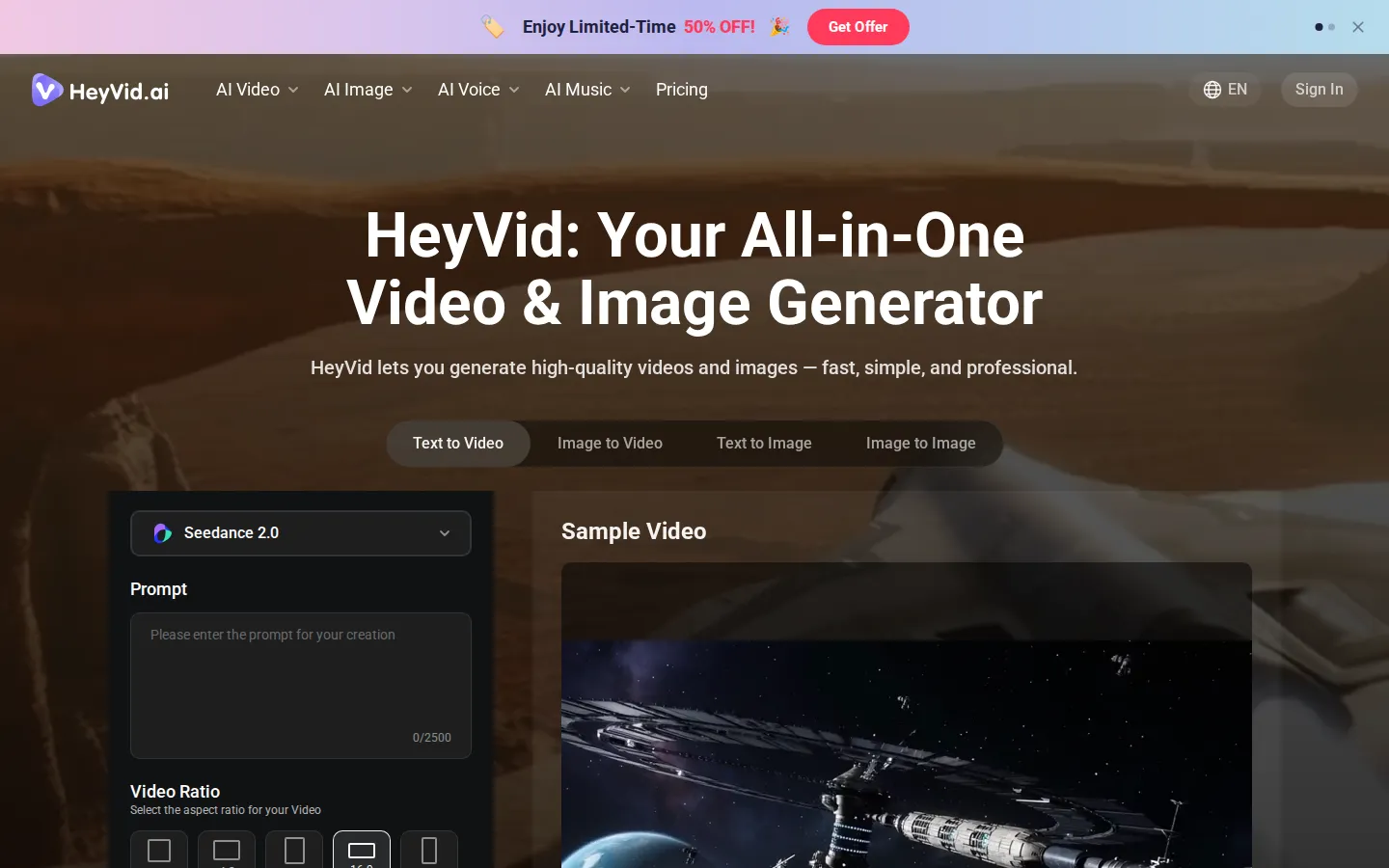
HeyVid Core Features
Multi-model video generation
Create clips using Kling, Sora, Runway, Veo, Seedance, Wan and more.
Image generation
Produce visuals with Midjourney, Flux, GPT-4o, Nano Banana and Stable Diffusion.
Image to video
Animate a still image into a realistic, dynamic video clip.
Reference to video
Keep characters and scenes consistent across every generated frame.
AI avatar and lip sync
Turn portrait photos into talking avatars synced in 17+ languages.
AI voice and music
Generate text to speech, voice cloning and Suno music tracks.
Custom controls
Fine-tune aspect ratio, resolution, duration and audio for each generation.
Who is HeyVid for?
HeyVid is built for people who need to produce video and image content quickly without a production team or editing skills. The platform removes technical barriers so users can focus on ideas rather than software, and it specifically targets several concrete roles. Content creators and YouTubers use it to turn scripts and images into short-form videos, thumbnails, podcast clips and YouTube content. Social media managers rely on it to produce a steady stream of posts, ads and motion graphics across multiple channels. Digital marketers and agencies generate campaign visuals, landing page images and email marketing assets on demand instead of booking studio time. Entrepreneurs and startups create pitch decks, product launch videos, brand stories and crowdfunding content that look professionally produced. Educators and course creators build tutorials, presentations and training materials from simple written prompts. Developers and product teams use it for app demos, documentation visuals, release notes and API tutorials, even though no public API is documented. Small businesses and enterprise teams produce corporate content, team updates, client presentations and onboarding material in house. Beginners with zero editing experience fit too, because the intuitive controls adapt to different skill levels, while experienced professionals still get fine-grained control over resolution, aspect ratio and duration. Paid plans with no-watermark outputs, private content and priority support make the platform suitable for client-facing and commercial work as well.
HeyVid Use Cases
Generate short-form social media videos from a simple written text prompt.
Animate product photos into dynamic clips for ads and landing pages.
Keep characters and scenes consistent across frames with reference to video.
Produce talking avatars and lip-synced presenter videos in multiple languages.
Design thumbnails, brand images and marketing visuals from text descriptions.
Restyle existing footage into new animation styles with video to video.
Create voiceovers, voice clones and background music for video projects.
HeyVid Pros and Cons
Pros
- Access to 18+ leading video and image models inside one subscription.
- Simple four-step workflow that requires no editing experience.
- No-watermark outputs, private content and priority support on paid plans.
- Runs entirely in the browser with an optional Chrome extension.
Cons
- Credit-based pricing means heavy users can exhaust monthly allowances quickly.
- No public API is documented despite developer-oriented marketing content.
- The largest discounts require annual billing, and pay-as-you-go credit packs cost more per credit.
FAQ About HeyVid
HeyVid Pricing
HeyVid uses a freemium, credit-based model. You can start free with credits, then upgrade to a monthly or annual subscription. The Lite plan costs $14.95 per month, Pro costs $29.95 per month and Max costs $99.95 per month, with annual billing saving up to 50%. Credit packs are also available for pay-as-you-go use.
Check official pricingFree
Start with free credits to try the AI video and image generators before upgrading.
Lite
2,000 credits/month, up to 400 videos and 1,000 images, 2 parallel tasks, no-watermark outputs.
Pro
5,000 credits/month, up to 1,000 videos and 2,500 images, 5 parallel tasks, priority support.
Max
18,000 credits/month, up to 3,600 videos and 9,000 images, 10 parallel tasks, priority queue.
HeyVid Alternatives
Alexya
Alexya is a web-based AI influencer studio that keeps one character's face consistent across generated photos and short vertical videos. It bundles three text-to-image modes, the Cinematic, Seedance 2.0/2.5, Omni and Nova video models, a Replace tool for swapping people in existing clips, plus a REST API and MCP connector. Plans start at $9 per month.
Clout AI
Clout AI is a browser studio that builds a reusable AI character and produces the photos, motion clips, faceless stories and scene-by-scene films around it. Character creation, 100+ image and video models, product ad templates, a motion library and Autopilot publishing share one workspace, so content stays recognisably the same persona across TikTok, Reels and Shorts.
Bananai
Bananai is a free-to-start AI image editor and video generator that puts the Nano Banana model family at the centre of one browser workspace. Type a prompt or upload a photo to remove backgrounds, restyle, upscale and generate 4K images, then animate stills or create clips with Seedance, Wan, Veo and other models. Paid credits start at $5.39 a month billed yearly.