EzLayers
EzLayers splits a flat image into separate editable layers using AI segmentation and amodal inpainting. Subjects, text and shadows arrive on individual layers with the hidden background painted back in, then export as a layered PSD or a transparent PNG stack for Photoshop, Figma and Canva. Credits stay universal across every tool, and a free tier covers 20 credits at signup.
What is EzLayers?
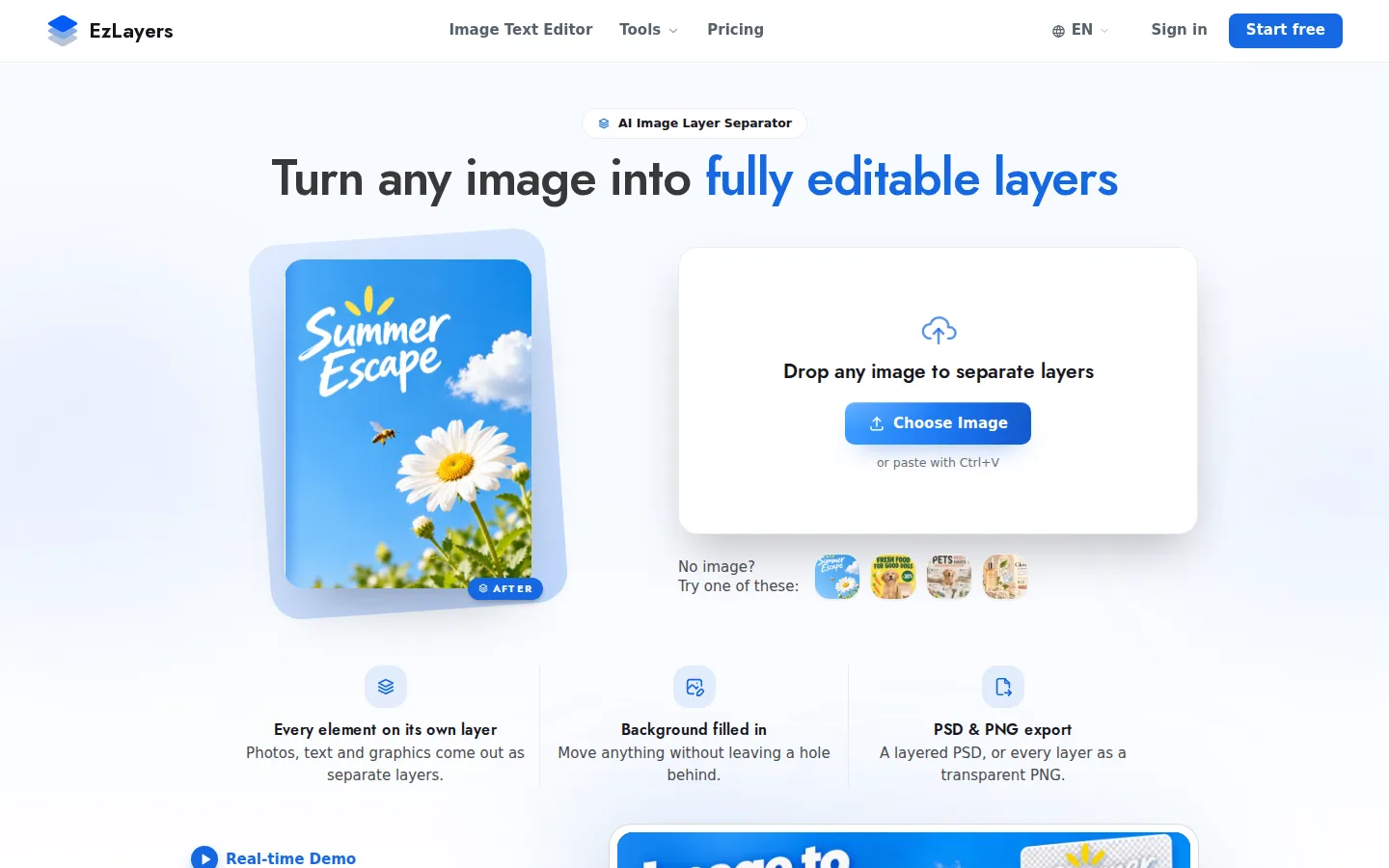
EzLayers is a browser-based AI image layer separator, positioned on its own homepage as the tool that turns any image into fully editable layers. You drop in a JPG, PNG or WebP, or pick one of the sample posters, and the service runs a segmentation model over the picture to decide what counts as a distinct element. Subjects, headline and body text, and even cast shadows are each placed on their own layer instead of being baked into one flattened bitmap. The second half of the pipeline is amodal inpainting: because every object was covering something, the model reconstructs the area behind it, matching texture and lighting so the background stays whole when a layer is moved, hidden or deleted. That combination is what separates EzLayers from a plain background remover, which only cuts a subject out and leaves a transparent hole. Separation can run fully automatically, or you can name what to pull out with a prompt and mark regions to raise the layer ceiling from 16 to 50 per image. Results land in an online layer canvas where you drag to reorder, toggle visibility and rename layers, and you can select a single layer and describe a change in natural language to edit it with AI. Export is deliberately aimed at existing tools: a layered PSD that preserves layer order, names and alpha masks, or a transparent PNG per layer at full resolution, both importable into Photoshop, Figma and Canva. Output tops out at 2K with any upload size, and batch uploads of ten images are included on paid plans. The product also ships adjacent utilities, including image-to-PSD, an image text editor, an image translator and a background remover, all drawing on one universal credit pool. A browser extension for Chrome, Edge and Firefox is live, Photoshop, Figma, Sketch, Canva and ChatGPT plugins are listed as coming soon, and a REST API at api.ezlayers.com offers the same separation engine to teams processing images at volume under a negotiated contract. Access is web-first, credits are consumed per separation, and 20 free credits are granted at signup without a card.
EzLayers Core Features
AI multi-layer separation puts subjects, text and cast shadows on individual editable layers.
Prompt-driven extraction lets you name the specific elements to pull out of an image.
Amodal background inpainting rebuilds hidden areas with matching texture and lighting.
Layered PSD export preserves layer order, layer names and alpha masks for Photoshop.
Transparent PNG stack export delivers every separated layer at full resolution.
Browser layer editor supports drag reordering, visibility toggling and renaming of layers.
AI layer editing applies natural-language change requests to one selected layer at a time.
Batch uploads process up to ten images per run on every paid plan.
Who is EzLayers for?
EzLayers is built for people who inherit flat artwork and need it back in pieces. Graphic designers and illustrators are the core audience: instead of redrawing a finished poster or banner from scratch, they upload the exported JPG or PNG and get a layered file they can actually edit. E-commerce and marketing teams use it to swap products, backgrounds and headline copy across regional versions of the same ad, because the amodal inpainting fills in whatever sat behind the object being moved. Print shops and custom apparel sellers rely on separation for prepress work, where artwork, lettering and base colour have to sit on distinct layers before production or recolouring. Presentation and content creators use it to pull subjects off flat slides so visuals can be animated or rearranged. Print-on-demand sellers and crafters get text and artwork separated for recolouring and cut-file preparation. Agencies handling batches of client assets, and SaaS teams that want to offer a make-this-editable feature to their own users, are served through the contact-based API. The common thread is that no original source file exists, only a flattened image, and rebuilding it manually would take hours. Beginners can start with the free credits and the sample images on the homepage, while professionals will care more about the PSD layer structure, alpha masks and 2K export ceiling. It is a focused production utility rather than a general design suite, so teams still finish work in Photoshop, Figma or Canva.
EzLayers Use Cases
Turn a flattened social ad into editable layers so each market gets a fast text swap.
Recover layered artwork from client-supplied flat PNGs before a print production run.
Replace a product photo inside a poster while the inpainted background keeps the scene intact.
Extract headline text from a banner image to fix typos without rebuilding the design.
Prepare print-on-demand artwork with base colour, art and lettering separated for recolouring.
Move separated subjects between slides to build interactive presentation visuals quickly.
Export a layered PSD straight into Figma or Photoshop for continued design work.
EzLayers Pros and Cons
Pros
- Handles text, subjects and shadows in a single pass rather than one mask per object.
- Background inpainting genuinely fills hidden areas, so moved layers leave no visible holes.
- PSD export keeps layer names, order and alpha masks, which removes most manual rebuild time.
- Free tier with 20 signup credits and no card makes the workflow cheap to evaluate.
Cons
- Credit-based pricing means high layer counts or large batches add up quickly.
- Layer count is capped at 16 per image, or 50 when you mark regions by hand.
- Photoshop, Figma, Canva, Sketch and ChatGPT plugins are still listed as coming soon.
FAQ About EzLayers
EzLayers Pricing
EzLayers is free to start with 20 signup credits and no card, then runs on universal credits: subscriptions cost $9.9 to $69.9 per month and one-off packs start at $4.9 for 150 credits.
Check official pricingFree
20 free credits at signup, no credit card required, enough to test separation on your own images.
Starter
500 credits monthly, roughly 124 image layers, PSD and PNG export, batches of 10.
Pro
2,000 credits monthly, roughly 499 image layers, priority GPU queue and batch uploads.
Studio
6,000 credits monthly, roughly 1,499 image layers, the lowest cost per 1,000 credits.
Credit pack
One-off pack of 150 credits valid 90 days, roughly 37 image layers, nothing auto-renews.
EzLayers Alternatives
Bananai
Bananai is a free-to-start AI image editor and video generator that puts the Nano Banana model family at the centre of one browser workspace. Type a prompt or upload a photo to remove backgrounds, restyle, upscale and generate 4K images, then animate stills or create clips with Seedance, Wan, Veo and other models. Paid credits start at $5.39 a month billed yearly.
CarePhoto
CarePhoto is a browser-based AI photo studio built around a chat window instead of editing panels. You upload reference photos, describe the change, and it runs on third-party models including Seedance 2.5, Seedream 5.0 Pro, FLUX 3, Nano Banana Pro and GPT Image. Plans start at $7.99 per month, with 20 free credits on signup.
Enhance AI
Enhance AI is a browser-based creative suite from India that puts GPT Image, Nano Banana, Seedance, WAN, Kling and Veo behind one prepaid token balance. Twelve studios cover image generation, editing, upscaling, video, music, voice and chat, with plans from $19 one time, no auto-renewal, commercial rights, free signup credits and a 24-hour refund window.