EzCreate
EzCreate is a browser-based AI photo and image editing studio. Upload a photo, describe the change in plain language, and pick from models such as EzCreate 4.0, Nano Banana Pro, SeeDream 5.0 or GPT Image 2 to remove objects, cut out backgrounds, expand scenes, restore old photos and upscale to 4K. It runs entirely in the browser, with free daily credits and no install.
What is EzCreate?
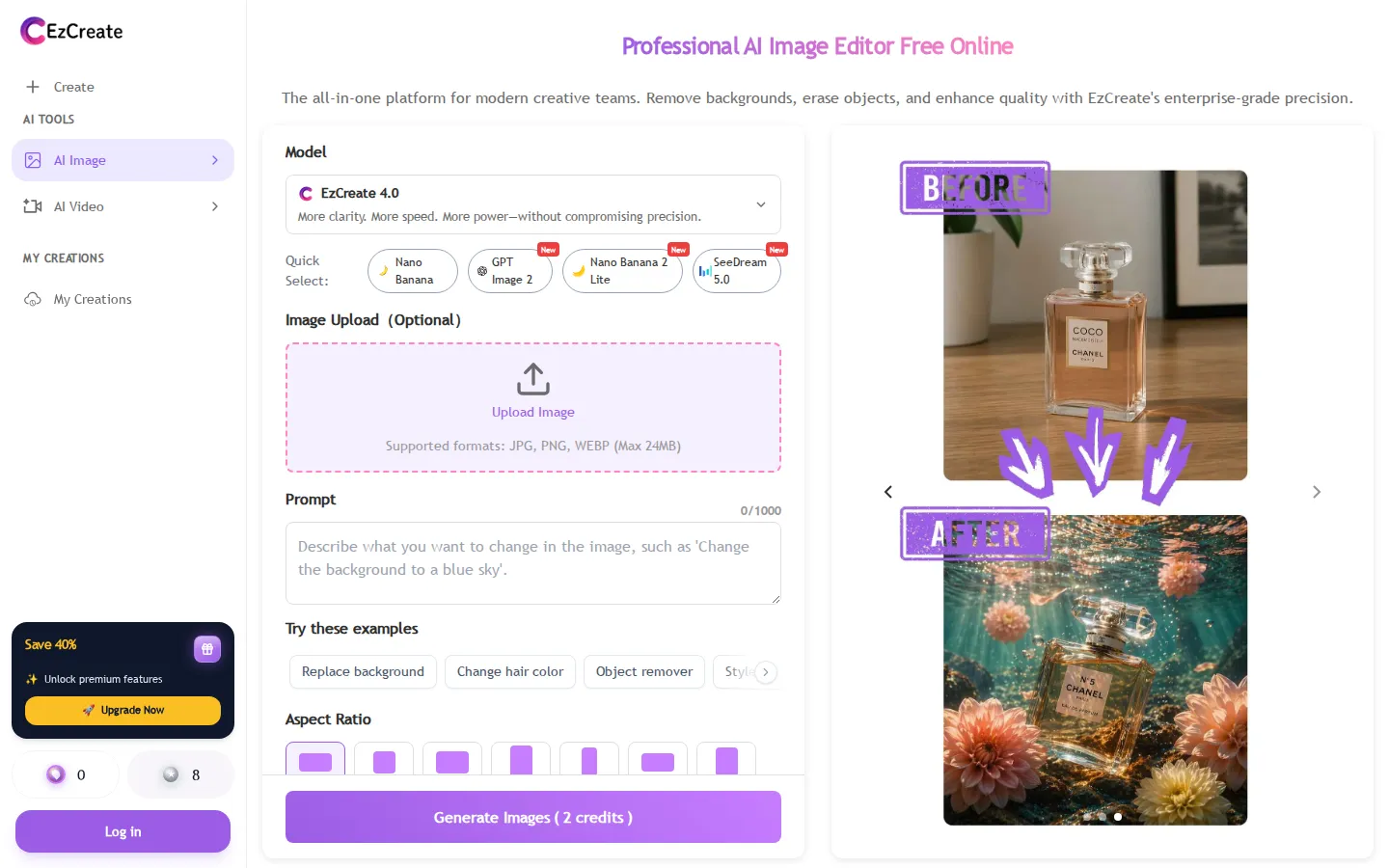
EzCreate is a browser-based AI photo editor and image generation platform built around a single prompt-and-upload workflow. Instead of stacking layers or painting masks by hand, you upload a JPG, PNG or WebP file up to 24 MB, describe the change you want in plain language, and choose from a roster of image models that includes EzCreate 3.0, EzCreate 4.0, Nano Banana, Nano Banana 2, Nano Banana 2 Lite, Nano Banana Pro, SeeDream 4.0, SeeDream 4.5, SeeDream 5.0 and GPT Image 2. Each model carries its own credit cost, typically two to eighteen credits per generation, so a quick background swap and a high-fidelity 4K edit can sit in the same workspace.
The editing jobs the product is organised around are object removal, background isolation, generative fill and upscaling. Object removal reconstructs the area behind a photobomber, watermark or parked car by sampling the surrounding texture and lighting pixel by pixel, which is why the marketing copy stresses that composition should survive the edit. Background isolation targets the awkward cases, fine hair strands, transparent glass and thin jewelry chains, and returns a transparent cutout rather than a rough outline. Generative fill extends a frame horizontally or vertically when a vertical phone photo has to become a horizontal banner or a cropped detail needs recovering. The upscaler advertises up to 400 percent clarity improvement, recovering facial detail and cutting compression noise instead of simply interpolating pixels.
Around those four headline jobs sit companion tools in the same account: a plain text-to-image generator, image-to-image transformation, dedicated photo restoration, general photo enhancement and an unblur tool. Output controls are deliberately simple. There are eight aspect ratios including 1:1, 3:2, 2:3, 9:16, 16:9, 3:4 and 4:3, resolution tiers at 1K, 2K and 4K, a prompt field capped at 1,000 characters, and one-click example prompts for replacing a background, changing hair colour, style transfer and restoring an old photo. A recent tasks strip and a My Creations library keep earlier generations reachable.
Access is the differentiator EzCreate leans on hardest. The editor runs without an account and grants eight free credits to anonymous visitors, while registering raises the allowance to fifteen free credits per day. Downloads are described as watermark-free at full HD for every user, including the free tier. Paid credit packages start at $7 for 100 credits and reach $80 for 5,000 credits, offered monthly, yearly or as a one-time purchase, and the site says purchased credits do not expire.
On privacy, EzCreate states that uploads travel over SSL, that no personal identity is tracked in the no-login flow, and that both original and edited files are permanently deleted from its servers after 24 hours. Commercial rights stay with the creator according to the site. There is no install step, no desktop application and no public developer API; everything runs in Chrome, Safari, Edge or Firefox on desktop or mobile.
EzCreate Core Features
Object removal and magic eraser that rebuilds background texture and lighting pixel by pixel
Background isolation producing transparent cutouts, including fine hair, glass and thin jewelry chains
Generative fill and expand for turning vertical photos into banners or recovering cropped detail
AI upscaling up to 4K with advertised clarity improvement of up to 400 percent
Multi-model picker spanning EzCreate 3.0 and 4.0, Nano Banana family, SeeDream 4.0 to 5.0 and GPT Image 2
Companion tools for photo restoration, photo enhancement, unblur and image-to-image transformation
Eight aspect ratios with 1K, 2K and 4K output tiers and prompts up to 1,000 characters
No-sign-up editing with 8 free credits, 15 daily credits for accounts and watermark-free downloads
Who is EzCreate for?
EzCreate is aimed at people who need clean, presentable images quickly and do not want to open Photoshop or pay for a design subscription. The clearest fit is ecommerce and resale work: marketplace sellers processing batches of product shots, second-hand clothing resellers who need uniform white backgrounds, and eBay or Depop listers who photograph dozens of items in an afternoon. For those users the value is throughput, because background isolation and object removal happen in one pass rather than as a manual masking session. A second group is social and marketing generalists. Community managers, small agency teams, newsletter writers and solo founders routinely need a square product shot turned into a vertical Story, a portrait extended into a banner, or a busy event photo cleaned up for a flyer. Generative fill and the eight preset aspect ratios cover most of that work without a design brief, and the prompt field accepts up to 1,000 characters of direction. Real estate and rental listing agents also fit the tool well. Removing parked cars, clutter and driveway mess from a property photo is the exact task the object remover is documented against, and a wide-angle interior shot that needs straightening out to a 16:9 web header is handled by generative expand. Photographers and retouchers use EzCreate as a fast pre-pass before heavier work: batch upscaling, unblurring a soft frame, or reviving a scanned family photo through the restoration and enhancement tools. Students, teachers and non-designers are explicitly served by the no-sign-up entry point. The site leans on the argument that professional tools should not be gated by credit cards or a learning curve, and the free daily credit allowance makes it practical for someone building slides, a club flyer or a birthday card. People editing on a phone in a mobile browser are also in scope, since the editor is responsive and needs no install. It is less suited to specialist production work. Anyone who needs vector output, CMYK print preparation, layered PSD handoff, brand-locked typography or precise multi-element compositing will still need a real editor, and teams that require an API, SSO or shared asset libraries will not find those here.
EzCreate Use Cases
Cleaning up marketplace and resale product photos with uniform white or transparent backgrounds
Removing photobombers, parked cars, clutter and watermarks from real estate and event photos
Turning a vertical phone portrait into a horizontal website banner or a 9:16 Story asset
Restoring scanned or damaged family photographs and bringing soft faces back into focus
Batch upscaling low-resolution client images to 4K for print or large displays
Producing ad and poster visuals from a short text prompt without a design brief
Standardising employee headshots and team portraits onto clean backgrounds
Generating quick slide, flyer and social graphics from a mobile browser with no install
EzCreate Pros and Cons
Pros
- Editing starts without an account, and the 8 anonymous credits plus 15 daily credits for registered users make casual use genuinely free
- Model choice is unusually broad for a free editor, covering in-house EzCreate models alongside Nano Banana, SeeDream and GPT Image 2
- Output is watermark-free at full HD on the free tier, with 1K, 2K and 4K options and eight aspect ratios
- Credit pricing scales sensibly, from $7 for 100 credits down to $0.016 per credit on the 5,000-credit package
- Runs entirely in the browser with no install, and the interface is responsive enough for phone editing
Cons
- There is no public API, desktop app, plugin or documented developer access, so the tool cannot be wired into an automated pipeline
- Every generation costs credits that vary by model, which makes high-volume batch work harder to budget than a flat subscription
- The site makes strong unverified claims, including a 4.9/5 rating from 10,000+ creators, and exposes no company legal entity, social profiles or support channel
FAQ About EzCreate
EzCreate Pricing
Freemium: 8 free credits without an account and 15 free credits daily after registering, with paid monthly credit packages from $7 for 100 credits to $80 for 5,000 credits, yearly billing advertised at up to 54 percent savings and one-time purchases also offered.
Check official pricingFree
8 credits for visitors without an account, 15 credits per day with a free account, watermark-free HD downloads.
100 Credits
Entry monthly package at $0.070 per credit, auto-renewing, cancel anytime.
500 Credits
Monthly package at $0.030 per credit with access to premium models.
2,000 Credits
Most popular tier at $0.018 per credit, listed as up to 1,000 image generations and 500 seconds of video per month.
5,000 Credits
Highest monthly package at $0.016 per credit, with priority generation queue and all premium models.
EzCreate Alternatives

Lummi
Lummi is a stock library where AI-generated photos, illustrations, and 3D models sit next to editing tools that work on the asset you just picked. Search by category, color, or mood, then reframe, restyle, or remove the background before downloading. The free tier covers standard-resolution personal and commercial use; Pro adds watermark-free files, ultra resolution, and generation credits.

PhotoTextEdit
PhotoTextEdit edits text inside existing photos, posters, screenshots and product shots without the original design file. Upload a PNG, JPG or WebP up to 10 MB, enter the original and replacement wording, and the AI regenerates the lettering with matched font, lighting and perspective in 30 to 60 seconds. A free Add Text tool is included.

SparkPix
SparkPix is a free AI photo editor that runs in the browser and edits photos from plain text instructions. Upload a JPG, PNG or WebP up to 20 MB, describe the change, and it removes backgrounds, erases objects, restores old prints, upscales resolution, restyles images or generates new ones using models such as GPT Image and NanoBanana.