
Diffusion Studio
Diffusion Studio is a free, open-source professional video editor that runs in the browser or on Mac, built so humans and coding agents can edit together. Scenes live on an infinite canvas with a multi-track timeline, while dapi, skills and generative AI handle footage analysis, transcription, captions and media creation, with unlimited 4K exports and no watermark.
What is Diffusion Studio?
Diffusion Studio is a professional AI video editor built for both agents and humans, offered as a free and open-source product under the MPL 2.0 license. Everything runs locally in the browser, on a macOS desktop app, or through the dapi CLI, and the company's tagline is turning your agent into a professional video editor because every edit is written to a real codebase that coding agents can read, write and render. The interface is a rethink of video editing around modern design tools: you start on an infinite canvas where scenes are arranged spatially, then sequence them on a multi-track timeline, with everything staying connected so you can organize and iterate without losing visual context. Editing features include precise property control for timing, position, scale and layout from a single inspector; built-in visual effects such as Lumetri Color and Motion Blur; audio mixing with effects like EQ and denoiser; and motion design through bezier curves, spring easing and presets.
The AI side is equally central. A generation panel supports prompts with reference images and model settings for creating video, images, audio, speech and sound effects, and credits are consumed when models run to understand footage, transcribe it or generate media. Coding agents work through dapi, activated from the macOS app, together with official skills; Claude Code, Codex, Cursor, Copilot and Gemini CLI can analyze footage, make edits, create and animate scenes, build motion graphics, generate media, transcribe, localize, add captions and export, and everything they create stays fully editable by humans, with iteration in both directions. Performance is a selling point: sub-120ms canvas response, pan, zoom and scrubbing, and 4K playback and export with no proxies and no waiting, while 75,000-plus creators are cited as users. For teams, one project can hold entire productions, and because compositions are TSX, reusable components can be versioned in GitHub as shared infrastructure. The business model is credit-based: the editor, exports and agent workflows are free, and paid plans only add credits for AI model actions such as generation, footage analysis and transcription.
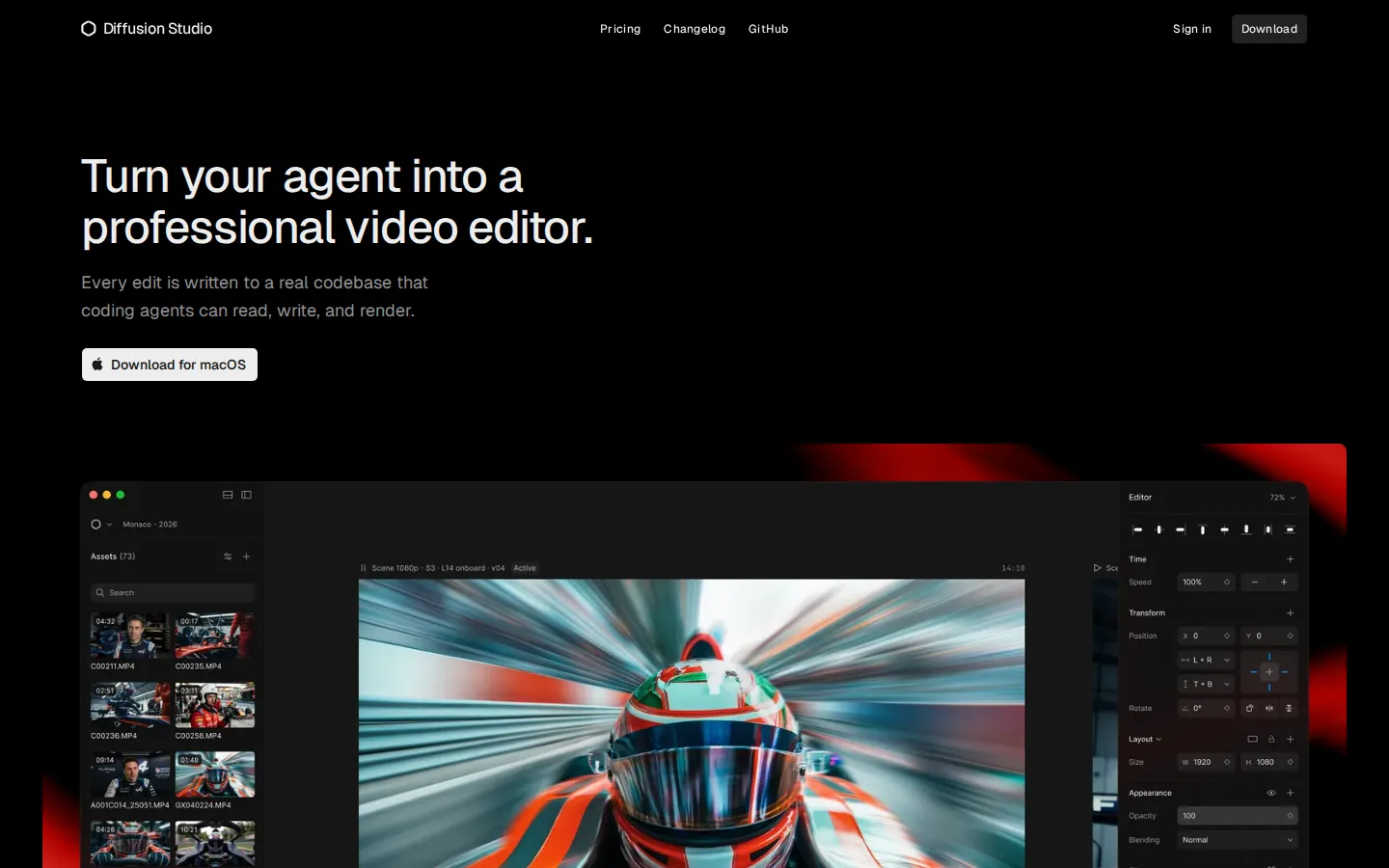
Diffusion Studio Core Features
Agentic Editing
Coding agents like Claude Code, Codex and Cursor read, write and render your project through dapi.
Infinite Canvas
Organize scenes spatially on an infinite canvas, then sequence them on a connected multi-track timeline.
Creative Speed
Sub-120ms canvas response with 4K playback and export, no proxies, no waiting.
AI Generation
Generate video, images, audio, speech and SFX from prompts with reference images and model settings.
Effects & Audio Built In
Stack visual effects, mix audio and apply filters without leaving the editor.
Precise Property Control
Adjust timing, position, scale and layout from one inspector with bezier curves and spring easing.
Open Source
MPL 2.0 licensed editor, dapi CLI and skills on GitHub, open to contribution.
Team-Scale Projects
Hold hundreds of scenes, formats and languages in one project with shared, reusable TSX components.
Who is Diffusion Studio for?
Diffusion Studio is built for two overlapping audiences: video creators who want a modern, browser-native editor, and developers or power users who want AI coding agents to do the editing. Individual creators and designers will appreciate an interface modeled on modern design tools, with an infinite canvas, precise property inspector, built-in effects and audio, and bezier and spring easing for motion. Content and social teams use it to produce many versions of a campaign in one project, since a single infinite canvas can hold hundreds of scenes, formats, languages and videos, and agents can produce and update variations without repeating work. Video professionals migrating from tools like ElevenLabs, Warner Bros. Discovery, Ramp, X, Microsoft, Canva, fal, Lovable and Shopify teams are cited as onboarded users, signaling agencies and product companies as core customers. The most distinctive audience is people who work with coding agents such as Claude Code, Codex, Cursor, Copilot and Gemini CLI: they can ask an agent to watch footage, cut it, create motion graphics, animate scenes, generate video, images, audio and SFX, transcribe, localize, add captions and export. Teams benefit from the codebase angle, because compositions are TSX and reusable components can live in GitHub as a shared source of truth for consistent, on-brand production. Open-source developers and contributors are served by the MPL 2.0 license across the editor, dapi CLI and skills. Browser users on Windows, macOS or Linux get full editing without installing anything, while agentic editing runs through the macOS desktop app, which requires macOS 12 or later with an M1 chip or newer. It is less suited to Windows users who want agent workflows today, since that desktop app is Mac-only for now.
Diffusion Studio Use Cases
Hand raw footage to your agent and ask it to watch, cut and assemble a finished sequence for you.
Generate video, images, audio and voice assets from prompts inside one production workspace.
Transcribe, localize and auto-caption footage for multilingual social and marketing videos.
Animate motion graphics and scenes with bezier easing and spring presets for product demos.
Keep reusable brand compositions and components in GitHub as a shared source of truth for teams.
Produce scene and campaign variations on one infinite canvas without duplicating work.
Edit and export 4K video from any browser on Windows, macOS or Linux without installing software.
Diffusion Studio Pros and Cons
Pros
- Genuinely free and open source: the editor, exports and agent workflows cost nothing, with credits only for AI model actions.
- First-class agentic editing through dapi, skills and TSX projects makes it one of the few video tools truly built for AI agents.
- Runs locally in the browser with fast canvas performance and unlimited 4K exports with no watermark.
- Everything an agent creates stays fully editable, and humans and agents can iterate on the same project in both directions.
Cons
- Agentic editing currently requires the macOS desktop app (macOS 12+, M1 or newer), so Windows users cannot use coding agents yet.
- Credits apply only to AI-powered actions and monthly credits do not roll over, so heavy AI use needs planning or top-ups.
- Advanced scene capabilities like HTML, WebGL and shaders work best in Chrome on capable hardware, and there is no Windows desktop app yet.
FAQ About Diffusion Studio
Diffusion Studio Pricing
Diffusion Studio is freemium: the full editor, unlimited projects and unlimited watermark-free 4K exports are free, while paid plans from $19/month add monthly credits for AI actions like generation, footage analysis and transcription, with custom team pricing.
Check official pricingFree
The full editor, unlimited projects and unlimited exports up to 4K with no watermark, plus 50 one-time free credits for AI-powered actions.
Pro
Billed annually (save up to 40%): 2,500 credits per month for AI editing, footage analysis and transcription, media generation and auto-generated subtitles, with anytime credit top-ups.
Teams
Custom credit volume for larger production operations, with shared workspaces and assets, SSO and audit logs, and pooled invoiced credits; contact sales.
Diffusion Studio Alternatives

VideoBGRemover
Remove backgrounds from recorded videos online. Keep motion and audio, export transparent WebM or MP4. Free trial and paid plans.

BGChanger AI
Remove video backgrounds with AI, export transparent WebM or solid-color clips, keep original audio, and choose MP4, WebM, MOV, MKV, or GIF.

Kaleidly
Kaleidly is an AI repurposing studio for long videos. Paste a YouTube, TikTok, Instagram, X or Facebook link and it transcribes the episode, learns your writing voice from your own posts, then returns scored vertical clips with synced captions plus five text formats. One credit covers one minute of video. It understands 35 languages and writes posts in the language you write in.