
Burning Bridges AI
Burning Bridges AI is a single-purpose video generator: upload one portrait, pet, or character photo, pick an aspect ratio, and get a fixed 15-second chandelier-party clip with the viral trend motion already applied. There is no prompt box and no reference footage to source. Output is 720p MP4 via Wan 3.0 reference mode, priced by credit packs from $9.90 or monthly plans from $29.
What is Burning Bridges AI?
Burning Bridges AI is a single-purpose AI video generator built around the viral Burning Bridges party trend. You upload one photo, whether a portrait, a pet, or an original character, and the site returns a fixed 15-second clip that places that subject in a warm, wood-panelled party room lit by crystal chandeliers, surrounded by a close crowd, with cup raises, waves, and the hand-above-the-eyes "Where she at?" gesture.
The important constraint is that the motion is not yours to write. There is no prompt box and no reference-video upload on the homepage workflow. The site ships a fixed reference motion, described as roughly fifteen seconds of gesture order, framing, and camera flow, and applies it to whatever identity your image supplies. Aspect ratio is the main creative setting: 9:16, 16:9, 4:3, or 3:4. Output is 720p HD MP4, and generation runs in Wan 3.0 reference mode. Uploads accept PNG, JPG, and WebP up to 10 MB.
That design trades flexibility for repeatability. Because every run uses the same motion reference, results are comparable across attempts, and a user does not need to learn motion prompting or source the original clip. The trade-off sits in the same place: the tool cannot produce a different scene, a longer video, or a custom action. The site describes it as made for TikTok, Reels, and Shorts rather than open-ended text-to-video.
Pricing is credit-based, and credits are consumed per generation, with the exact cost shown on the Generate button before you spend. One-time packs run from $9.90 for one video and 240 credits to $29.90 for five videos and 1,200 credits. Monthly subscriptions run from $29 for six videos and 1,440 credits to $99 for twenty videos and 4,800 credits, with annual billing at half the monthly rate. New accounts may receive up to 20 trial credits when the signup grant is enabled, and no card is required to sign in.
The site is explicit about what it is not: an independent fan tool, not a Drake app, OVO product, or label-endorsed service. It also warns that audio and lip sync are not guaranteed and that outputs are AI-generated performances rather than real footage. Payments run through third-party providers, the first subscription can be refunded within three days if 50 credits or fewer were used, and one-time packs are non-refundable.
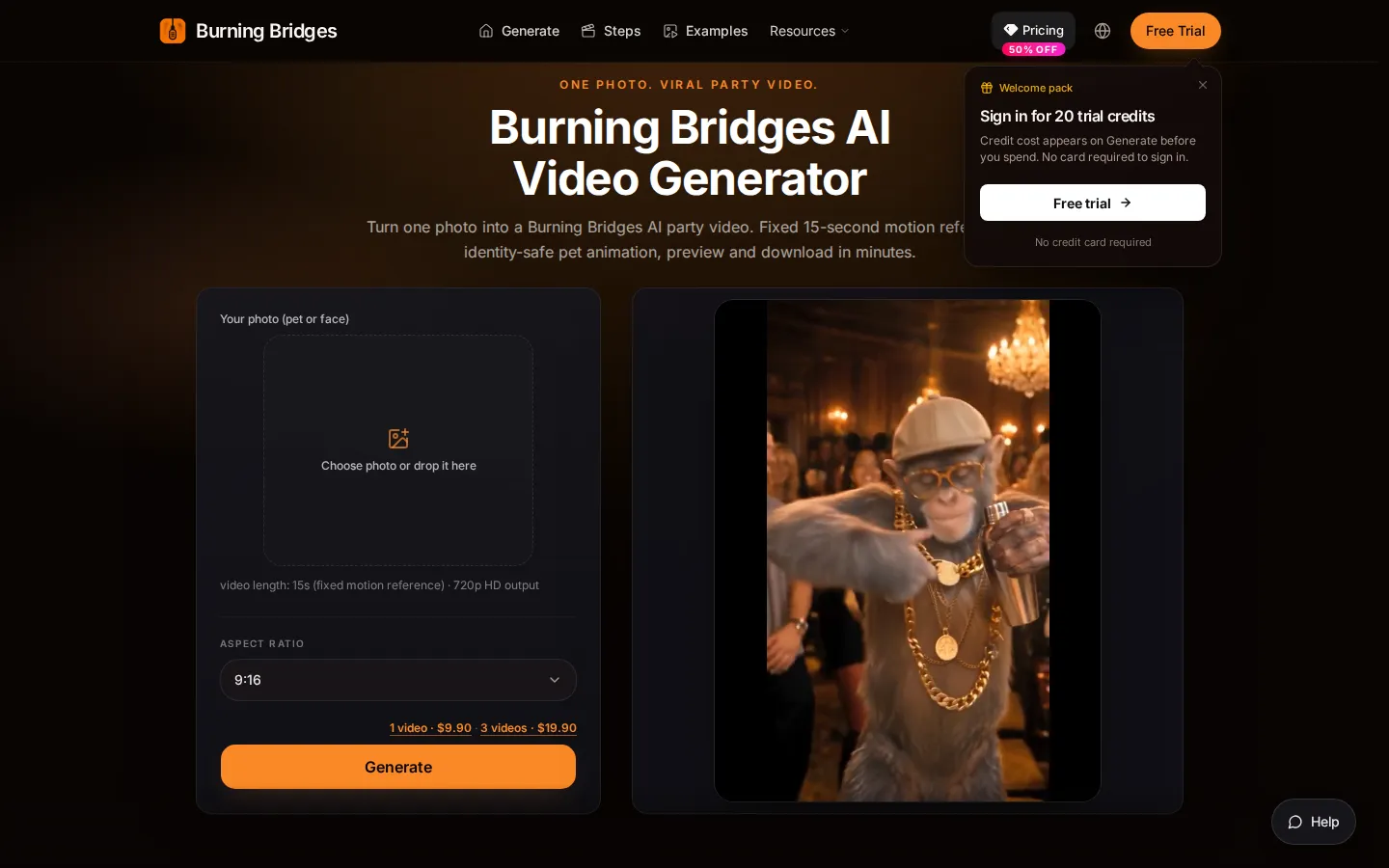
Burning Bridges AI Core Features
One-photo input
Upload a portrait, pet, or original character image in PNG, JPG, or WebP up to 10 MB, and the site casts it as the lead performer.
Fixed trend motion
The Burning Bridges gesture order, framing, and camera flow ship as a built-in ~15-second reference, so there is no prompt box and no reference video to upload.
Identity preservation
The workflow is tuned to keep facial features, fur, outfit, and character look recognisable throughout the crowd scene.
Party scene baked in
Warm chandelier lighting, crowd energy, and props such as a silver cup are part of the preset rather than something you build.
Four aspect ratios
Choose 9:16, 16:9, 4:3, or 3:4 before generating, with 9:16 as the vertical default for Reels, Shorts, and TikTok.
15-second 720p output
Every homepage run produces a fixed 15-second MP4 in 720p HD through Wan 3.0 reference mode.
Preview and history
Watch the result in the preview panel, download it, and revisit finished tasks from your generation history.
Credit packs or subscriptions
Buy one-time credits from $9.90 or subscribe monthly from $29, with unused credits rolling over and packs that do not expire.
Who is Burning Bridges AI for?
Burning Bridges AI suits short-form creators who want to ride a specific trend without editing: TikTok, Reels, and Shorts accounts posting meme edits, pet content, or character clips that need a recognisable party scene in minutes rather than a shot list. Pet accounts are an obvious fit. The site supports dog and cat photos, maps the animal into the lead performer slot, and aims to keep fur and face consistent through the crowd scene, which is laborious to do by hand. Fan-edit and meme pages are the second group. Because the reference motion is fixed, a page can push several leads through the same look, keep a series visually consistent, and drop the 9:16 default straight into a vertical feed. Social managers at small brands use it for a single trend-reactive post without hiring an editor, and people making personalised clips for friends, birthdays, or group chats buy the one-time $9.90 pack instead of subscribing. Because the input is a single still, it also works for creators who already have character art or a mascot and want motion without commissioning an animator. It is a poor fit for anyone who needs a custom scene, longer runtime, reliable lip sync, or a licensed soundtrack. Marketers producing evergreen video, agencies wanting shot-level control, and teams that need an official association with the artist should look elsewhere, since the site states it is unaffiliated with Drake and his label. Those buyers are better served by tools that expose duration, scene, and music licensing as settings rather than fixed presets.
Burning Bridges AI Use Cases
Drop a pet photo into the party scene for a shareable vertical clip.
Turn a character portrait into a trend edit without writing a motion prompt.
Post a same-day reaction to the Burning Bridges meme on TikTok or Reels.
Run several leads through one fixed look to keep a meme series consistent.
Generate a 16:9 or 4:3 version for YouTube and feed placements instead of vertical.
Test one idea for $9.90 with a single-video pack before committing to a subscription.
Refine a character still in the text-to-image tool before animating it.
Disclose an AI-generated clip and get consent from everyone pictured before sharing.
Burning Bridges AI Pros and Cons
Pros
- The workflow is genuinely one step: upload a photo, pick a ratio, generate, with no prompt engineering and no reference footage to source.
- Entry cost is low and granular, thanks to a $9.90 single-video pack and up to 20 trial credits before you pay anything.
- The fixed motion reference keeps output consistent across attempts, which suits meme pages running a series of leads.
- Identity handling covers pets as well as people, and the site states its limits on audio, lip sync, and artist affiliation instead of overselling.
Cons
- The scene, motion, and 15-second length are fixed, so the tool cannot produce a different setting, a longer clip, or a custom action.
- Audio and lip sync are not guaranteed, and the site tells you to add music you have rights to in an editor afterwards.
- One-time credit packs are non-refundable, and refunds on a first subscription apply only within three days and 50 used credits.
FAQ About Burning Bridges AI
Burning Bridges AI Pricing
Credit-based: one-time packs at $9.90 (1 video, 240 credits), $19.90 (3 videos) and $29.90 (5 videos); monthly plans at $29, $49 and $99 for 6, 10 and 20 videos, with annual billing at 50% off. New accounts may get 20 trial credits; no card required to sign in.
Check official pricingBurning Bridges AI Alternatives

Rumpelstiltskin AI
Rumpelstiltskin AI turns two photos into a short, whimsical fairytale scene with an AI-powered dance video.
Pollo AI
Pollo AI bundles dozens of third-party generative models behind a single workspace: video generation with Pollo 2.5 and Seedance 2.5, image generation with Pollo Image 2.0 and Nano Banana, plus avatar, audio and editing tools. Credits are shared across models, paid plans remove watermarks, and an MCP/API path exists for automation.
ImgtoVideo.ai
ImgtoVideo.ai is a free web-based AI image-to-video generator that turns a still JPG or PNG photo into a short animated clip. Upload an image, describe the motion in a prompt or pick a one-click filter, and the AI renders a video in roughly thirty seconds. Paid plans unlock HD resolution, longer durations and full commercial rights.