Zread
Zread is an AI-powered GitHub repository reading assistant. Give it a public repository and it produces structured docs — what the project solves, how it works, core design principles, and a file tree — with sources cited. A searchable Discover feed surfaces trending repos, and private repositories, a library, an MCP server, and a CLI extend the workflow.
What is Zread?
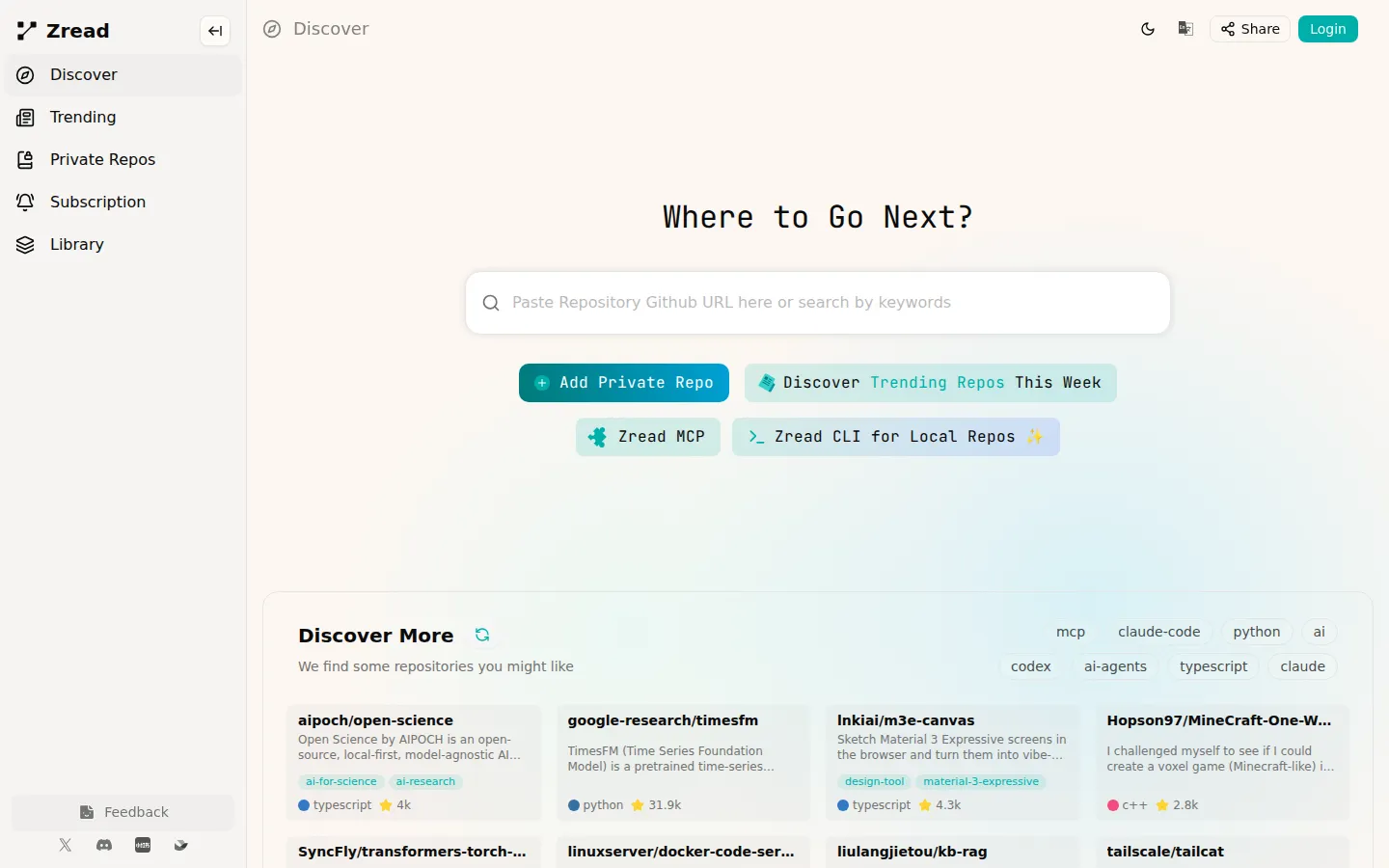
Zread is an AI-powered GitHub repository reading assistant from Z.AI, the company behind the Z.ai platform, that converts code repositories into structured, readable documentation. Instead of dumping a raw README or a wall of source code, Zread generates guided pages that explain what a project solves, how it works at a glance, its core design principles, and its file layout, with every section citing the actual source files it was built from. A typical repository page opens with an Overview that summarizes the problem the project addresses and the approach it takes, then adds sections such as 'How It Works at a Glance,' tables of design principles and their implementations, a project structure tree with per-file annotations, and source references. Pages carry practical metadata like an estimated read time and a difficulty level such as Beginner, plus an 'Ask AI' assistant for follow-up questions and a 'Report Issue' path for inaccurate output. The service presents a curated home feed called Discover, a Trending view of repositories popular this week, tag filters such as mcp, claude-code, python, ai, and typescript, and a Library where saved repositories are organized. Users can add public repositories by name or connect Private Repos for code they do not want to expose, which is where the service shifts from pure discovery toward a documentation workspace. Zread extends into the AI-agent ecosystem through two integrations: Zread MCP, a remote MCP server hosted at api.z.ai that exposes tools like search_doc, get_repo_structure, and read_file so MCP-compatible clients such as Claude Code and Cline can explore repositories programmatically, and the Zread CLI, which brings the same reading capability to local repositories. According to the Z.AI developer documentation, the Zread MCP server is an exclusive remote MCP server developed for GLM Coding Plan users and is built on the Model Context Protocol and powered by zread.ai. The site itself is a fast single-page app with light and dark themes, shareable repository pages, and global search, and it renders public-repository content without requiring an account, while features like private repos, subscription management, and the library sit behind a Z.ai login. Overall, Zread is best understood as a reading layer for GitHub: it does not generate code, it generates understanding, turning an unstructured repository into documentation that both humans and AI agents can navigate quickly.
Zread Core Features
AI-Generated Repository Overviews
Each repo page explains what the project solves and its core approach, written from the actual source and README rather than guessed.
How-It-Works and Design Sections
Structured breakdowns with principle-versus-implementation tables and step-by-step pipeline explanations for deeper understanding.
Cited Sources on Every Section
Overview, structure, and principle blocks list the files they were derived from, so claims can be traced back to real code.
Project Structure Trees
Annotated file trees show module layout and per-file purpose, helping newcomers orient in seconds.
Ask AI Assistant
Repo-level Q&A lets readers ask grounded follow-up questions instead of reading entire files.
Discover and Trending Feeds
A curated home feed, weekly trending list, and tag filters (mcp, claude-code, python, ai, typescript) make new repositories findable.
Private Repos and Library
Connect private repositories and organize saved repos in a library for ongoing reference work.
MCP Server and CLI
A remote Zread MCP server (search_doc, get_repo_structure, read_file) works with Claude Code, Cline, and other agents, while the CLI reads local repos.
Who is Zread for?
Zread is designed primarily for software developers who need to understand an unfamiliar codebase quickly. Engineers onboarding to a new project can read an AI-generated overview instead of skimming a raw README, and developers evaluating an open-source dependency can check its structure, purpose, and maintenance state before adopting it. Team leads and engineering managers use the same overview pages when scoping integrations or planning secondary development on libraries their stack depends on. Open-source maintainers benefit because well-described repos become easier for newcomers to digest, reducing repetitive questions and lowering the contribution barrier. Technical writers and documentation authors use Zread's generated structure as a starting skeleton for official docs, since each section lists the source files it was built from. Students and self-taught programmers learning from real projects — for example exploring how a Go CLI, a Swift utility, or a Python agent framework is organized — get guided reading material complete with read-time estimates and difficulty levels. A second important audience is AI-assisted developers: people running Claude Code, Cline, OpenCode, Roo Code, or similar agents connect Zread's remote MCP server so their assistant can search repository documentation, fetch directory structures, and read file contents directly, which the docs describe as exclusive to Z.AI GLM Coding Plan users. Data scientists and researchers who reuse GitHub implementations of papers or benchmarks can also orient themselves in repos without reading thousands of lines of code. Finally, developers working on local or proprietary code use the Zread CLI for local repositories and the Private Repos area to generate documentation for projects they cannot make public, making the tool useful well beyond open-source browsing.
Zread Use Cases
Onboard onto an unfamiliar open-source codebase in minutes by reading an AI-generated overview instead of the raw source.
Evaluate a dependency before adopting it — check structure, purpose, and maintenance signals without a deep manual dive.
Help AI coding agents explore repositories: connect the Zread MCP server to Claude Code or Cline to search docs and read files.
Scaffold official documentation from Zread's generated sections, which already cite the source files each claim comes from.
Study real-world projects as a learner, using guided pages with read-time estimates and difficulty levels.
Document internal or proprietary code with the Private Repos area or the Zread CLI for local repositories.
Stay current with trending repositories by browsing the weekly trending and tag-filtered discovery feeds.
Answer quick questions about how a library works through the Ask AI assistant on its repository page.
Zread Pros and Cons
Pros
- Genuinely useful reading layer for GitHub: structured overviews, design tables, and structure trees beat raw READMEs for fast understanding.
- Citation discipline — sections name their source files — makes the AI output verifiable rather than plausible-sounding.
- Tight AI-agent story: a remote MCP server with search_doc, get_repo_structure, and read_file works with Claude Code, Cline, and other clients.
- Covers private and local code through Private Repos and the CLI, so value extends beyond public open-source browsing.
- Clean, fast single-page app with light/dark themes, tag filters, and a library for organizing saved repositories.
Cons
- Pricing is not publicly documented on zread.ai: subscriptions are managed behind a Z.ai login, and the MCP server is restricted to GLM Coding Plan users.
- Documentation quality varies with repository popularity and structure, so niche or poorly organized repos may produce thinner overviews.
- The site occasionally returns gateway errors under load, and heavier app pages can time out, which interrupts deep research sessions.
FAQ About Zread
Zread Pricing
Zread does not publish a public price list on zread.ai; the Subscription page redirects to a Z.ai login, and pricing appears only after authentication. Public GitHub repositories can be browsed and read on the free side of the product without an account. Paid access centers on a Z.AI (Zhipu AI) account: private repositories, library features, and subscription management are gated behind Z.ai SSO, and the Zread MCP server is exclusive to Z.AI GLM Coding Plan subscribers, whose plan pricing is published by Z.AI rather than zread.ai. Any specific GLM Coding Plan price cited elsewhere is third-party information, not a zread.ai listing.
Check official pricingFree
Browse Discover and Trending feeds and read AI-generated documentation for public GitHub repositories without an account.
Z.AI Subscription
Unlocks private repos, library, and subscription features behind Z.ai login; Zread MCP is exclusive to GLM Coding Plan users. Pricing shown after sign-in.
Zread Alternatives

QuickPod
Affordable on-demand GPU and CPU rentals with Jupyter pre-configured for TensorFlow, PyTorch or any framework. Save up to 80% vs major clouds.

T3 Code
T3 Code is an open-source control plane for coding agents. It runs Claude Code, Codex, Antigravity, OpenCode, Cursor and Grok from one desktop app, keeps every agent thread on its own Git branch, and commits, pushes and opens a pull request with one button. iOS and Android apps steer the same work remotely. The app is free and MIT licensed; you bring your own agent subscriptions.

TinyHumans
TinyHumans builds open-source AI agents for individuals, led by OpenHuman, a personal AI super intelligence that runs as a desktop app on macOS, Windows and Linux. OpenHuman keeps a local-first, encrypted memory of your life, plugs into the apps your work already lives in, and orchestrates fleets of agents that automate real work. Pricing starts at $19.99/month.