
Zanta AI
Zanta AI is a browser-based AI image and video studio that puts Google, OpenAI, ByteDance, Kling, and Runway models in one workspace. Start from a prompt or an uploaded image, set the model, ratio, and resolution, then compare, download, and reuse the results. Credits are shared across tools, with a free tier and monthly or yearly plans.
What is Zanta AI?
Zanta AI is a browser-based creative studio that generates images and short videos from text prompts or uploaded source images. Instead of training its own models, it routes work to third-party engines such as Google Veo 3.1 and Nano Banana, OpenAI GPT Image, ByteDance Seedance, Kling, Runway, Flux, Qwen, Ideogram, and Seedream. The site presents itself as a practical production tool rather than an open-ended playground.
The studio is split into an AI Image path and an AI Video path. Image work runs through Nano Banana, Nano Banana 2, Nano Banana Pro, GPT Image 2, GPT Image 2.5, Seedream 5, Flux Kontext, Qwen Image, Grok Image, and Ideogram V3, with resolution options such as 1K, 2K, and 4K on supported models, aspect ratio selection, and opaque or transparent backgrounds on GPT Image. Video work covers text-to-video and image-to-video through Veo 3.1, Kling 3.0, Seedance 2.0 and 2.5, Runway Gen-4, Grok Imagine, Wan 2.6, MiniMax H3, and Hailuo.
Beyond raw generation, Zanta ships a large library of one-click effects. Image effects include 1980s and 1990s photo filters, a ghost mannequin product tool, a no-beard filter, photo to sketch, photo to anime, coloring page, PS2 filter, watercolor, action figure, and embroidery. Video effects include Hotel Lobby AI, Earth Zoom, and an AI Hug generator. Free utilities cover background removal, image upscaling, and image-to-prompt conversion.
Everything runs on a single credit balance shared across models. The free plan adds 100 credits at signup plus 420 activation check-in credits, which the site estimates at roughly five images or two videos. Paid plans are Starter at $29.90 per month for 4,000 credits, Pro at $49.90 for 10,000, and Max at $99.90 for 25,000, with yearly billing quoted at $8.33, $30.00, and $49.90 per month. One-time credit packs are sold separately.
Zanta states plainly that it is an independent service and is not affiliated with the model providers, and that availability, models, and assets may change over time. Prompts and uploads are screened before generation, commercial use is allowed under the terms, and support runs through a single email address. There is no public API or team workspace, and the site publishes plan-level image and video counts rather than a per-model credit table.
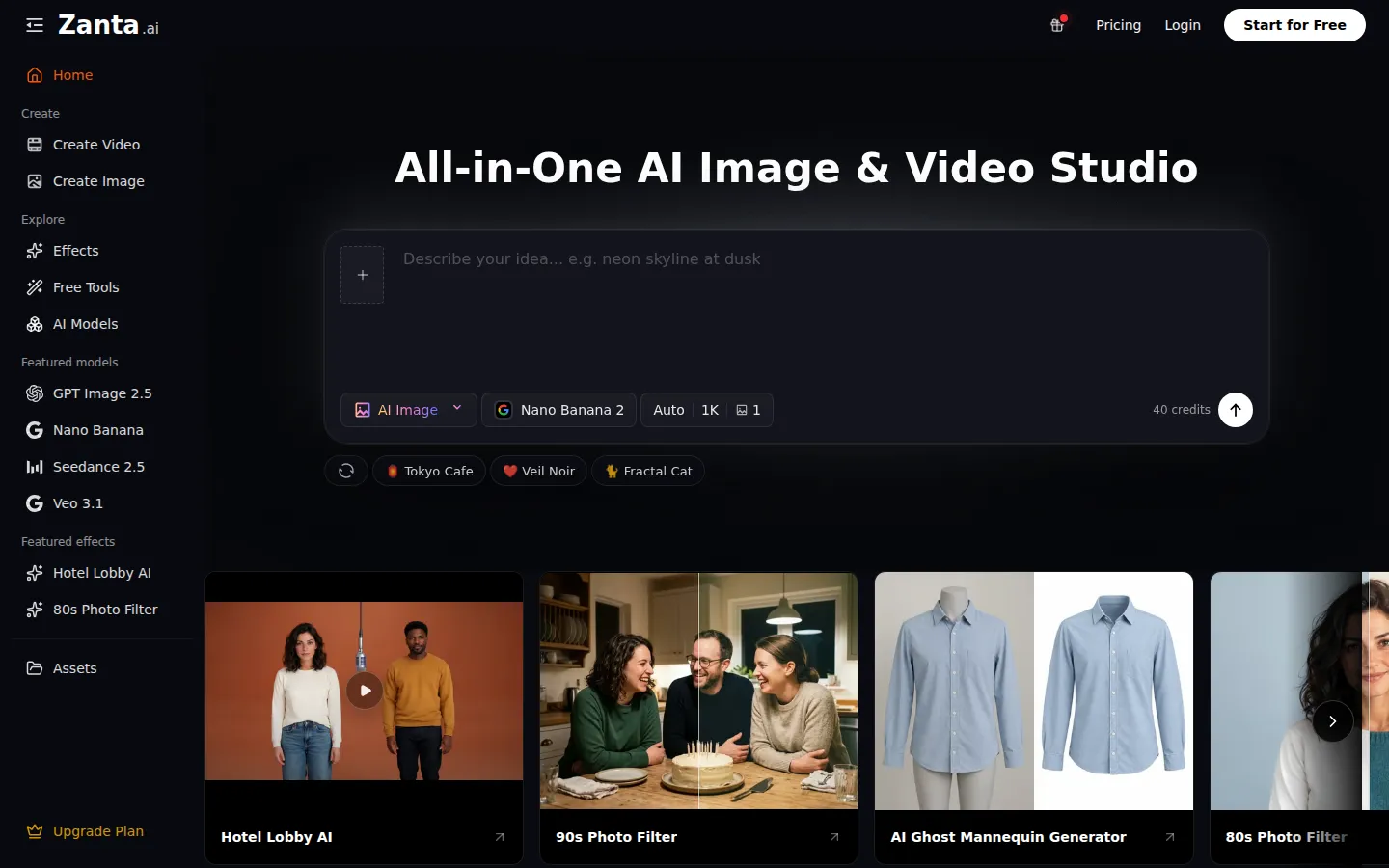
Zanta AI Core Features
Multi-Model Image Generation
Create stills with Nano Banana 2, Nano Banana Pro, GPT Image 2, GPT Image 2.5, Seedream 5, Flux Kontext, Qwen Image, Ideogram V3, and Grok Image from a single prompt box.
Text-to-Video and Image-to-Video
Animate a written prompt or an uploaded frame with Veo 3.1, Kling 3.0, Seedance 2.0 and 2.5, Runway Gen-4, Grok Imagine, Wan 2.6, MiniMax H3, and Hailuo.
Side-by-Side Model Comparison
Run the same idea across image or video models to judge text rendering, motion stability, and finish before spending credits on a final render.
Output Controls
Choose resolution up to 4K where supported, select an aspect ratio, set clip duration, and switch between opaque and transparent backgrounds on GPT Image.
One-Click Image Effects
Apply 80s and 90s photo filters, ghost mannequin, photo to sketch, photo to anime, coloring page, PS2, watercolor, action figure, embroidery, and no-beard treatments.
Video Effects Library
Hotel Lobby AI, Earth Zoom, and AI Hug templates turn a single uploaded photo into a short stylized clip without prompt writing.
Free Utility Tools
A background remover, image upscaler, and image-to-prompt converter sit alongside the paid studio and are listed under Free Tools.
Shared Credit Balance
One credit pool covers images, videos, effects, and utilities, and the pricing page publishes per-model image and video counts for every plan.
Who is Zanta AI for?
Zanta AI is built for people who need usable visuals quickly and would rather compare models in one place than manage several separate subscriptions. The homepage, about page, and use-case sections name creators, paid media teams, ecommerce sellers, and product marketers as the core audience, and the model list supports that framing. Social content creators fit well because the studio covers both stills and short motion. A creator can draft a fashion, beauty, or character concept with Nano Banana or GPT Image, then push the frame that works into image-to-video with Veo, Kling, or Runway for reels, shorts, and teasers, without exporting between tools. Paid media and performance marketers use it to turn a landing-page brief into ad hooks, product reveals, and social cuts before production budget is committed. Comparing several video models on the same prompt is genuinely useful when the first three seconds decide whether an ad works, and per-model video counts on the pricing page make cost estimates concrete. Ecommerce teams are a natural fit for the image side. Product photos, packaging references, and catalog ideas can be cleaned up with the ghost mannequin, background remover, upscaler, and Flux Kontext edit workflows, then reused for product detail pages, ads, and launch surfaces where product consistency matters more than artistic novelty. Product marketing and small startups get launch visuals, feature explainers, deck images, and announcement clips from one creative direction. Freelance designers and small agencies can prototype several style directions for a client in an afternoon, and storytellers can test character continuity and camera language in short narrative clips before committing to a larger production. It is a weaker fit for anyone who needs programmatic access, team seats, approval workflows, or guaranteed batch throughput, since no API, workspace sharing, or bulk pipeline is documented. Heavy users should also watch credit burn: the best video models consume far more credits than quick stills, so a plan sized for images will not stretch across repeated Veo Quality renders.
Zanta AI Use Cases
Draft campaign concept stills and ad hooks before a photo or video shoot is booked.
Animate an approved product photo into a hero loop for a landing page or launch page.
Produce short social ads and reels with Veo 3.1, Kling 3.0, or Seedance from a written brief.
Clean up ecommerce catalog images with the ghost mannequin, background remover, and upscaler.
Test character continuity and camera moves for a short narrative clip before a larger production.
Generate launch visuals, feature explainers, and deck images with strong in-image text using Nano Banana Pro.
Create 80s or 90s style portrait content for social posts from existing photos.
Compare motion directions cheaply with Runway or Grok Imagine before committing to a premium video model.
Zanta AI Pros and Cons
Pros
- One workspace covers a wide spread of frontier image and video models, so teams can compare engines without separate subscriptions.
- Pricing is public and specific, with per-model image and video counts listed for every tier rather than vague credit promises.
- A free tier adds 100 signup credits plus 420 check-in credits, enough to test the workflow without a card.
- Commercial use is permitted under the terms, and refund, privacy, and acceptable-use policies are published openly.
Cons
- Credit burn varies sharply by model, and premium video models return very few clips per plan.
- There is no public API, team workspace, shared seats, or batch automation for production pipelines.
- The free allowance covers only a handful of generations, and yearly plans bill the full year upfront.
FAQ About Zanta AI
Zanta AI Pricing
Freemium credit subscriptions plus one-time packs. Free: $0, 100 signup credits plus 420 activation check-in credits, about 5 images or 2 videos. Starter: $29.90/month for 4,000 credits, or $100/year at $8.33/month for 12,000. Pro: $49.90/month for 10,000 credits, or $360/year at $30.00/month for 120,000. Max: $99.90/month for 25,000 credits, or $599/year at $49.90/month for 300,000. Yearly plans bill the full year upfront; credits are added after payment and subscriptions can be cancelled at any time.
Check official pricingFree
100 credits added instantly plus 420 activation check-in credits, listed as up to 5 images or 2 videos, with HD watermark-free results on all supported models.
Starter Monthly
4,000 credits per month, about 200 Nano Banana images or 80 Veo 3 Lite videos, with HD watermark-free output and standard processing.
Starter Yearly
12,000 credits per year billed at $100, quoted as $8.33 per month, about 600 Nano Banana images or 240 Veo 3 Lite videos.
Pro Monthly
10,000 credits per month, about 500 Nano Banana images or 200 Veo 3 Lite videos, with priority processing.
Pro Yearly
120,000 credits per year billed at $360, quoted as $30.00 per month, about 6,000 Nano Banana images or 2,400 Veo 3 Lite videos.
Max Monthly
25,000 credits per month, about 1,250 Nano Banana images or 500 Veo 3 Lite videos, with highest priority processing.
Max Yearly
300,000 credits per year billed at $599, quoted as $49.90 per month, about 15,000 Nano Banana images or 6,000 Veo 3 Lite videos.
Zanta AI Alternatives
Sartoris
Sartoris is a browser-based AI creative studio that generates premium still images and cinematic video from text prompts, with optional start and end frames plus image, video, and audio references. It runs on purchased credits rather than a subscription, keeps one library for both media types, and deletes finished generations twelve hours after they are created.

Reelina AI
Reelina AI is a web studio for generating video, images, voice and music with several hundred third-party and in-house models on a single coin balance. Weekly and monthly plans include coins that never expire, and coin packs can be added at any time. Generation costs appear before you run anything, so you can compare models without separate subscriptions.

ANI
ANI (anicomic.ai) turns a single selfie into a four-panel manga, manhwa, or comic strip in roughly 30 seconds. Choose from seven hand-tuned art styles, add dialogue and a beginning-middle-end story, then download, print, or share the result. It runs in the browser and as an iOS and Android app, with 1.8M+ comics created and a 4.9 App Store rating.