ANI
ANI (anicomic.ai) turns a single selfie into a four-panel manga, manhwa, or comic strip in roughly 30 seconds. Choose from seven hand-tuned art styles, add dialogue and a beginning-middle-end story, then download, print, or share the result. It runs in the browser and as an iOS and Android app, with 1.8M+ comics created and a 4.9 App Store rating.
What is ANI?
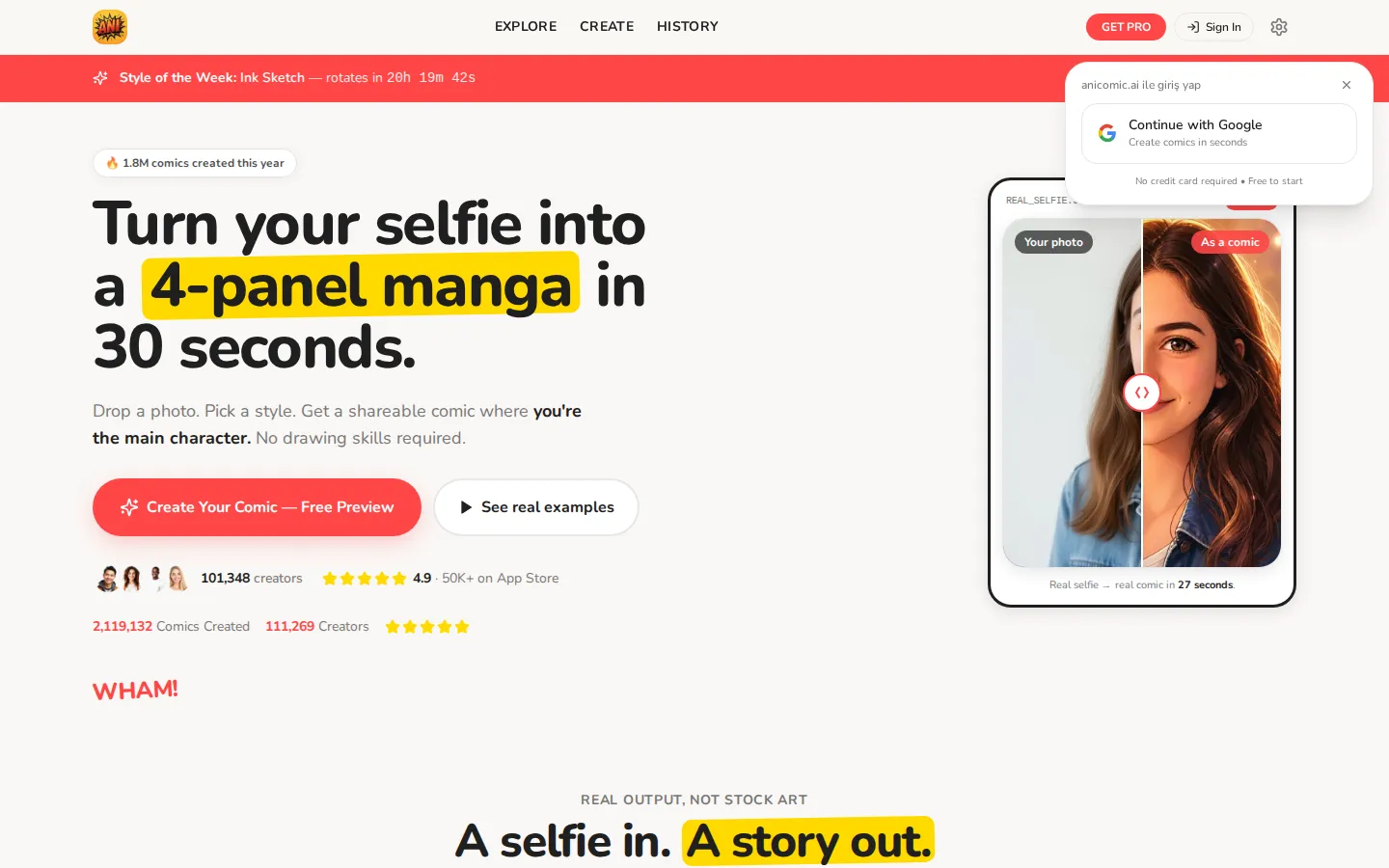
ANI is a web and mobile comic generator from ANI Comic Maker (anicomic.ai) that converts an ordinary selfie into a finished four-panel manga, manhwa, or comic strip. The pitch is deliberately narrow: drop a photo, pick a visual style, and receive a shareable story in roughly thirty seconds, with your own face as the protagonist. There is no canvas, no layer stack, and no drawing skill involved.
The pipeline runs in three steps. You upload a JPG, PNG, or HEIC file up to 12MB, choose one of seven hand-tuned styles — Manga, Comic, Manhwa, Manhua, Seinen, Love Triangle, and Golden Spirit — and ANI returns four panels that share one character design, one setting, and one narrative arc. Dialogue, captions, and sound effects are generated with the art, so the strip reads as a small story rather than four disconnected portraits. A rotating Style of the Week gives each visit a different default look.
Beyond the blank create flow, ANI ships more than 180 templates aimed at specific occasions: couple comics, pet hero stories, birthday gifts, vertical TikTok strips, kid superhero adventures, and brand-safe team or company strips. Each template preloads the framing and tone, which shortens the prompt work to almost nothing. Explore feeds show public examples, and every generation is saved to a personal history you can revisit or re-render in another style.
Output quality is tuned for sharing rather than print production by default. Free users get a preview; Pro removes watermarks, unlocks HD downloads, and adds print-ready 300 DPI files on the annual tier, along with priority generation that cuts wait time from about 30 seconds to roughly 12. Annual subscribers can also train a custom style on a favorite artist's look, a feature reserved for the yearly plan.
The site states that uploaded photos are not used to train models, which matters for a tool whose input is a face. ANI reports 1.8M comics created, 101,348 creators, and a 4.9 rating across 50K+ App Store reviews. It is a consumer product, not a production suite: panels are fixed at four, layout control is minimal, and the likeness is stylized anime rather than photoreal. For social posts, gifts, and quick character play, that trade-off is the point.
ANI Core Features
Selfie-to-comic conversion
Upload a JPG, PNG, or HEIC up to 12MB and ANI casts your face as the lead across all four panels, keeping one character design through the strip.
Seven hand-tuned art styles
Manga, Comic, Manhwa, Manhua, Seinen, Love Triangle, and Golden Spirit, plus a Style of the Week that rotates on a timer.
Automatic story and dialogue
The engine builds a beginning-middle-end beat sheet, then fills speech bubbles, captions, and sound effects so the panels read as one scene.
180+ occasion templates
Starters for couple comics, pet hero stories, birthday gifts, vertical TikTok strips, kid superhero adventures, and team or company strips.
Custom style training
Annual Pro subscribers can train a private style on a favorite artist's look, useful when a recurring character needs a consistent visual identity.
Export and print options
Pro removes watermarks and unlocks HD downloads, while the annual plan adds print-ready 300 DPI files sized for framing.
Web, iOS, and Android apps
The same account and comic history work in the browser and in the App Store and Google Play apps, so generations sync across devices.
Privacy-first photo handling
The site states uploaded selfies are never used to train models, and each image stays tied to your own generation history.
Who is ANI for?
ANI is built for people who want a comic starring themselves without hiring an artist or learning software. The core audience is social-first: TikTok and Instagram creators who need a scroll-stopping vertical strip, meme makers, and anyone who wants a profile picture or sticker set with a consistent character. The template library is organized around those habits, with dedicated starters for Reels, Shorts, and story formats. A second group is gift buyers. Couples making anniversary or Valentine's comics, friends building birthday strips, parents casting a kid as a shonen hero, and pet owners turning a golden retriever into a magical girl all fit the four-panel, 30-second format. Print-ready 300 DPI output on the annual plan exists specifically for framing a comic as a present. The third group is light professional use: small teams wanting a brand-safe internal strip for Slack, indie marketers testing a mascot concept, and writers storyboarding a beat before commissioning real art. It is also a reasonable entry point for manga and webtoon fans who want to see their own character in a genre they already read. It is a poor fit for working comic artists. There is no page layout, panel-count control, lettering placement, or layered export, and the anime-house style will not match a photoreal or hand-inked book. Anyone needing the same character across dozens of pages, or an API for automated generation, should look at production-oriented tools instead.
ANI Use Cases
Make a couple's anniversary comic that casts both partners as manga leads.
Turn a pet photo into a superhero or magical-girl strip for social posting.
Create a printable birthday or wedding comic as a framed gift.
Produce vertical four-panel comics sized for TikTok, Reels, and Shorts.
Cast your kid as a shonen hero for a bedtime story or party favor.
Draft a brand-safe team or company strip for Slack and internal announcements.
Test a character concept or art style before commissioning a full illustration.
ANI Pros and Cons
Pros
- Genuinely fast: a four-panel comic with dialogue lands in about 30 seconds, and Pro Annual priority generation cuts that to roughly 12 seconds.
- Style range is unusually broad for a one-photo tool, covering shonen manga, soft-gradient manhwa, cinematic manhua, and moody ink-heavy seinen.
- The 180+ template library removes the blank-page problem, with ready framing for gifts, pets, couples, kids, and vertical social formats.
- The free preview needs no credit card, so you can see your own face in a finished panel before deciding to pay.
Cons
- Output is locked to a four-panel strip, with no control over page layout, panel count, or lettering placement.
- The free tier is preview-only: HD files, watermark removal, and several styles sit behind a subscription.
- Weekly billing at $6.99 is steep for short trials, and custom style training is reserved for the $39.99 annual plan.
FAQ About ANI
ANI Pricing
Free preview with no credit card, then Pro Weekly at $6.99/week (15 comics per month, all seven styles, HD downloads, no watermarks) or Pro Annual at a one-time $39.99/year, advertised as 86% off $363 and about $3.33/month, with unlimited comics, priority generation near 12 seconds, print-ready 300 DPI files, and custom style training.
Check official pricing