
SnoopSolve
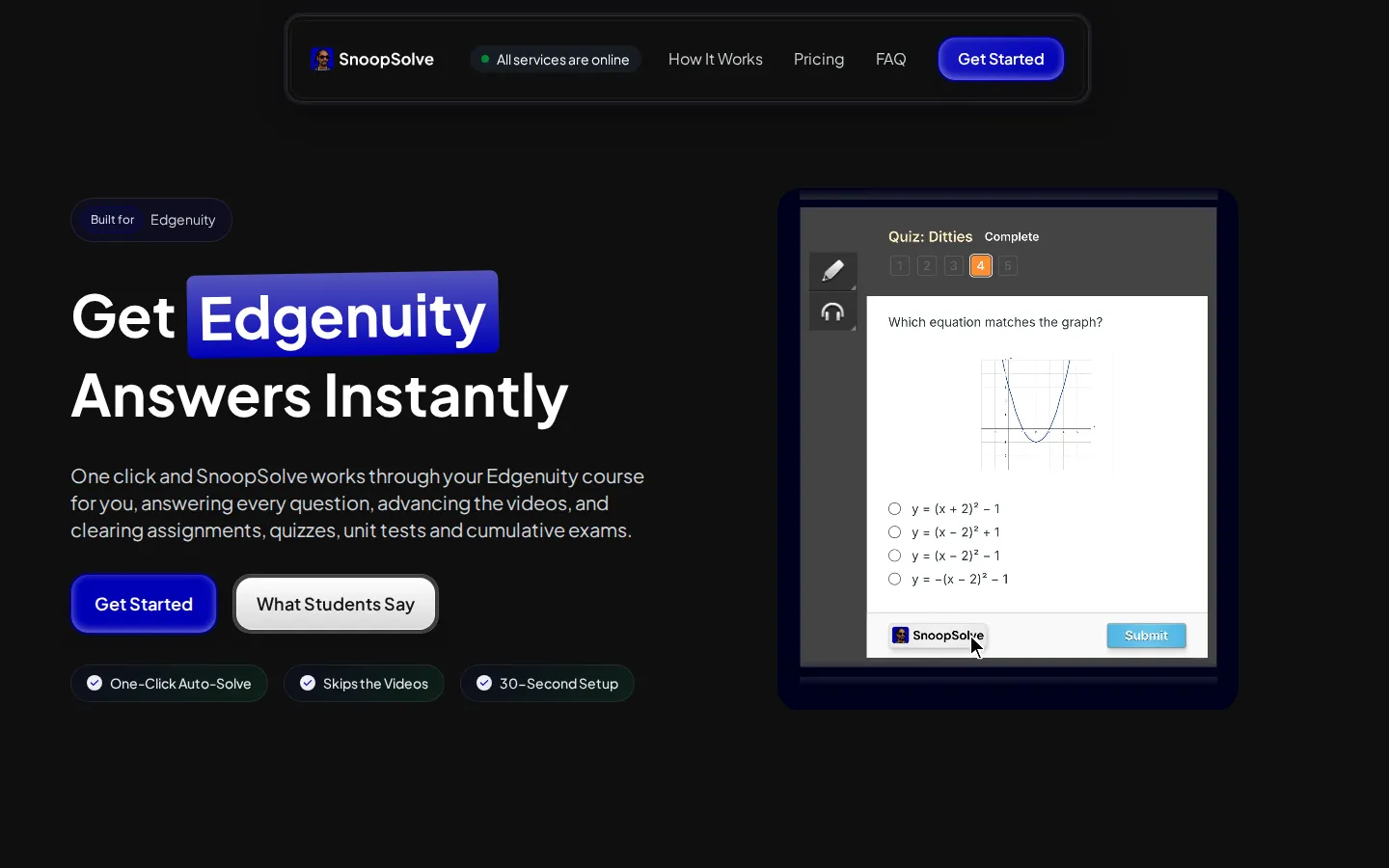
SnoopSolve is a browser extension that works through your Edgenuity course for you: it reads each question on screen, fills in the answer, and advances videos, assignments, quizzes, unit tests and cumulative exams automatically. Optional step-by-step explanations are one click away, and Privacy Guard keeps your activity log clean. Setup takes about thirty seconds on Chrome, Edge, Brave or Firefox, including managed school Chromebooks.
What is SnoopSolve?
SnoopSolve is a browser extension built specifically for Edgenuity, the online courseware platform operated by Imagine Learning and widely used by schools and districts for core courses, credit recovery and summer school. The extension automates coursework in three ways. First, it reads each question rendered on the Edgenuity page you have open, works out the correct answer, and fills it in for you. Second, it advances activities automatically — instruction, warm-ups, summaries, assignments, end-of-lesson quizzes, unit tests and cumulative exams — so you do not have to sit through lecture videos or click through each screen. Third, it shows a step-by-step explanation of any answer if you ask for one, so you can check the working rather than just taking the result. The important design detail is that SnoopSolve reads the actual question on your screen instead of matching it against a stored answer key. That means it keeps working on district-customised versions of courses, which is exactly where downloadable answer keys and Quizlet decks fail. It supports every question type Edgenuity uses: multiple choice, multi-select, matching, drag-and-drop and ordering, fill-in-the-blank, and written responses. The extension ships with a feature called Privacy Guard, which stops Edgenuity from seeing tab switches, window changes and focus loss while you work, keeping your activity log clean. Everything runs locally in your own browser: SnoopSolve never asks for or sees your Edgenuity password and stores no personal information. It installs as a real browser extension on Chrome, Edge, Brave and Firefox, including managed school Chromebooks, where Tampermonkey userscripts are usually blocked. Pricing is subscription-based — weekly, monthly, quarterly or annual — with no usage limits on any plan. SnoopSolve is not an Imagine Learning product, and the site states clearly that neither Imagine Learning nor your school has reviewed, licensed or approved it. The tool is positioned for speed and convenience: setup takes about thirty seconds, there is nothing to configure, and a progress panel shows exactly where the automation is working so you can pause or stop it at any point. It is sold as a paid subscription with weekly, monthly, quarterly and annual options, all with no usage limits.
SnoopSolve Core Features
One-click Auto-Solve — works through an entire Edgenuity course automatically, answering and advancing as it goes
Reads the on-screen question — no stored answer key, so district-customised courses keep working
Covers every question type — multiple choice, multi-select, matching, drag-and-drop, ordering, fill-in-the-blank and written responses
Advances videos and instruction — warm-ups, summaries and lecture videos are skipped automatically
Privacy Guard — stops Edgenuity seeing tab switches, window changes and focus loss while you work
Step-by-step explanations — optional working shown for any answer, one click away
Works on school Chromebooks — a real browser extension, no Tampermonkey or script manager required
Cross-browser support — Chrome, Edge, Brave and Firefox
Who is SnoopSolve for?
SnoopSolve is aimed at students working through Edgenuity courses who want to clear assignments, quizzes and exams faster. The most common profile is the credit recovery student: someone who has fallen behind, needs to make up one or two semesters, and has only a few weeks to do it. The testimonials on the site feature students in exactly this situation — a twelfth grader making up two semesters in eleven weeks, and a summer school student working through a course in the library. It is also useful for students in fully online schools who have no teacher or tutor sitting next to them, and who want something closer to having a hand raised in the middle of an assignment. Quiz retakes are another target: students who keep burning retake attempts on questions they only half understand can read the optional explanation before committing to an answer. Because SnoopSolve works on every Edgenuity course and question type, it suits students across Algebra, Geometry, Biology, Chemistry, Earth and Space Science, US History, US Government, English 9 through 12, Spanish and the rest of the catalogue. The extension is also designed for students using school-managed Chromebooks, where most Edgenuity bots fail because they are Tampermonkey userscripts that require a script manager school devices block outright. SnoopSolve is a real browser extension that installs on managed Chrome the same way it does at home. The target user is typically a high school student in the US, though the tool works for anyone with an Edgenuity account. Buyers should note the site's own guidance: your district, school and teacher set the policy for your courses, and their rules govern what you are allowed to do.
SnoopSolve Use Cases
Credit recovery students making up one or two semesters within a few weeks
Summer school students finishing Edgenuity coursework in a fraction of the time
Online school students working without a teacher or tutor nearby
Students checking the step-by-step reasoning before committing a quiz retake
Anyone who wants to skip the video-heavy instruction blocks in Edgenuity
Students on district-customised courses where downloadable answer keys fail
Students on school-managed Chromebooks where userscripts are blocked
SnoopSolve Pros and Cons
Pros
- Reads the actual question on screen instead of matching a stored answer key
- One-click automation covers videos, assignments, quizzes, unit tests and exams
- Privacy Guard keeps the activity log clean from tab and focus monitoring
- Works on managed school Chromebooks without extra software
- Optional step-by-step explanations support actual learning
Cons
- Only supports Edgenuity, not other learning platforms
- Answers are high-confidence but not guaranteed correct
- No free tier — requires a paid subscription to use
FAQ About SnoopSolve
SnoopSolve Pricing
Paid subscription: Weekly $9.99, Monthly $24.99 (most popular), Quarterly $49.99 billed quarterly ($16.66/month), Yearly $99.99 billed annually ($8.33/month, save 67%). No usage limits, cancel anytime.
Check official pricingWeekly
Perfect for short-term use. Instant answers, every Edgenuity course, no usage limits, cancel anytime.
Monthly
Most flexible option. Instant answers, every Edgenuity course, no usage limits, cancel anytime.
Quarterly
$16.66/month equivalent, save 33%. Instant answers, every Edgenuity course, no usage limits, cancel anytime.
Yearly
$8.33/month equivalent, save 67%, best value. Instant answers, every Edgenuity course, no usage limits, cancel anytime.
SnoopSolve Alternatives

Makon AI
Makon AI is a test-prep platform for the Digital SAT, ACT, and AP exams that pairs a 5,000+ question practice library with Mako, an always-available AI tutor that gives hints and step-by-step explanations. Prediction tests, spaced-repetition vocabulary, and analytics that flag weak topics keep each study session pointed at the skills most likely to move a score before test day.
Gauth
Gauth is an AI learning platform from GauthTech, formerly known as Gauthmath. Photograph a maths, physics, chemistry or biology homework question and it returns a worked solution with step-by-step explanations, then adds interactive AI courses, a visual Atlas explorer, a 100-million-question bank and human tutors available around the clock. Native iOS and Android apps, nineteen languages, and a free tier that needs no card.

RevisionDojo
RevisionDojo is an AI study platform built specifically for the International Baccalaureate and MYP. It bundles exam-style question banks, AI grading of written answers, spaced-repetition flashcards, syllabus-aligned notes, past-paper video walkthroughs, and predicted papers, while the Jojo AI tutor delivers instant mark-scheme feedback and coursework grading for IB Internal Assessments, Extended Essays, and TOK projects.