Passport Size Photo
Passport Size Photo is a browser-based passport and ID photo maker. Upload a clear photo, choose a country preset such as U.S. 2×2 in or 35×45 mm, review the crop and background, then pay once to download a high-resolution digital file plus a printable 4×6 sheet. A free iPhone and iPad app mirrors the same workflow.
What is Passport Size Photo?
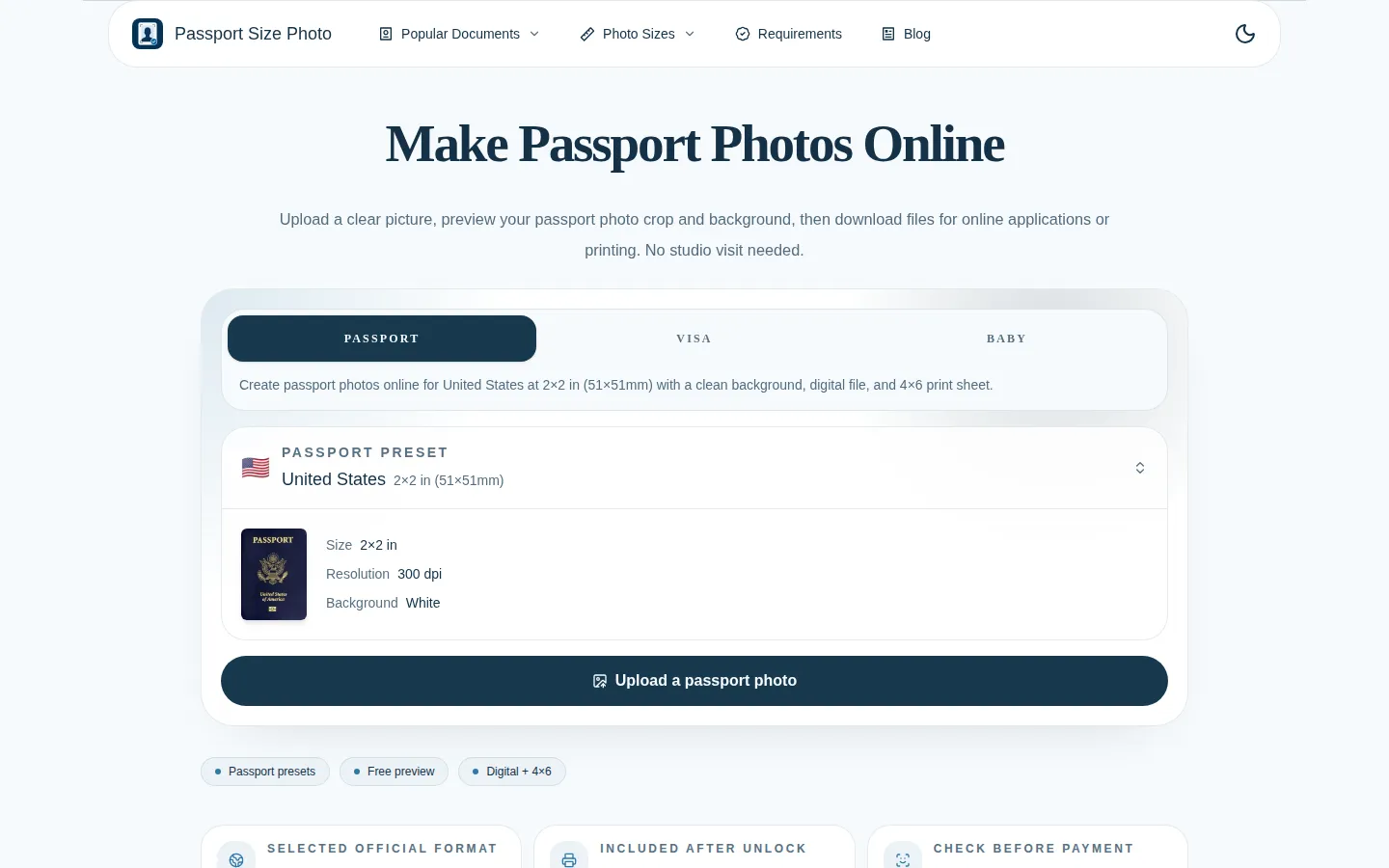
Passport Size Photo (passportsizephoto.net) is an online passport, visa, and ID photo maker that turns an ordinary phone photo into a correctly sized, print-ready document photo. The workflow is deliberately short: pick the document or country format, upload a picture, review the crop frame and background in the browser, then pay once to unlock the final files. No studio appointment, no trip to a pharmacy kiosk, and no software install.
The core of the product is its preset library. Instead of asking users to remember dimensions, the site ships country and document presets — United States at 2×2 in (51×51 mm) on a white background at 300 dpi, the 35×45 mm format used across much of Europe and Asia, China at 33×48 mm, and Canada at 50×70 mm. Those presets extend to specific applications: US passport, USCIS, US visa, Schengen visa, Chinese visa, India passport and India visa, plus a dedicated baby passport photo mode. A 2×2 photo maker, a background remover, a crop-to-passport-size tool, a KB resizer for portal upload limits, and a signature resizer round out the toolkit.
Output comes in two forms from a single purchase. One high-resolution digital image is sized for online applications and portal uploads; one 4×6 inch print sheet lays the photo out for home printers, pharmacies, and kiosks, so four copies come off a single sheet. The site exports at 300 dpi and states the outer dimensions explicitly for the selected preset, which is the detail most rejection notices hinge on.
Before payment, the maker renders a real preview: the finished crop, the cleaned background, and the print layout. You decide whether the head is centered and the backdrop is clean, and only then does checkout appear. A separate standards section shows one accepted example next to common rejects — face shadows, glasses, a non-white background, and a tilted head — so the failure modes are visible rather than buried in a PDF.
Pricing is a single one-time package rather than a subscription. The site lists the package at US$9.99, currently discounted to US$8.99, with no recurring fee. It also ships an official iPhone and iPad app, ID Passport Photo Maker, that reproduces the preset, crop, and export flow on mobile, with an Android version marked coming soon.
Passport Size Photo Core Features
Country size presets
Switch between U.S 2×2 in (51×51 mm), 35×45 mm, China 33×48 mm, Canada 50×70 mm, and other document formats before cropping.
AI background cleanup
Replaces a cluttered room with the plain white, light grey, or blue backdrop the chosen document requires.
Crop and face-position preview
Shows the crop frame and where the head sits, so an off-centre or too-tight shot is caught before payment.
Free preview before checkout
Renders the finished photo with the selected format and background, then asks for payment only at download.
Digital file plus 4×6 print sheet
One high-resolution image for online forms and a printable sheet sized for pharmacies, kiosks, and home printers.
300 dpi output
Exports at print resolution with the outer dimensions matched to the selected country preset.
Visa and ID coverage
Presets extend to USCIS, US visa, Schengen visa, Chinese and Indian visa photos, plus a baby passport mode.
Who is Passport Size Photo for?
Passport Size Photo is built for anyone who needs a compliant document photo quickly and does not want to pay studio prices or wait in line. The clearest fit is the ordinary applicant: a first-time passport holder, a family renewing documents before a trip, a student assembling a visa file, or a parent who needs a usable baby photo without wrestling an infant into a photo booth. A second group is frequent travellers and remote workers who deal with several formats at once. Business travellers moving between U.S., Schengen, UK-style 35×45 mm, Chinese, and Canadian requirements can reuse one clean source photo and re-crop it per country instead of hunting for a different studio in each city. Immigration and visa applicants benefit from the same thing, since USCIS, visa, and passport specs differ in ways that are easy to get wrong at a kiosk. A third group is the cost-conscious and the time-pressed: people who need photos at night or on a weekend, people far from a pharmacy that still offers the service, and anyone who has already been rejected once and wants to see the crop and background before spending again. Photographers and small offices also use it to produce quick ID photos for clients without opening a full editing suite. It is a weaker fit for professional print work. There is no manual retouching, no lighting correction, no layered export, and no batch mode, so a studio preparing dozens of photos or a designer needing precise colour control will want a real editor. Anyone expecting a guaranteed acceptance or an automated compliance check against an embassy database should also look elsewhere; the site is explicit that the issuing authority decides.
Passport Size Photo Use Cases
Replace a drugstore passport photo run with a phone shot cropped at home.
Prepare a 2×2 in U.S. passport photo and print four copies on one 4×6 sheet.
Convert a holiday snapshot into a 35×45 mm Schengen visa photo on white.
Make matching photos for a whole family, including a baby who will not sit still.
Fix a rejected submission by whitening the background and re-centring the head.
Produce a digital file that fits a portal upload instead of mailing printed photos.
Generate China, India, or Canada format photos before an embassy appointment.
Passport Size Photo Pros and Cons
Pros
- A fully rendered preview comes before payment, so the crop, background, and 4×6 layout are all visible before spending anything.
- Country presets cover the formats people actually need, from U.S. 2×2 and 35×45 mm to China 33×48 mm and Canada 50×70 mm.
- Both outputs arrive in one US$8.99 purchase: a 300 dpi digital file for online applications and a printable 4×6 sheet.
Cons
- The free tier stops at the preview; there is no watermarked or low-resolution export to inspect in hand before paying.
- No manual retouching: brightness, stray hair, and fine crop nudges outside the preset frame cannot be adjusted.
- Acceptance rests with the issuing authority, as the site itself notes, and the pricing page promises no refund for a rejected photo.
FAQ About Passport Size Photo
Passport Size Photo Pricing
A free browser preview with no account, then a single one-time Single Photo Package at US$8.99 (listed at US$9.99) that unlocks one 300 dpi digital photo and one printable 4×6 sheet with AI-assisted crop and background cleanup — no subscription or recurring fee.
Check official pricing