
Orca
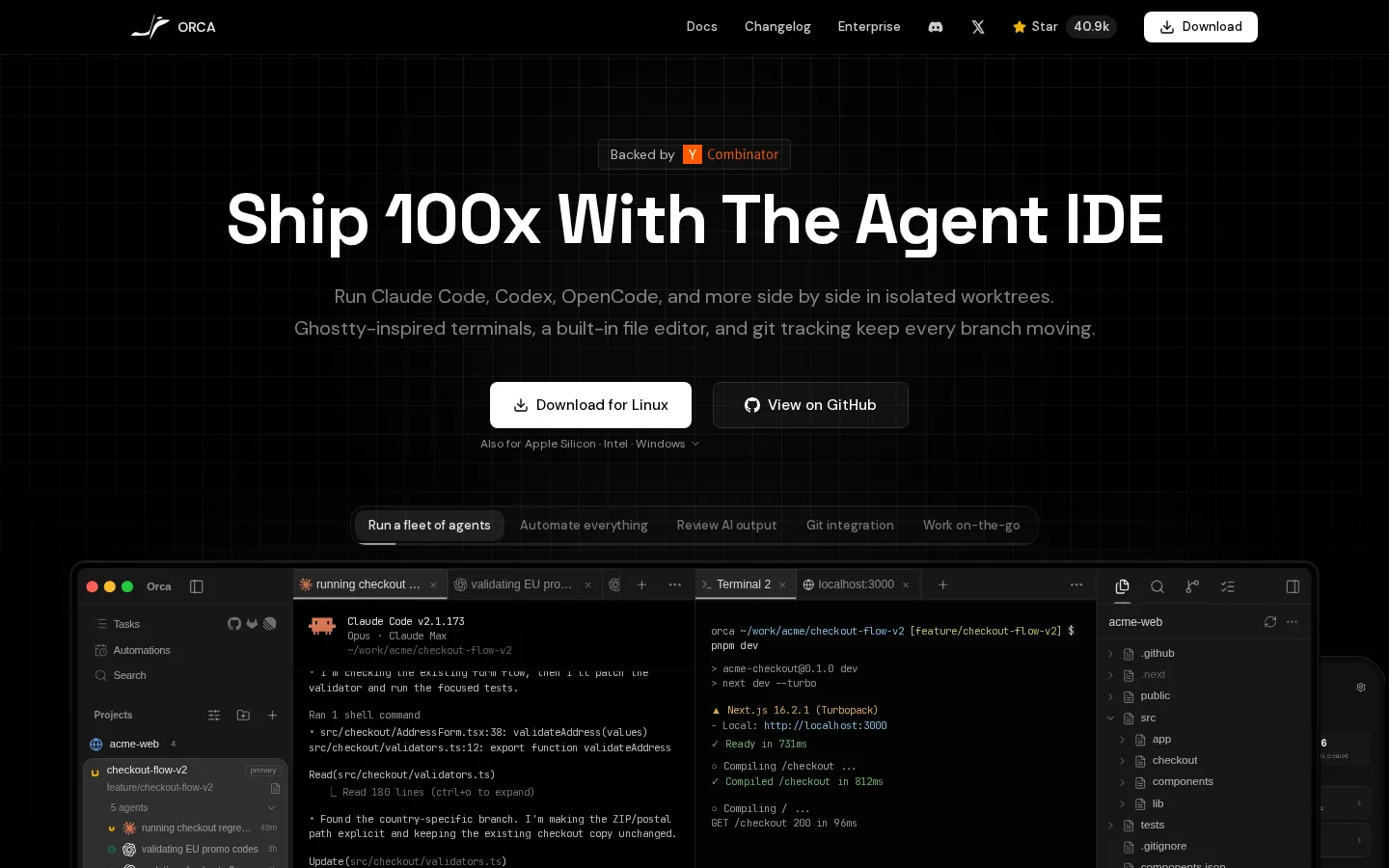
Orca is an open-source Agent Development Environment that lets developers run Claude Code, Codex, OpenCode, and other AI coding agents side by side in isolated worktrees. It includes Ghostty-inspired terminals, a built-in file editor, git tracking, a fleet workflow for automating and reviewing AI output, and mobile companions for iOS and Android. It is MIT-licensed, backed by Y Combinator, and free, with an enterprise tier for teams.
What is Orca?
Orca is an open-source Agent Development Environment, or ADE, designed to make working with AI coding agents more manageable by giving each agent its own isolated workspace. The core idea is that developers can run Claude Code, Codex, OpenCode, Grok, and any other agent CLI side by side, with each agent operating in a separate worktree so they never interfere with each other's files or branches. Around that core, Orca provides Ghostty-inspired terminals, a built-in file editor, and git tracking that keeps every branch moving, plus a project view where developers can see all their tasks, running agents, and checkpoints in one place. The fleet workflow lets users run multiple agents on the same project, automate repetitive tasks, review AI output, and integrate with git workflows. A mobile companion for iOS and Android extends the experience so developers can monitor agents and review progress while away from the computer, and remote access setup makes it possible to keep building from anywhere. Orca is free and open source under the MIT license, available for macOS, Windows, and Linux with new features shipped daily, and it is backed by Y Combinator with over 40,000 GitHub stars. The product positions itself as the most powerful agent development environment on the market, and an enterprise tier is available for teams that need additional controls and support. Because Orca works with existing agent subscriptions, users bring their own Claude Code, Codex, or other agent accounts, and Orca provides the workspace, terminals, and orchestration around them. The product positions itself as the most powerful agent development environment on the market, and an enterprise tier is available for teams that need additional controls and support. Because Orca works with existing agent subscriptions, users bring their own Claude Code, Codex, or other agent accounts, and Orca provides the workspace, terminals, and orchestration around them. The repository includes the desktop app, mobile releases, and release notes for each version.
Orca Core Features
Isolated worktrees
Run Claude Code, Codex, OpenCode, and more side by side without agents interfering with each other.
Fleet workflow
Automate tasks, review AI output, and run multiple agents on the same project at once.
Ghostty-inspired terminals
A fast, modern terminal experience built into the agent IDE.
Built-in file editor and git tracking
Edit files and follow every branch's progress without leaving the app.
Mobile companions
iOS and Android apps let you monitor agents and review progress on the go.
Agent account hot-swapping
See usage and rate-limit resets, and swap Codex accounts without re-logging in.
Remote access
Set up remote access to keep building and deploying while away from your computer.
Free and open source
MIT-licensed with over 40,000 GitHub stars and new features shipped daily.
Who is Orca for?
Orca is built for software developers and engineering teams who work with AI coding agents daily and need better ways to run, monitor, and review them. Individual developers who use Claude Code or Codex will appreciate the ability to run several agents in parallel on different branches without them colliding, while engineering leads can use the fleet view to automate tasks, review AI-generated output, and track what each agent is doing across projects. Developers who work from multiple locations benefit from the mobile companion apps, which let them check on running agents and review changes from a phone. Open-source contributors and tooling enthusiasts will find the MIT license and the 40.8k-star GitHub repository appealing, and teams considering enterprise adoption can evaluate the dedicated enterprise offering. It also suits developers who want a Ghostty-style terminal experience with a built-in file editor and git integration in one window, and anyone who wants to hot-swap between multiple agent subscriptions without re-logging in. The mobile companions also make Orca attractive to developers who travel or work across multiple machines, and the open-source license appeals to engineers who want to audit, extend, or contribute to the tool itself. Teams evaluating agent orchestration platforms can prototype with the free version before engaging the enterprise tier, and technical leads can use the fleet view to supervise junior developers' agent usage. It also suits developers who want a Ghostty-style terminal experience with a built-in file editor and git integration in one window, and anyone who wants to hot-swap between multiple agent subscriptions without re-logging in.
Orca Use Cases
Run a Claude Code agent on a feature branch while a Codex agent handles bug fixes in parallel.
Automate checkout regression tests and validate promo code logic with a fleet of agents.
Review AI-generated pull requests and revert individual checkpoints you do not want.
Monitor long-running agent tasks from your phone with the iOS or Android companion app.
Hot-swap between multiple Codex or Claude subscriptions without repeated logins.
Use Orca's terminals and editor to inspect agent output before merging changes.
Orca Pros and Cons
Pros
- Free and open source under MIT, with a large active GitHub community.
- Runs multiple agent CLIs side by side without worktree conflicts.
- Mobile companions extend the workflow beyond the desktop.
- Works with the agent subscriptions you already pay for.
- YC-backed with rapid, daily feature shipping.
Cons
- Requires separate subscriptions for the underlying agents like Claude Code or Codex.
- Advanced orchestration features are best suited to developers comfortable with CLI tooling.
- Mobile app is a companion, not a full replacement for the desktop environment.
FAQ About Orca
Orca Pricing
Freemium: free and open source (MIT) with an enterprise tier for teams; users bring their own agent subscriptions such as Claude Code or Codex.
Check official pricingFree
Open-source MIT-licensed ADE for macOS, Windows, Linux, iOS, and Android with all core features.
Enterprise
Dedicated controls, deployment options, and support for teams.
Orca Alternatives

Polsia
Polsia is an AI platform that runs companies on autopilot. Built on agent SDKs and MCP integrations, Polsia plans roadmaps, ships code, runs ads, replies to customers, and posts content around the clock without human intervention. Founded by Ben Cera and operated by Polsia, Inc., it is free to start with no credit card required and subscription billing via Stripe.

Otty
Otty is a native, GPU-accelerated terminal app for macOS designed for developers who use AI coding agents. It combines a fast, beautiful terminal with first-class affordances for Claude Code, Codex, and OpenCode, including agent status, live previews of agent edits, and parallel agent task monitoring. All offline usage is free with no account required, and Windows and Linux support is on the way.

Blink
Blink is an AI app builder where users describe an app in natural language and get a full-stack web or mobile application with database, authentication, APIs, and hosting included. The free plan provides 5 build credits daily with a live URL, while paid plans add custom domains, production hosting, and App Store publishing. Built by 1Flow, Inc., Blink targets founders and builders creating MVPs fast.