
Keysake
Keysake is a macOS input method for Chinese speakers learning English. As you type in Chinese, it displays matching English expressions in real time, so you pick up phrasing inside your own messages, emails and notes. A shortcut opens a bilingual panel where you save sentences, then revisit them for automatic grammar and sentence-structure explanations.
What is Keysake?
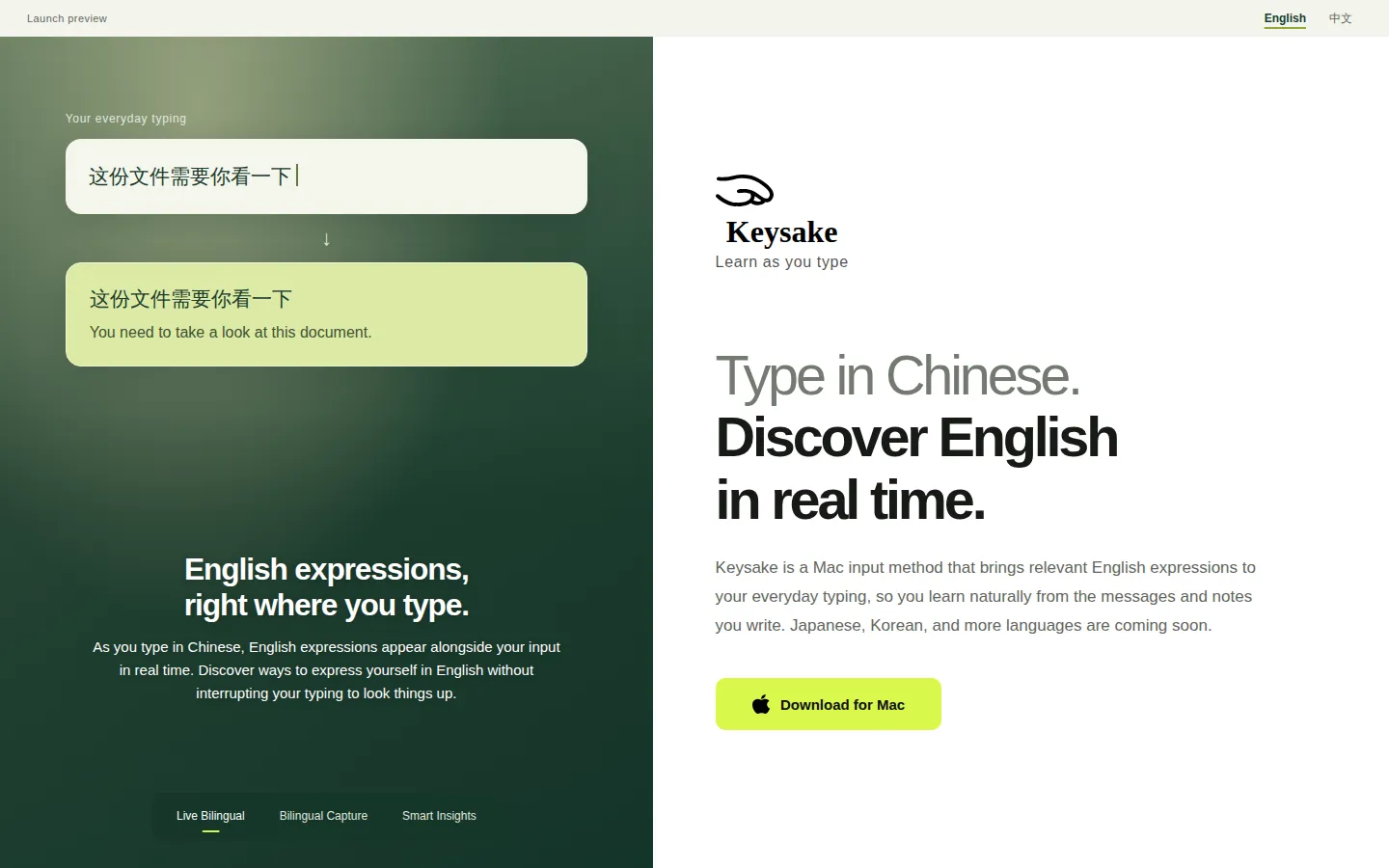
Keysake is a macOS input method that adds a second layer to Chinese typing: as you enter characters, the app shows the English expression matching what you are writing. The English appears alongside your input in real time, so the sentence you were already going to write becomes the example sentence for your next English lesson. The site frames the idea simply, start with what you already want to say, and argues that learning sticks better when new phrases attach to your own messages, notes and email drafts rather than to a random vocabulary list.
Mechanically, Keysake behaves like a normal input source. You enable it in macOS, switch to it when you want to practise, and keep typing in whatever app you already use, whether a chat window, a mail client or a notes app. There is no separate editor and no copy-paste step. A keyboard shortcut opens a bilingual panel showing what you have typed so far, or only what is new since you last opened it. From that panel you can star sentences to save them, and saving individual words or phrases is also supported.
Saved material is where the learning loop closes. Keysake keeps a collection of the sentences you flagged, and the site describes built-in insights that break a sentence into subject, predicate and object and explain grammar points such as when a particular construction applies. On the current site this Smart Insights section is labelled as a feature coming soon, so treat the grammar explanations as announced rather than fully shipped.
Two constraints matter for evaluation. First, translation runs on Apple's on-device translation technology, so your input is translated locally on the Mac rather than uploaded to a server for translation, a real privacy and latency advantage. Second, coverage is narrow: today the interface is Chinese, the input is Chinese and the output is English. English input, learning Chinese from English, and Japanese or Korean support are all listed as future plans.
The current website is explicitly a design preview: the download button notes that an installer is not connected yet. Keysake has appeared on Product Hunt and in several directory listings describing it as a free macOS input method, and no pricing tiers have been published. For a learner, the concept and interaction model can be judged now, while the shipped product still has to prove the grammar insights and the wider language support.
Keysake Core Features
Real-time English expressions appear beside your Chinese as you type in any Mac app
Bilingual panel opens by shortcut and shows text typed since your last visit
One-tap starring saves full sentences to a personal collection for later review
Separate saving for individual words and phrases you want to remember
Grammar insights break sentences into subject, predicate and object with short explanations
On-device translation through Apple's technology keeps your typed text local
Works as a standard macOS input source inside messages, mail, notes and documents
Chinese-language interface today, with Japanese, Korean and English input announced
Who is Keysake for?
Keysake is aimed at Chinese-speaking adults who already handle everyday English but want their phrasing to sound natural rather than textbook-stiff. If you write in Chinese all day, in chat threads, work emails and shared notes, and you keep telling yourself you will practise English later, this tool puts the practice inside the writing you were going to do anyway. It suits intermediate learners who read English reasonably well but freeze when producing it. Instead of opening a dictionary or a chatbot mid-sentence, you type as usual and glance at the English line beside your text, which shows how a fluent speaker might phrase the same thought. That makes it useful for recall and production practice rather than another flashcard queue. It is also a reasonable fit for students preparing for exams or overseas study, freelancers and remote workers writing to English-speaking clients, and professionals who routinely turn their own Chinese thoughts into English reports and messages. Anyone who learns best from their own real sentences instead of curated word lists will get more from it. Because the app is a macOS input method with a Chinese-language interface, you need a Mac and you need to type Chinese. Absolute beginners, English speakers who want to learn Chinese, Windows and phone users, and anyone expecting structured courses, pronunciation drilling or speaking practice should look elsewhere for now. The developer has flagged Japanese, Korean and English-input support as future work, but the only supported direction today is Chinese input with English expressions.
Keysake Use Cases
Learn natural English phrasing while writing everyday chat messages and personal notes
Practise business English by drafting client emails in Chinese and reading the English rendering
Build a personal sentence bank from your own writing instead of copying example lists
Review saved sentences with grammar breakdowns to understand why a construction works
Check how a Chinese thought maps to idiomatic English before sending a message
Study English passively during work hours without opening a separate learning app
Prepare for writing-heavy exams by rehearsing the sentences you actually use
Keep translations private on a Mac when handling sensitive work documents
Keysake Pros and Cons
Pros
- Practice happens inside your existing writing flow, with no separate study app to open
- On-device translation means typed text is not uploaded for translation
- Saved sentences come from your own life, so examples stay relevant and memorable
- Free to use, with no published subscription, credits or usage limits
Cons
- macOS only, with a Chinese-language interface and Chinese input as the sole direction
- The site is still a design preview: the download button confirms no installer is connected yet
- Smart Insights grammar explanations are marked coming soon, and there is no speaking or pronunciation practice
FAQ About Keysake
Keysake Pricing
Keysake is free: no pricing page, subscription or paid tier is published, and the makers present the macOS input method as free while the product remains in launch preview.
Check official pricingFree
Full access to Chinese-to-English expressions as you type, saved sentences and grammar insights, with no paid tiers published.
Keysake Alternatives

Mocko
Mocko is an independent exam-prep platform for high-stakes language tests. It runs full mock exams and short practice tests in the official format of TEF Canada, TCF Canada, CELPIP, Versant, DELE A2, the SLE and Staatsexamen NT2 B1, then returns AI feedback on writing and speaking, CEFR-linked reports and progress tracking. Plans start with a free tier, priced in Canadian dollars.

Talkio AI
Talkio AI is a language-learning web and mobile app from Aidia ApS in Denmark that helps you speak a new language out loud. Practise voice conversations with hundreds of AI tutors across more than 70 languages, get instant feedback on pronunciation, grammar and fluency, review saved vocabulary, and track weekly progress. A seven-day free trial starts every subscription.

Tengwar
Tengwar is an AI-powered language learning platform for three constructed languages from fiction: Tolkien's Elvish (Quenya and Sindarin), Star Trek's Klingon, and Game of Thrones' Dothraki. It offers short interactive lessons, a grounded AI tutor named Mithrandir, spaced repetition review, a Tengwar script transcriber, and twelve free tools. The first 30 lessons are free forever, with no credit card required.