
FireVibe
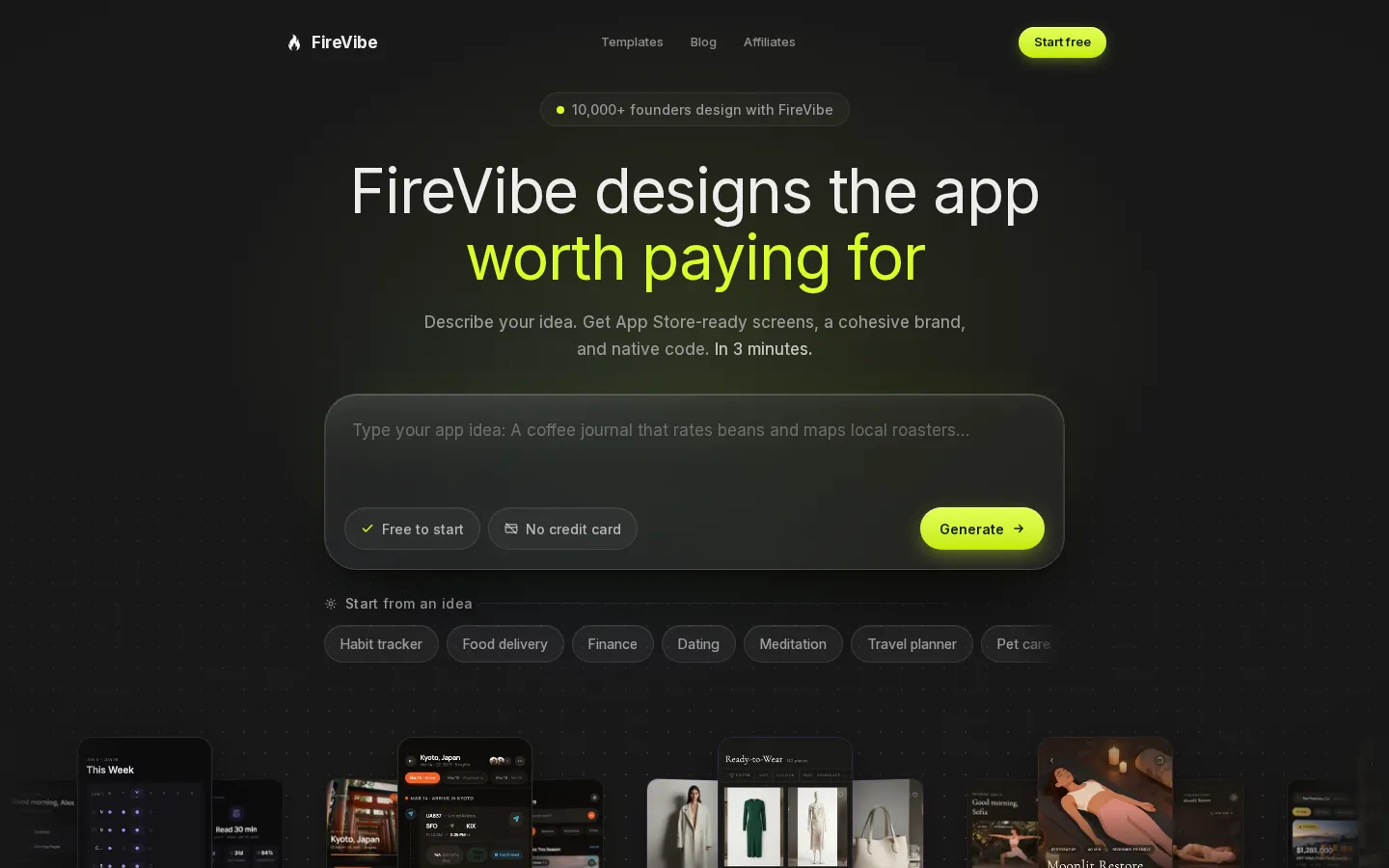
FireVibe is an AI design tool for mobile apps. You describe your app in a prompt and it generates a set of consistent, production-ready screens with a design system, AI-generated imagery and exportable code for SwiftUI, Flutter, React Native, Jetpack Compose and React. Screens can be refined in chat, pasted into Figma as vector layers, or handed to an AI coding tool.
What is FireVibe?
FireVibe is an AI design tool for mobile applications. You describe your app in a sentence or two, and the service designs it: a complete set of screens, a matching design system, AI-generated images and exportable code. Its marketing site compares the output with a freelance designer at 3 to 4 weeks and $5,000 or more, a design agency at 6 to 8 weeks and $15,000 or more, and DIY design at 2 to 3 weeks of evenings.
The marketing site lives at firevibe.ai and the product runs at app.firevibe.ai, where you sign in with Google or an email account. Generation starts from a dashboard prompt. FireVibe opens the project workspace, creates a theme and streams finished screens onto a canvas. The demo describes a real estate app that first produces Discover, Listing and Map, then adds Saved and Profile on request, ending with five consistent screens ready to export. A second starting point is the template gallery of 21 example apps generated in under three minutes each, covering habit trackers, travel planners, e-commerce, real estate, food delivery, budget planners, weather, recipes, language learning and fitness trackers.
Every screen arrives fully designed, with colours, typography, spacing, icons and images that match the rest of the project. FireVibe states that layouts follow the spacing and touch target conventions of Apple's Human Interface Guidelines and Material Design, and that the design system is generated as unified tokens so that consistency is not maintained by hand. Images are generated by AI for the app rather than taken from stock libraries. A theme editor changes colours, fonts and corner radius across all screens, and an AI chat applies requests such as making the primary colour warmer or adding a Settings screen.
FireVibe exports to SwiftUI, Flutter, React Native, Jetpack Compose and React, which the company describes as clean, structured production code rather than pseudo-code, ready to open in Xcode, Android Studio or VS Code and to hand to an AI coding tool such as Cursor or Claude Code. Screens can also be pasted into Figma with vector layers, editable text and real images.
FireVibe has no public pricing page: firevibe.ai/pricing returns a 404. The Terms of Service state that the service has free and paid plans, that paid plans are billed monthly or annually through Stripe, and that credits are consumed by generation, chat edits, image generation and code export, with costs shown before each action and no rollover between billing periods. The affiliate program page publishes standard monthly pricing of Starter $19, Pro $29 and Team $79. The free plan allows limited use, and its limits on projects, screens and features may change. Generated output belongs to the user and may be used commercially, and the company states that it works with third-party models from Anthropic, Google and Replicate. FireVibe counts 11,348 founders designing, 76,212 screens designed and 13,857 apps shipped, is made in San Francisco, and can be reached at contact@firevibe.ai.
FireVibe Core Features
Prompt-to-screens generation
Describe your app idea and receive several fully designed screens in one pass.
Cohesive design system
Colours, typography, spacing, icons and corner radius stay consistent across every screen.
AI-generated imagery
Photos, illustrations and artwork created for your app's category instead of generic stock photos.
Native code export
One-click export to SwiftUI, Flutter, React Native, Jetpack Compose or React, ready for your IDE.
Figma handoff
Paste screens into Figma with vector layers, editable text and real images for designer collaboration.
Chat-based editing
Ask for colour, layout or copy changes in plain language and they apply across all screens.
Template gallery
Twenty-one example app designs you can browse, each one generated in under three minutes.
Theme controls
Edit colours, fonts and corner radius once and watch every screen update instantly.
Who is FireVibe for?
FireVibe is aimed at solo builders and small teams who need a credible mobile app design without hiring a designer. That includes indie hackers and weekend project builders who want to see an idea as real screens before writing interface code, and who measure progress in hours rather than weeks. It also suits people building with AI coding tools, because the exported SwiftUI, Flutter, React Native, Compose or React code can be passed straight to Cursor, Claude Code or a similar assistant as the visual starting point. Founders without design experience are a natural fit. The service asks for a plain-English description instead of design skill, generates the brand alongside the screens, and keeps every screen consistent through a shared design system. Non-technical founders can use it for App Store screenshots, a landing page or an investor deck, and the Figma export gives designers a file with vector layers and editable text if someone else takes over later. Freelancers, studios and product managers can use it to explore visual directions for a client quickly, produce first-round concepts for a pitch, or mock up a feature set before a build is approved. Marketers and creators working on app launches get a consistent set of product visuals and screenshots in the same style. It is a mobile-first tool, so teams building web, desktop or embedded interfaces are not the target. FireVibe's own cost guide notes the same limit as any automated design tool: apps that depend on a completely custom interaction model, such as a drawing canvas, a digital audio workstation or a game, are outside what prompt based design covers well. Teams that need user research, brand strategy or a fully bespoke design language should still expect to work with designers, using FireVibe as a fast first pass rather than a replacement. Anyone who wants the cheapest way to learn design from scratch is also better served by learning a design tool directly, since FireVibe optimises for speed to a finished-looking product rather than for teaching.
FireVibe Use Cases
Turn a weekend app idea into a full set of screens before writing any interface code.
Generate App Store screenshots and a cohesive brand for a mobile product launch.
Prototype a client concept for a pitch deck without hiring a product designer.
Hand a finished design to Cursor, Claude Code or another AI coder for implementation.
Start from a template such as a habit tracker, budget planner or food delivery app.
Keep an existing app consistent by regenerating screens against the same design system.
Explore several visual directions for one idea before committing to a brand.
Produce marketing visuals and product screenshots for a landing page or store listing.
FireVibe Pros and Cons
Pros
- A complete first draft in minutes: screens, design system, images and code from one prompt, instead of weeks of manual design.
- Five code export targets plus a Figma handoff, so the output fits an existing Xcode, Android Studio or VS Code workflow.
- A free plan with no credit card lets you judge the quality of the generated screens before paying.
- Plain-language chat edits keep every screen consistent, which removes the usual file-by-file editing work.
Cons
- There is no public pricing page, since firevibe.ai/pricing returns a 404; the Starter, Pro and Team monthly prices are only published on the affiliate program page.
- It is a mobile app design tool, so web and desktop interfaces and custom interaction models such as drawing canvases or games are out of scope.
- Free plan limits on projects, screens and features can change at any time, and unused credits do not roll over to the next billing period.
FAQ About FireVibe
FireVibe Pricing
FireVibe has no dedicated pricing page: firevibe.ai/pricing returns a 404, and the app's own pricing and billing routes fall back to the sign-in screen. The Terms of Service confirm that the product offers free and paid plans, that paid plans are billed monthly or annually through Stripe, and that credits are spent on generation, chat edits, image generation and code export, with costs shown before each action and no rollover between billing periods. The affiliate program page publishes standard monthly pricing of Starter $19, Pro $29 and Team $79, described there as an estimate for commission purposes. The free plan allows limited use, and its limits on projects, screens and features may change at the company's discretion.
Check official pricingFree
Limited use of the service at no cost, with no credit card required to start. The Terms state that free plan limits on projects, screens and features may change at any time.
Starter
Standard monthly price published on the FireVibe affiliate program page. Paid plans are billed monthly or annually through Stripe, and credits are consumed per AI operation.
Pro
Mid tier in the standard monthly pricing listed on the affiliate program page, used there as the example for affiliate earnings estimates.
Team
Highest published standard monthly tier, aimed at teams working on app design together. Annual billing and credit allowances are shown inside the app after signup.
FireVibe Alternatives

BlockPoster.ai
Create custom block posters from your photos or AI-generated art with BlockPoster.ai. Easily crop, split, and preview designs for free.

Zoviz
Zoviz is an AI branding and content platform for small businesses, creators, and agencies. Set up a Brand Profile with your audience, voice, colors, and fonts, then generate logos, business cards, social posts, product ads, videos, and websites that automatically match your brand. It also offers API and MCP access for developers, plus mobile apps for iOS and Android.
NormalMap AI
NormalMap AI is a free browser-based generator that converts a single photo or albedo texture into a complete set of PBR maps—normal, height, roughness, metallic and ambient occlusion—using real-time WebGL, so nothing is uploaded. Its AI section turns text prompts into seamless, tileable textures, and the built-in 3D viewer previews results on spheres, cubes and planes before you download transparent PNGs.