
Bing Image Creator
Bing Image Creator is Microsoft's free AI image generator built into Bing. Users type a text description and receive original AI-generated pictures, with multiple models such as MAI-Image-2.5-Flash, adjustable aspect ratios, and quantity options. It includes free AI templates, an AI photo editor, and a gallery of ideas to explore, all accessible in the browser with a Microsoft account.
What is Bing Image Creator?
Bing Image Creator is Microsoft's free AI image generation tool that lets anyone turn a text description into original pictures directly in the browser. It is part of the Bing search experience, so users can access it at the dedicated create page without installing software or paying a subscription. The tool is powered by Microsoft's AI image models, including MAI-Image-2.5-Flash for detailed and dynamic results and MAI-Image-2e for quick stylized art, with modes for vivid and natural output as well as stylized illustration. Users type a prompt, choose an aspect ratio from options such as square, horizontal, vertical, 3:2, and 2:3, select how many images to generate in one batch, and the tool renders pictures within seconds. Bing Image Creator also includes free AI templates that give users starting points for common image types, an AI photo editor for refining and editing generated or uploaded images, and a large gallery of explore ideas that showcases what other users have created with the tool. Because it is a Microsoft product, results are tied to a Microsoft account, and some models or features require signing in. The tool supports uploading an image as a starting point for editing or variation, making it useful for quick design tasks, social media visuals, blog illustrations, and creative experimentation. Bing Image Creator is positioned as an accessible entry point into AI image generation for everyday users who want fast, no-cost results without learning complex prompting or installing specialist software, while still offering enough model variety and output controls for more deliberate creative work. Because the tool lives inside Bing, results can be shared, saved, and reused across Microsoft's ecosystem, and prompts can be refined iteratively to converge on the desired image. The explore ideas gallery doubles as a prompt library, showing users what kinds of descriptions produce strong results and helping beginners learn the craft of prompt writing by example. For users who need variations, the quantity selector generates multiple images per prompt so the best composition can be chosen, and the aspect ratio controls prepare output for specific placements such as social feeds, banners, or portrait posts. Microsoft continues to expand the model lineup and editor capabilities, keeping the free tool competitive with paid services while remaining accessible to anyone with a Microsoft account.
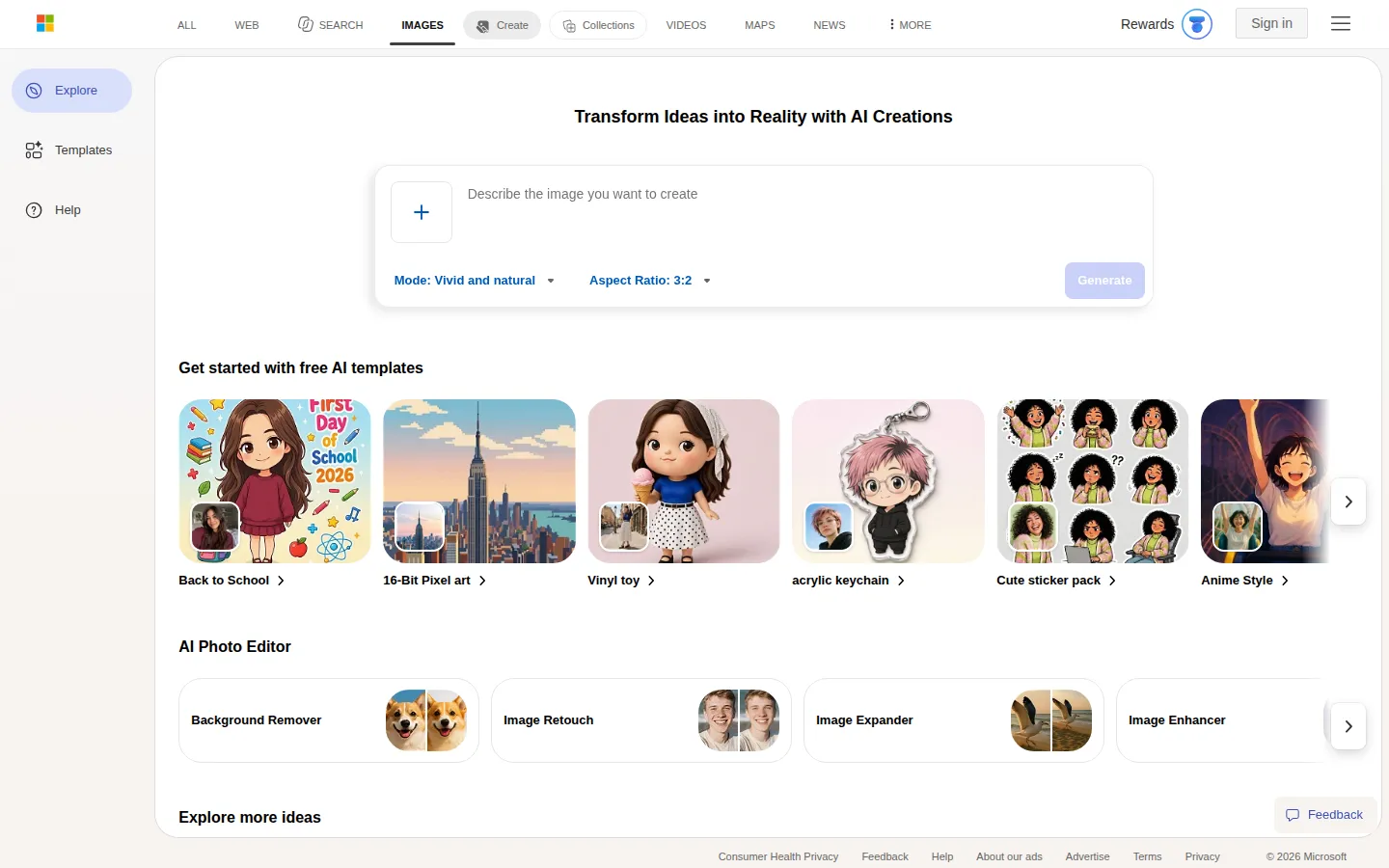
Bing Image Creator Core Features
Text-to-image generation
Turn written descriptions into original AI-generated pictures in seconds.
Multiple AI models
Choose between models like MAI-Image-2.5-Flash for detailed dynamic output and MAI-Image-2e for quick stylized art.
Flexible aspect ratios
Generate square, horizontal, vertical, 3:2, and 2:3 images to fit different platforms and layouts.
Batch generation
Create 1, 2, or 4 images per prompt to compare variations quickly.
Free AI templates
Start from pre-built prompt templates for common image types and use cases.
AI photo editor
Edit generated or uploaded images with AI-powered tools and refinements.
Explore ideas gallery
Browse a curated gallery of example prompts and creations for inspiration.
Image upload input
Upload an existing image as a starting point for editing or new variations.
Who is Bing Image Creator for?
Bing Image Creator suits casual creators who want quick visuals for social media posts, students and educators who need illustrations for presentations and assignments, bloggers and content marketers looking for free header images and article art, and small business owners who want product mockups or marketing graphics without hiring a designer. Designers and marketers use it to explore concepts and mood boards before committing to production tools, while hobbyists and artists experiment with prompts and styles for personal projects. It is also a practical starting point for anyone new to AI image generation who wants to learn prompting skills without paying for a subscription. Teachers and students use it to create custom illustrations for lessons and projects without copyright concerns, while social media managers generate on-brand graphics for posts and stories on demand. Freelance writers and bloggers produce original header images for articles instead of relying on stock photo subscriptions, and small business owners mock up product concepts and promotional graphics quickly. Nonprofits and community organizers create flyers and awareness visuals at no cost, and designers use it to explore visual directions and gather reference material before moving to professional tools. Families and hobbyists enjoy generating personalized artwork for cards, gifts, and digital projects, making it one of the most broadly accessible AI image tools available.
Bing Image Creator Use Cases
Create free header images and article illustrations for blog posts and newsletters.
Design quick social media graphics and promotional visuals for small businesses.
Generate concept art and mood boards for design projects before production.
Make custom illustrations for school assignments, slides, and classroom materials.
Produce product mockups and lifestyle images for e-commerce listings.
Experiment with AI prompting styles to learn how to write effective image prompts.
Bing Image Creator Pros and Cons
Pros
- Completely free to use with a Microsoft account and no credit system or watermark requirement.
- Multiple models and aspect ratios provide more creative control than many free generators.
- Integrated AI photo editor and templates extend the tool beyond simple text-to-image.
- Backed by Microsoft, with reliable infrastructure and continuous model updates.
Cons
- Requires signing in with a Microsoft account for full access to all models and features.
- Some models are region-restricted or gated behind sign-in requirements.
- Output style leans toward consumer-friendly results rather than professional-grade control.
FAQ About Bing Image Creator
Bing Image Creator Pricing
Free to use with a Microsoft account; no credit system, no subscription, no watermark.
Check official pricingFree
Free AI image generation with a Microsoft account, including multiple models, aspect ratios, templates, and photo editing
Bing Image Creator Alternatives
Sartoris
Sartoris is a browser-based AI creative studio that generates premium still images and cinematic video from text prompts, with optional start and end frames plus image, video, and audio references. It runs on purchased credits rather than a subscription, keeps one library for both media types, and deletes finished generations twelve hours after they are created.

Reelina AI
Reelina AI is a web studio for generating video, images, voice and music with several hundred third-party and in-house models on a single coin balance. Weekly and monthly plans include coins that never expire, and coin packs can be added at any time. Generation costs appear before you run anything, so you can compare models without separate subscriptions.

ANI
ANI (anicomic.ai) turns a single selfie into a four-panel manga, manhwa, or comic strip in roughly 30 seconds. Choose from seven hand-tuned art styles, add dialogue and a beginning-middle-end story, then download, print, or share the result. It runs in the browser and as an iOS and Android app, with 1.8M+ comics created and a 4.9 App Store rating.