
JavaScript Tools
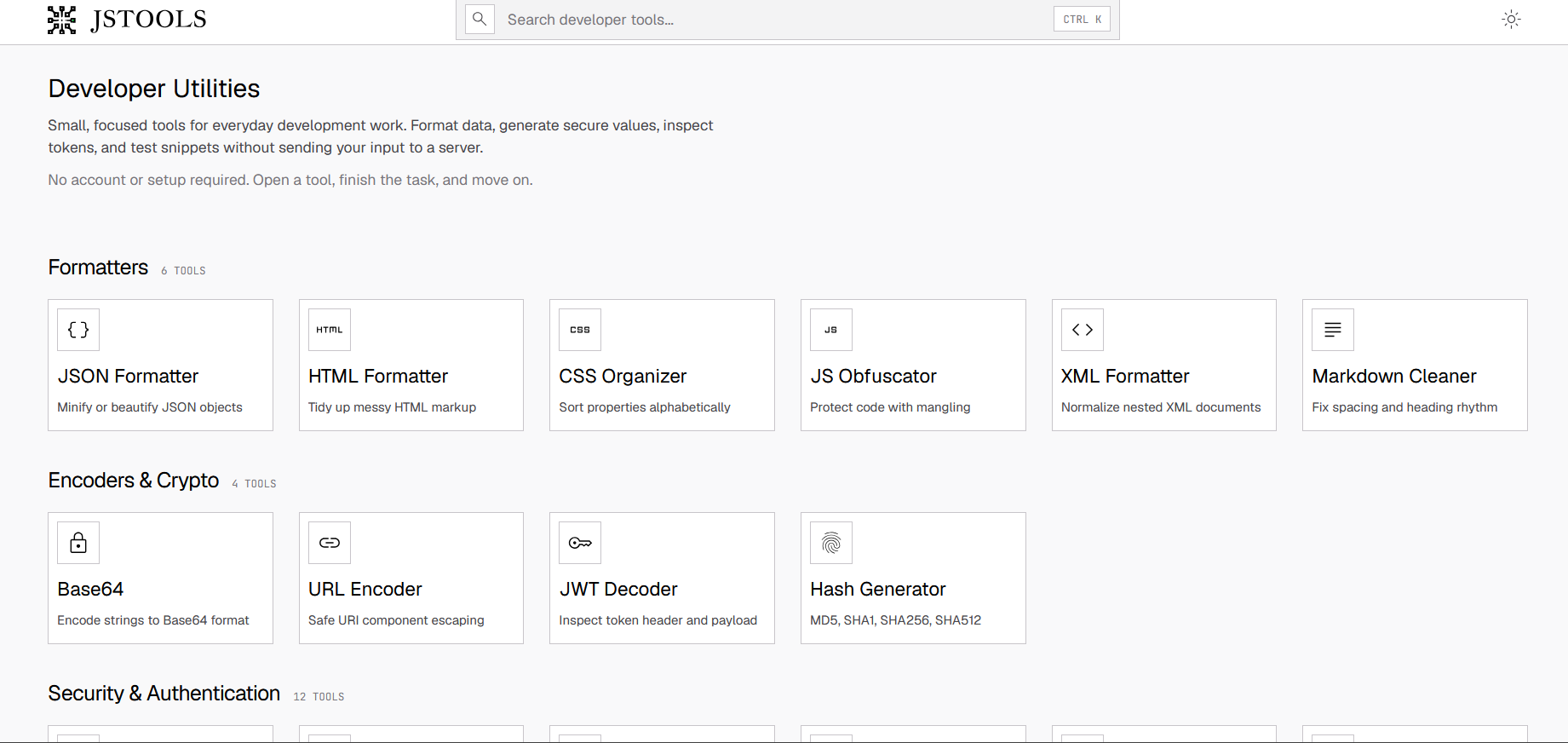
JSTools.Space is a free, privacy-first developer utility platform featuring 80+ browser-based tools. Format JSON, HTML, CSS, XML, and SQL; generate passwords, API keys, UUIDs, JWT secrets, and nonces; encode/decode Base64 for text, images, audio, and files; edit Markdown and export to HTML, PDF, Word, Jira, Slack, Notion, Confluence; convert timestamps and time zones; validate YAML and XML; and much more. All processing stays in your browser — no accounts, no uploads, no ads.
What is JavaScript Tools?
JavaScript Tools is a curated directory of JavaScript libraries, frameworks, and developer tools. It helps developers discover, compare, and evaluate JavaScript-based technologies for web development projects across frontend, backend, testing, and build tooling categories.
JavaScript Tools Core Features
Formatting toolkit
Format JSON, HTML, CSS, XML, SQL, and Markdown with real-time validation and error highlighting.
Security generators
Create passwords, API keys, UUIDs, JWT secrets, nonces, salts, session IDs, and CSRF tokens on demand.
Encryption utilities
Decode and inspect JWT tokens; encrypt and decrypt data using AES; generate SHA, Argon2, Bcrypt, and MurmurHash hashes.
Base64 converter
Encode and decode text, images, audio, video, PDF, and files to and from Base64 format instantly.
Diff checker
Compare two text blocks side by side with highlighted additions, removals, and line-level changes.
Markdown workspace
Write, preview, lint, and export Markdown to HTML, PDF, Word, Google Docs, Jira, Slack, Notion, Confluence, and ASCII.
Text processing tools
Convert text case, remove duplicate lines, clean whitespace, generate URL-safe slugs, and transform Unicode characters.
Developer converters
Convert between Unix timestamps and dates, translate time zones across IANA zones, and parse detailed user agent strings.
Configuration validators
Validate YAML files, convert between YAML and JSON, edit YAML Frontmatter, and generate GitIgnore templates.
SEO utilities
Validate sitemap XML, robots.txt directives, and LLMs.txt files for search engine compliance.
QR code generator
Create scannable QR codes from any text or URL input with adjustable size and format.
Contrast checker
Verify color contrast ratios against WCAG accessibility standards for web design compliance.
Who is JavaScript Tools for?
Frontend and backend developers API developers QA and automation engineers DevOps engineers Security-conscious developers Students learning web development Technical writers preparing examples Designers and developers needing test content
JavaScript Tools Use Cases
Format JSON responses and XML payloads during API development and debugging sessions.
Generate strong passwords, API keys, and JWT secrets when setting up application authentication.
Decode and inspect JWT tokens to verify claims, expiration, and signature during security audits.
Encode images and files to Base64 for embedding in email HTML, CSS data URIs, or API payloads.
Write technical documentation in Markdown and export to company wikis, Slack channels, or Jira tickets.
Validate sitemaps and robots.txt files before submitting a new website to search engines.
Convert timestamps between time zones when coordinating deployments across global engineering teams.
Compare configuration file versions or code snippets to identify differences during code reviews.
Generate QR codes linking to app stores, landing pages, or Wi-Fi configuration for events.
Clean up exported data by removing duplicate lines, normalizing whitespace, and converting text case.
JavaScript Tools Pros and Cons
Pros
- 80+ developer utilities covering formatting, generation, encoding, conversion, and validation.
- All processing runs locally in the browser — no data is uploaded to any server.
- No account registration, sign-in, or subscription required for any tool.
- Completely free with no advertisements, trackers, or analytics scripts.
- Clean and consistent interface design across all tools minimizes learning curve.
- Markdown export supports eight destination platforms including Jira, Slack, Notion, and Confluence.
Cons
- Certain features such as YouTube thumbnail fetching require internet connectivity.
- No desktop offline client or API is available for programmatic access.
- Batch or bulk processing is not supported for large-volume file operations.
- Advanced Markdown features may render differently across target platforms.
FAQ About JavaScript Tools
JavaScript Tools Pricing
JavaScript Tools is completely free with 80+ privacy-first developer tools that run entirely in your browser.
Free
Completely free. All tools run in-browser with no server processing.
- All 80+ developer tools
- Browser-based processing
- Privacy-first design
JavaScript Tools Alternatives

HappySeeds
HappySeeds helps users create AI-powered apps from rough ideas with AI agents, planning, built-in payments, one-click deployment, templates, cloud resources, databases, custom domains, and project management.

Blueprint.am
Blueprint.am is an AI hardware design tool by 3E8 Robotics. Users describe what they want to build, and the product helps create hardware prototype designs with wiring diagrams, bills of materials, and step-by-step assembly guidance from a prompt-driven chat workflow.