
VideoCoding
VideoCoding is an AI video creation platform that turns one brief, a raw talking-head recording, or an audio track into a finished, directed video. It offers Text to Video, Audio to Video and Video to Video modes, adds research, script, scenes, captions, motion graphics, music and sound design, and exposes a REST API for developers. A $39 monthly membership is required to generate.
What is VideoCoding?
VideoCoding is an AI video creation platform that turns a single brief, a piece of raw footage, or an audio track into a finished, directed video. Rather than stitching together separate script, voiceover, editing and motion tools, VideoCoding handles research, structure, audio, visuals, code motion and the final cut inside one browser workspace at videocoding.ai. The product is built around three creation modes: Text to Video, which creates a video from a prompt; Audio to Video, which builds matching visuals around narration, an interview, a podcast or music; and Video to Video, which enhances or recuts existing footage.
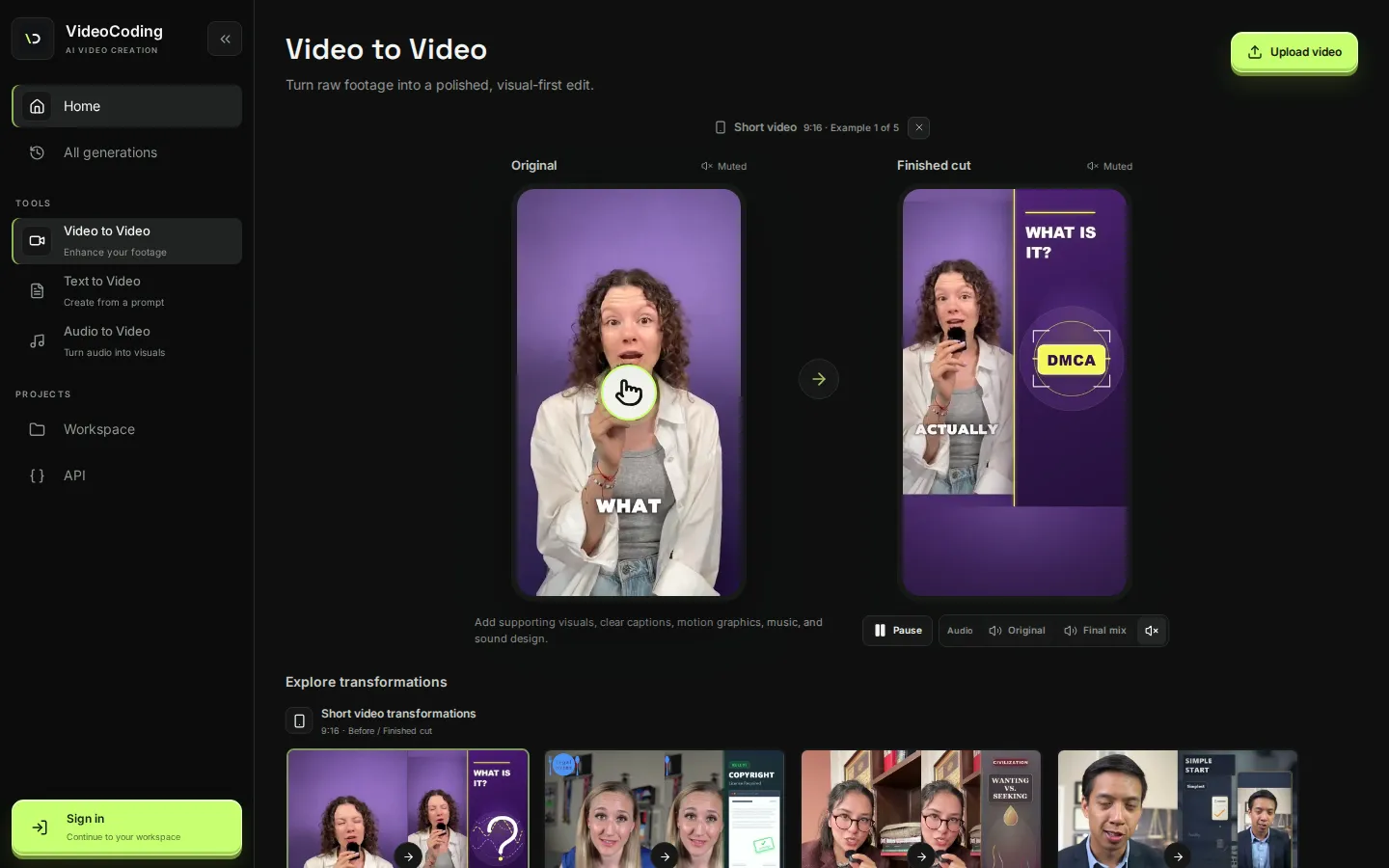
Text to Video is the zero-upload path. You describe the topic, audience, format, tone and key points, and VideoCoding writes the research and script, then turns them into scenes, audio, motion graphics and a finished edit. Audio to Video is for audio-led work: you upload narration, a podcast segment or a music track, and the audio becomes the timeline, with chapters, visuals and a final edit built around it. The tool creates clean chapter visuals, clear pacing and supporting scenes that follow the beat. Video to Video takes a talking-head recording, a lecture or a product video and augments it with explanatory graphics, B-roll, captions, motion graphics, music and sound design, without requiring a written prompt. The site markets this as turning raw footage into a polished, visual-first edit, and it shows before-and-after transformations for short-form 9:16 and 16:9 YouTube formats.
Production features include Full HD 1080p exports, automatic subtitles in more than 70 languages, graphics, B-roll, captions, music and sound effects, plus voice cloning and original-audio preservation. A conversational scene editor lets you refine scenes with plain instructions such as moving a title, warming a chart colour or replacing a background. You can attach reference materials, including images, video, audio and documents such as PDF, DOCX and XLSX files, to guide the generated scenes.
VideoCoding also ships a developer API. The Developer Console at videocoding.ai/developers issues a short-lived pairing code that your server or coding agent exchanges for a bearer token, after which you can submit text, audio and video jobs, follow progress, cancel a task and retrieve the finished file. The live contract is published at /api/vai/config, so integrations read the current routes instead of hardcoding them. Generation, billing and membership are enforced server-side, and API tokens cannot buy memberships or top-ups.
Access is membership based: uploading and generating requires the VideoCoding Pro membership at $39 per month, which includes a monthly generation allowance that can be topped up with extra credits. Payments run through Stripe under the merchant name ClipAI, and cancellation keeps access and credits until the period ends.
VideoCoding Core Features
Text to Video
describe a topic, audience, format and tone, and VideoCoding writes the research and script, then builds scenes, audio and a finished edit from a prompt.
Audio to Video
upload narration, a podcast segment or a music track and the audio becomes the timeline, with chapter visuals, pacing and a final mix built around it.
Video to Video
drop in a talking-head recording, lecture or product video and get an augmented cut with explanatory graphics, B-roll, captions, motion graphics, music and sound design.
Conversational scene editor
refine individual scenes with plain instructions such as moving a title, warming a chart colour or replacing the background.
Subtitles and language support
automatic subtitles in more than 70 languages, plus captions, graphics, music and sound effects, with Full HD 1080p exports.
Voice tools
clone your voice or record narration in-app, with original audio preservation and a preview before you commit.
Reference materials
attach images, video, audio or documents such as PDF, DOCX, XLSX, PPTX and TXT to guide the generated scenes.
Developer API
pair a server or coding agent with a single-use code, then submit jobs over SSE, track status, cancel tasks and fetch finished files through a published contract.
Who is VideoCoding for?
VideoCoding is aimed at people who have a message, a recording or an audio track and need a finished, publish-ready video without running a full editing suite. Its clearest fit is the talking-head creator: a founder, educator, consultant, YouTuber or course author who already records to camera and wants the same footage turned into a structured, visual-first edit with chapters, diagrams, captions, B-roll and music. Anyone recutting one recording into several publish-ready versions for different platforms is squarely in scope, because Video to Video can generate multiple cuts with a different visual rhythm while keeping the same speaker and message. It also suits audio-first producers. Podcasters, interviewers and musicians can upload narration, a segment or a track and let Audio to Video build chapter visuals, pacing and supporting scenes around the audio, which becomes the timeline. Teachers and explainer teams benefit from the text-led path: describe a topic such as how neural networks learn or how solar panels convert sunlight, and VideoCoding returns a structured visual explanation with diagrams and captions. Because a REST API ships alongside the browser workspace, VideoCoding is also relevant to developers and technical teams who want to script video production. A connected server or coding agent can create text, audio and video jobs, poll status, cancel tasks and fetch finished files, while billing stays in the signed-in website. Agencies and small marketing teams that produce explainer films, product launch narratives or legal explainers at volume are a natural fit, since the member allowance and pay-as-you-go top-ups scale with volume. VideoCoding is less suited to editors who need frame-accurate timeline control, node-based compositing or fine colour grading, because it is a directed, prompt-and-review generator rather than a professional editing suite. Studios with strict model-provenance or data-residency requirements should review the terms first, and it is not a free tool: generation requires the $39 monthly membership, so hobbyists who only want a single clip may find it expensive. Teams that already own a full production pipeline may gain less from an automated edit.
VideoCoding Use Cases
Turn a founder's talking-head recording into a publish-ready product explainer.
Create several publish-ready versions of the same video with different visual rhythms.
Convert a lecture or course lesson into a structured visual explanation with diagrams.
Build chapter visuals and pacing around an interview, podcast segment or music track.
Turn a product launch brief into a directed explainer film with a clear narrative arc.
Visualize an abstract topic such as the carbon cycle, neural networks or solar power.
Reduce legal or policy points to clean on-screen proof, chapter cards and animated callouts.
Script video production from your own server or coding agent through the REST API.
VideoCoding Pros and Cons
Pros
- One workspace covers text-led, audio-led and footage-led video, so a prompt, a recording and an audio track all reach a finished cut without a separate editor or voiceover tool.
- The output layer is production focused: Full HD 1080p exports, subtitles in more than 70 languages, B-roll, captions, motion graphics, music, sound effects and voice cloning.
- A complete developer API with pairing codes, SSE generation, status, cancel and file routes, and a published live contract at /api/vai/config.
- Video to Video can recut the same recording into multiple platform-ready versions, and reference materials keep characters, products and scenes consistent.
- Payments run through Stripe with cancel-anytime access, and unused membership and top-up credits are refundable to the original payment method.
Cons
- There is no free generation: uploading and generating require the $39 monthly membership, so you cannot judge the output quality before paying.
- Credits are consumed per generation and the exact cost of a video is estimated upfront rather than published, so heavy use depends on buying top-ups.
- It is a directed web generator rather than a professional editing suite, so frame-accurate timeline editing, compositing and advanced colour grading are out of scope.
FAQ About VideoCoding
VideoCoding Pricing
VideoCoding is a paid membership product: creating videos requires the VideoCoding Pro membership at $39 USD per month (billed through Stripe), which includes a monthly generation allowance plus optional credit top-ups. A free account can sign in to the browser workspace and Developer Console but cannot generate finished videos. API access is available on the /developers page; there is no permanent free tier.
Check official pricingVideoCoding Pro
The only public membership. Unlocks Text to Video, Audio to Video and Video to Video, a monthly included generation allowance, Full HD 1080p exports, automatic subtitles in 70+ languages, graphics, B-roll, captions, music and sound effects, and one active generation at a time. Billed via Stripe, cancel anytime; access and credits stay until the period ends.
Credit top-up (pay as you go)
Once the included monthly generation allowance is used, Pro members can buy additional generation credits at a custom amount, with a minimum and a step set on the pricing page. Top-up options appear only when the server permits them.
VideoCoding Alternatives

Filmpire
Filmpire combines AI video, image, and voice generation in one browser studio built on a shared credit balance. Start from a prompt or reference image, choose from models such as Hailuo, Seedance, Kling, Veo, or GPT Image, let the AI director plan a full story, then export watermark-free files with commercial rights on any paid plan.

APIPod
APIPod is a unified AI media generation API for developers: one key unlocks 156 image, video and language models from 14 providers, including Seedance, Google Veo, Sora, Nano Banana, GPT Image, Kling, Wan and MiniMax. Billing is pay-as-you-go through credit top-ups, metered per token, request or second, with weighted multi-channel routing, automatic failover and circuit breakers on every request.

Sartoris
Sartoris is a browser-based AI creative studio that generates premium still images and cinematic video from text prompts, with optional start and end frames plus image, video, and audio references. It runs on purchased credits rather than a subscription, keeps one library for both media types, and deletes finished generations twelve hours after they are created.