
Morphic
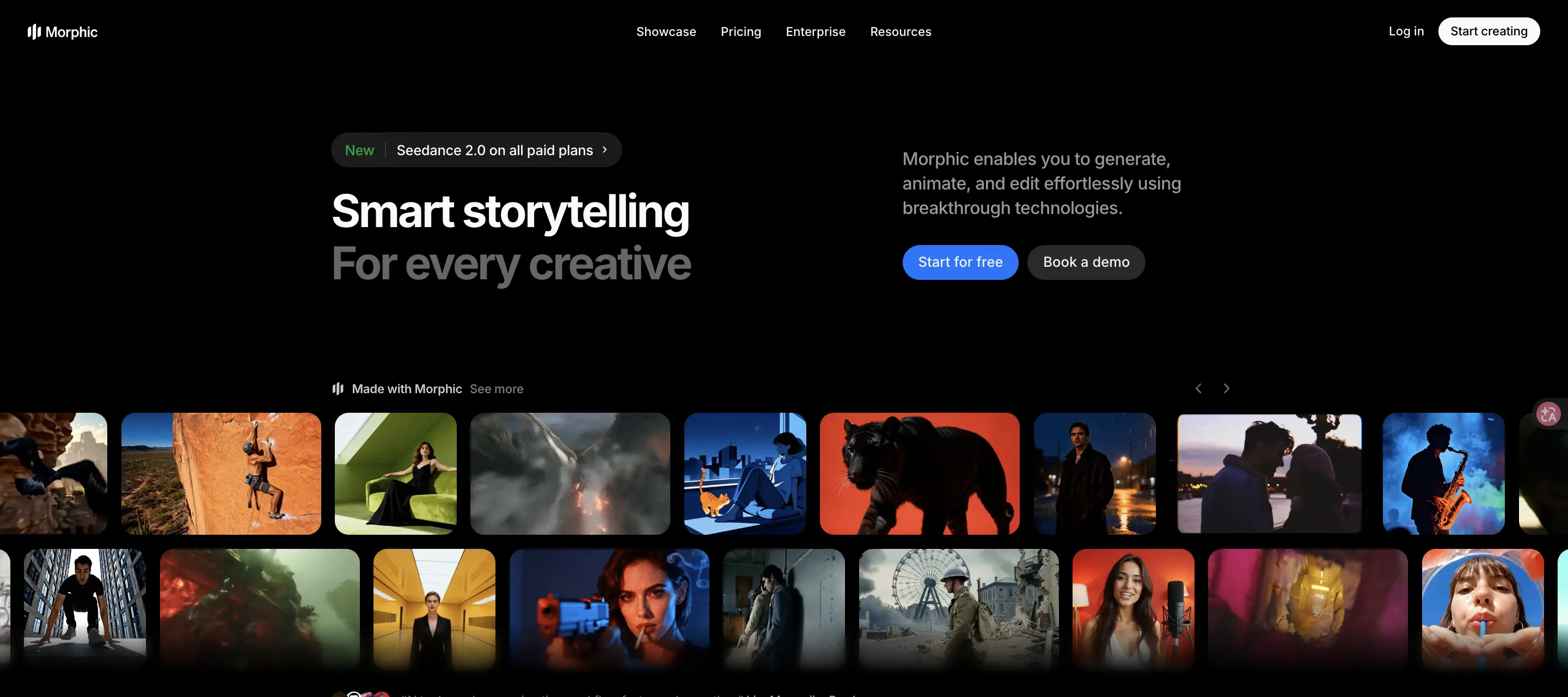
Morphic helps creatives turn ideas into images, animations, storyboards, short films, and social video concepts. Its web workspace combines Canvas, Copilot, Compose, reusable workflows, editing tools, and team features so creators can move from prompt or reference material to polished visual stories without installing desktop software.
What is Morphic?
Morphic is an AI video and storytelling tool designed to help users generate, animate, edit, and organize creative scenes. It focuses on creative production workflows rather than a single prompt box, giving users a canvas, copilot-style prompt support, composition tools, and workflow templates. Users can create images, add motion, build storyboards, generate short films, restyle videos, refine objects, and keep characters or visual styles consistent across scenes. The platform is browser-based and is designed for creative professionals, solo creators, agencies, and teams that want to move from idea to finished visual story more quickly.
Morphic Core Features
Canvas workspace
Plan and organize generated visuals, scenes, prompts, and edits in one creative space.
Copilot assistance
Use prompt guidance to explore ideas and iterate on creative directions faster.
Compose workflow
Turn individual moments into structured visual stories and short film concepts.
Image and video generation
Generate images, add motion, and connect visual scenes with sound.
Precision editing tools
Select objects, segment, upscale, inpaint, resize, and refine frames with prompts.
Reusable workflows
Run templates for storyboards, UGC ads, fashion shoots, headshots, and cinematic scenes.
Style consistency
Reuse characters and visual styles across multiple scenes for coherent storytelling.
Team collaboration
Invite team members to create, share files, exchange ideas, and stay aligned.
Enterprise controls
Access custom support, security, usage rights, onboarding, and admin controls for teams.
Who is Morphic for?
Morphic is built for filmmakers, animators, AI artists, marketers, social content creators, game teams, agencies, educators, and creative departments that need a faster way to prototype visual stories. It may also suit founders and product teams creating campaign assets or concept videos. Larger teams can use enterprise features for collaboration, privacy, onboarding, and administrative control.
Morphic Use Cases
Create short films from a written story idea, scene description, or visual concept.
Generate cinematic storyboards with shot angles, mood, and reference-driven direction.
Animate still images into video clips with motion, camera movement, and sound.
Produce UGC-style product ads from product photos and campaign formats.
Restyle existing videos while preserving motion and changing the visual look.
Build social-ready AI influencer clips, headshots, fashion images, and try-on visuals.
Create game, marketing, and film concept assets before full production.
Collaborate with teammates on creative assets inside a shared browser workspace.
Morphic Pros and Cons
Pros
- Combines generation, editing, and story organization in a single browser workspace.
- Includes many ready-made workflows for cinematic, marketing, fashion, and social video use cases.
- Homepage and pricing page clearly describe free, paid, education, and enterprise options.
- Enterprise page states ownership, privacy, SOC 2 Type 1 certification, and admin controls.
Cons
- Exact monthly prices may be easier to verify directly on the live pricing page before purchase.
- Output quality and consistency may vary depending on prompts, references, and selected models.
- Advanced workflows, higher credit limits, and team features may require paid or enterprise access.
- Some workflows may require experimentation to get production-ready results.
FAQ About Morphic
Morphic Pricing
Morphic offers a free plan with limited credits, paid creator plans, credit packs, education pricing, and custom enterprise pricing. Annual plan text on the pricing page includes Basic billed as $108 per year, Standard billed as $288 per year, Pro billed as $540 per year, and Pro Max billed as $2040 per year.
Check official pricingMorphic Alternatives
Sartoris
Sartoris is a browser-based AI creative studio that generates premium still images and cinematic video from text prompts, with optional start and end frames plus image, video, and audio references. It runs on purchased credits rather than a subscription, keeps one library for both media types, and deletes finished generations twelve hours after they are created.

Reelina AI
Reelina AI is a web studio for generating video, images, voice and music with several hundred third-party and in-house models on a single coin balance. Weekly and monthly plans include coins that never expire, and coin packs can be added at any time. Generation costs appear before you run anything, so you can compare models without separate subscriptions.
Kenerate AI
An online AI creative studio for generating videos, images, voiceovers, and music from prompts or images.