
Lexica
Lexica is an AI image platform combining a state-of-the-art generation engine, Aperture, with a searchable gallery of millions of AI-generated images. Users generate images from text prompts, explore and copy prompts from community images, and manage their work through history and likes. Paid plans start at $10 per month with 1,000 fast generations, custom aspect ratios, image uploads, and commercial licenses.
What is Lexica?
Lexica is an AI image generation engine and search platform built around the Aperture model. Users describe an image in a text prompt and Aperture generates results, with each prompt submission consuming four image generation credits. Every paid plan includes a monthly allotment of fast generations, which run on priority servers, and the Pro and Max plans add unlimited slow generations with a daily cap for when the fast queue is exhausted. Beyond generation, Lexica operates one of the largest searchable galleries of AI-generated images on the web, where users can search by prompt text, view the exact prompt behind any image, and copy or remix it for their own creations. Account features include generation history, a likes collection, image uploads for reference-based generation, and custom aspect ratios so images can be produced in non-square dimensions. The platform has no free plan: generating requires a subscription starting at $10 per month for the Starter plan, which includes 1,000 fast generations, two concurrent fast jobs, public images, and a personal commercial license. The Pro plan at $30 per month adds 3,000 fast generations, unlimited slow generations, three concurrent jobs, and a full commercial license, while the Max plan at $60 per month raises fast generations to 7,000 and keeps generated images private. Extra fast generations can be purchased at $0.05 each and never expire, though an active plan is required to use them. Annual billing offers 20% off, and commercial usage is governed by a published license page. Lexica's interface is built around four main areas: Home, which opens the searchable image gallery; Generate, which launches the Aperture generation canvas; History, which lists every image the account has produced; and Likes, a personal collection of saved favorites. Search supports both text queries and image-based discovery, and every gallery image displays its full prompt so users can learn from and reuse successful generations. The generation experience includes aspect ratio controls, reference image uploads, and model settings, and the account page manages subscription, billing, and plan limits, including options to buy extra fast generations. The company describes Lexica as the state of the art in AI image generation, and its commercial terms are documented on a dedicated license page, making usage rights explicit for businesses.
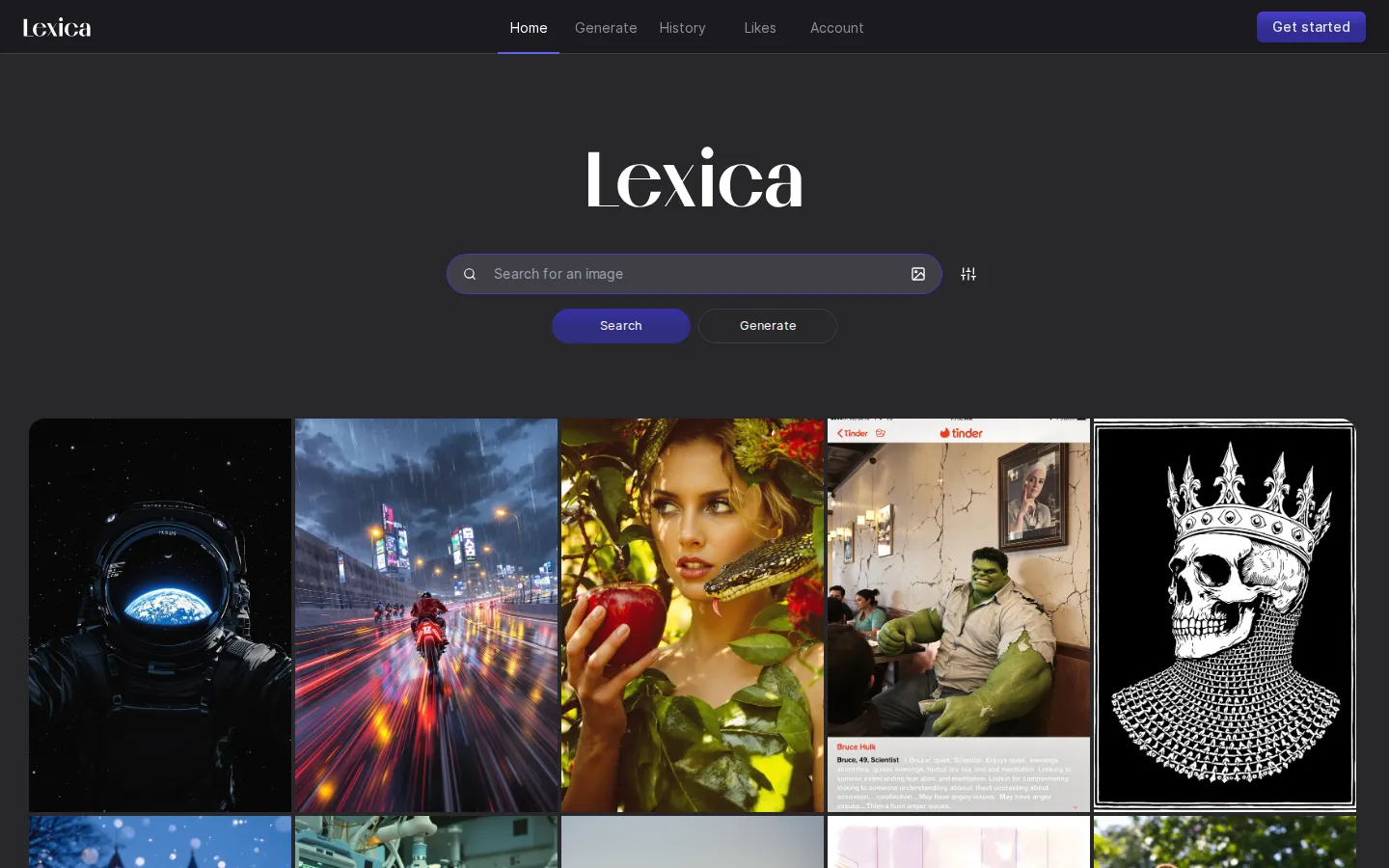
Lexica Core Features
Aperture generation engine
Create images from text prompts with Lexica's state-of-the-art AI image generation model
AI image search
Search millions of AI-generated images by prompt text and reuse or remix their prompts
Fast and slow generation queues
Fast generations use priority servers, while Pro and Max plans add unlimited slow generations with a daily cap
Custom aspect ratios
Generate images in the dimensions your project needs instead of fixed square crops
Image uploads
Upload reference images to guide generations with your own visual input
Commercial licenses
Personal commercial license on Starter and full commercial license on Pro and Max
Private generations
The Max plan keeps generated images private instead of the public gallery default
History and likes
Track past generations and save favorite images in your account
Who is Lexica for?
Lexica serves anyone who needs to produce AI images regularly. Digital artists and illustrators use it to generate concept art and iterate on prompts, while game and film studios use it for early visual development. Designers and marketers use custom aspect ratios and commercial licenses to create social media visuals, ad creatives, and client deliverables. Content creators and social media managers rely on the gallery to find inspiration and reuse proven prompts. Product teams use the Aperture model to explore visual directions quickly before committing to production art. Hobbyists and prompt enthusiasts use the searchable gallery to study how different prompts produce different results. The platform is best suited to users who generate images frequently enough to justify a subscription, since there is no free plan. Teams that need private images or full commercial rights will gravitate to the Pro and Max tiers, while casual users can start on the Starter plan and top up with extra fast generations when deadlines demand it. Small creative studios use Lexica as a low-cost visual R&D tool before commissioning final artwork. E-commerce teams generate product and lifestyle imagery with commercial licenses. Educators teaching prompt engineering use the gallery as a searchable corpus of prompt-to-image examples. Agencies producing large volumes of concept visuals value the transparent fast-generation metering and top-up system that keeps production predictable.
Lexica Use Cases
Generate concept art from text prompts for games, films, and design projects
Search the gallery for inspiration and reuse the exact prompt behind an image you like
Produce social media visuals quickly with custom aspect ratios for each platform
Upload a reference photo and remix it into new styles with Aperture
Use Pro's full commercial license to create client deliverables and marketing assets
Keep internal design explorations private with the Max plan's private generations
Experiment with early-access models to stay ahead of new generation capabilities
Top up with extra fast generations for deadline-heavy production months
Lexica Pros and Cons
Pros
- Combines generation and discovery: the searchable gallery doubles as a massive prompt library
- Transparent generation limits: fast generations are clearly metered, with $0.05 top-ups that never expire
- Commercial licensing is explicit, with full commercial rights from the Pro plan up
- Custom aspect ratios and image uploads cover practical production needs beyond square images
Cons
- No free plan: generating images requires a paid subscription starting at $10 per month
- Starter plan images are public and limited to a personal commercial license
- Slow generations are capped daily and fast generation limits may throttle heavy users
FAQ About Lexica
Lexica Pricing
Paid only: Starter $10/month ($8 annual), Pro $30/month ($24 annual), Max $60/month ($48 annual); extra fast generations $0.05 each, no free plan.
Check official pricingStarter
1,000 fast generations per month, 2 concurrent fast jobs, public images, personal commercial license, custom aspect ratios, image uploads, credit top-ups
Pro
3,000 fast generations, unlimited slow generations with daily cap, 3 concurrent fast jobs, full commercial license
Max
7,000 fast generations, unlimited slow generations, 3 concurrent fast jobs, private images, full commercial license
Lexica Alternatives

Garden Letters
Create heartfelt digital letters on floral paper, seal them in an envelope, add optional music, and send them like a gift.

Faymas
Faymas is a prompt discovery and sharing platform for AI creators. Every listed prompt is shown with the AI-generated output it produced, the model it targets, and counters for how many times it was copied and saved. Users browse by category or tag, save favourites, and publish their own prompts to build a following and earn from their work.

AIMakeTattoo
AIMakeTattoo is a web-based suite for designing and planning tattoos. It generates tattoo artwork from text prompts, creates custom lettering for names, dates, and phrases, converts photos and sketches into tattoo designs, previews tattoo fonts, and estimates tattoo costs. Free daily generations and one-time credit packs let you explore styles, placements, and detail levels before committing to ink.